Closing operations
Closing operations
Purpose
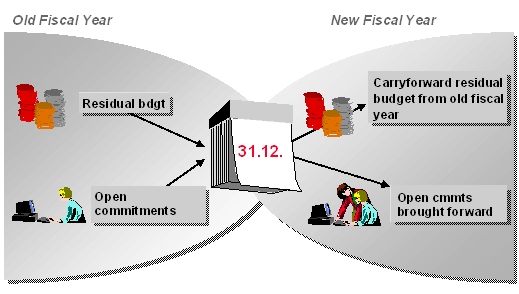
This component allows you to prepare and execute all year-end closing operations. These include carrying forward of open commitments (commitments carryforward) and a differentiated carryforward of unused budgets (budget carryforward of residual budgets) from the old fiscal year to the new. You use the closing operations to display budgets and assigned values by period.
Implementation Considerations
You perform the closing operations in a series of steps which you must carry out in sequence.
The commitment carryforward always reflects the current state of the data in the Funds Management feeder systems. However, there is no automatic link to the closing operations in other components. This means that changes made to documents in other components are not reflected in Funds Management after you have carried out the closing operations in Funds Management. For this reason, we recommend you do not carry out Funds Management closing operations until you have completed the closing operations in the other components.
There is no technical necessity for carrying out closing operations for the fiscal year change. If you do not, budget already used remains in the old fiscal year and cannot be used in the new fiscal year. Open commitments are correctly reduced in the old fiscal year if you process them further in the new. (For example, a purchase order from 1997 can be reduced by an invoice arriving in 1998.)
The carryforward from commitments and budget is, in principle, dependent on the
Update Profile chosen. Specified in the update profile is whether a carryforward is even possible and for which value types (e.g. purchase orders, earmarked funds, invoices) a carryforward may take place.Features
You can simulate the tasks to be carried out at the fiscal year change and can schedule them for different dates, regardless of when your fiscal year actually ends. A number of report programs are available for the commitment and budget carryforwards. For more information, read
Programs for Closing Operations.You can apply various selection criteria, such as individual funds centers, particular
You can carry forward budget into the new fiscal year, which has become available due to a commitment carryforward into the new year.
The defining of carryforward parameters and rules allows you to achieve individual control of residual budget carryforward, thus ensuring that account is taken of changes to the organizational structure. In the new fiscal year, you can distribute the residual budget to one or more receivers. It is possible to carry forward partial amounts.
If you work with funds and have allocated an overall budget across several fiscal years, the balances carryforward in funds will allow for an overview of the balances in the funds. Unlike the commitment carryforward, this involves summarizing and carrying forward actual data.