 Executing a Work Item as an Electronic Form
Executing a Work Item as an Electronic Form
Use
You can define a step in a workflow with a
form task so that it must be processed with an electronic form. Even though the work item is still displayed in the user’s workflow inbox in the R/3 System, it is actually processed with an electronic form that is stored as a local file on the PC.Prerequisites
Extend Container
The container of the form task must be extended to include those elements that are to be displayed or processed on the form. Only elements that reference a field (and not an object) are permitted.
The elements are declared as import or export elements in accordance with the standard workflow logic.
Create a Form and Process it with the SAPforms Designer
After you have
created the electronic form, you must prepare it for communication with the R/3 System. This is the task of the SAPforms Designer.Features
A form task only makes sense as a step in a workflow definition. The information that is to appear and possibly be modified on the form is created in the previous steps.
Depending on the way in which the form has been configured, the user is allowed to change values on the form (and thus indirectly in the work item container) and therefore affect how the workflow is processed. When the form is executed, the modified values are returned to the "waiting" work item in the R/3 System.
When the data is received in R/3,
The changes to the contents of the workflow container are then evaluated in one of the subsequent workflow steps.
Executing a Form Task as Work Item in the workflow inbox
 When a form task is executed in a workflow, the associated work item is then displayed in the
workflow inbox of the
agent responsible for this step in the usual way.
When a form task is executed in a workflow, the associated work item is then displayed in the
workflow inbox of the
agent responsible for this step in the usual way.The following steps are then carried out:
R3F
( R/3 Form) is a file format that is used to transfer workflow information from an R/3 System to a form and vice versa. The R3F file contains the data from the form task container as well as the name of the form file.Executing a Form Task as an Internet Mail in an External Mail System
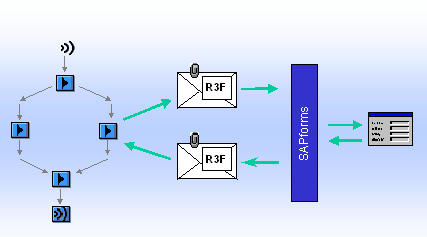
In addition to the work item that is created as standard, an Internet mail, which contains the data from the work item container in an R3F attachment is sent to the selected agents.
The following default settings determine whether this Internet mail is created at all and to which of the selected agents it is sent:
For more information, see
SAPforms Administration.