Reducing Earmarked Funds: Fin. Accounting Docs
Reducing Earmarked Funds: Fin. Accounting Docs
Use
From the Funds Management viewpoint you can illustrate a procurement process using
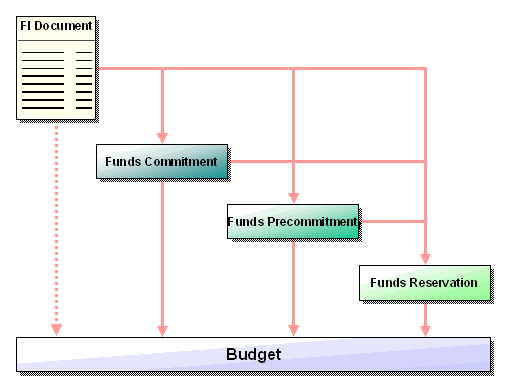
Earmarked Funds without using the Purchasing component. In doing so you can choose how many phases the process should run through.In order to control and monitor the assigned funds in an differentiated way via the budget, you can for example use all three ways of earmarking budget for specific purposes (funds reservation, funds precommitment, funds commitment). However, you can only use the funds reservation or the funds commitment to illustrate this process.
Integration
Reduction of earmarked funds
Prerequisites
So that the document number of a funds reservation or a funds commitment can be included for the postings in Financial Accounting, the field Earmarked funds must be marked as required input or optional input in the Financial Accounting Customizing in workstep Maintain field status variants.
Note the following when you enter documents in different currencies:
The reducing document for earmarked funds entered in the local currency of the company code, can be entered in any foreign currency.
The currency of the reducing document must correspond to the currency of the reduced document for earmarked funds in foreign currency.
Features
The following financial accounting documents can either reduce the funds reservation or the funds commitment.
Activities
When posting a financial accounting document, enter the document number of a funds reservation or a funds commitment in the coding block of the Earmarked funds field.
The system automatically transfers the Funds Management account assignment from the funds reservation. The earmarked funds are correspondingly reduced.
The available budget only changes if the posting amount exceeds the earmarked funds amount, and you have specified when entering the earmarked funds that the earmarked funds amount can be overdrawn without limit or as a percentage.

Down payment requests - Down payments - Invoices
When posting down payment requests and down payments you must take the following into account when reducing the earmarked funds with these documents:
Down payment requests and down payments each reduce earmarked funds independently. In doing so, it is possible to enter a down payment request, a down payment and an invoice with reference to earmarked funds respectively, in the full amount of the reservation document.
This ensures for example, that both a down payment and its invoice can reduce the corresponding earmarked funds without reducing double the amount.
This procedure can also have disadvantages. Example: An earmarked fund is exhausted directly (without down payment settlement) by an invoice. Nevertheless a down payment request and a down payment respectively are posted with reference to these earmarked funds. An invoice belonging to these documents could then no longer refer to these earmarked funds.
You must therefore ensure that, when posting the documents, the reference to earmarked funds is the same for all documents, or hide the Earmarked funds field in the coding block to prevent down payment requests and down payments from reducing earmarked funds.
You will find an example under
Parked documents
For parked documents the reduction takes place if the parked document is set to the status "complete". If this status is reset or the parked document is deleted, the reduction is automatically canceled again.