
Sort (Function)
This function is used for sorting the lines of a table structure. First, a dialog box is displayed in which the user can specify the criteria according to which the table structure is to be sorted. In this case, the user can determine the sequence of the sort criteria by assigning numbers for the required criteria in fields provided. The entries are sorted only after the user has confirmed the specifications by pressing
ENTER and the first page of the table structure is displayed.Illustration
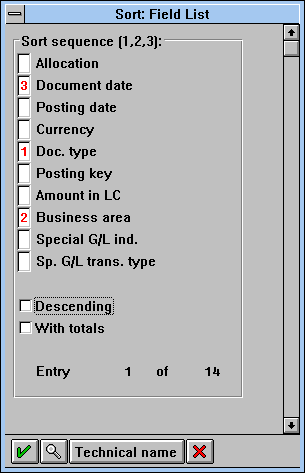
Sort Sequence in a Dialog Box
Access
Function Key |
Pull-Down Menu |
Pushbutton |
Access Character |
Icons |
F16 (recommended); if, however, Hold (Function) or Save Without Check (Function) is also active and therefore F16 is used: function key can be defined freely. |
Menu Edit |
Application toolbar: in the block of the standard functions |
S for Sort |
(ascending)
(descending) |
Cross-References

