
Types of Selection
Selection may be classified as
single or multiple.Single Selection
Definition and Use
Single selection allows the user to select a single object in the table structure. Selecting an object automatically deselects a previously selected object. The table structure is not ready for input. Objects which can be selected are entire logical lines.
Appearance
For one-column or two-column tables, you can use a radio button to perform the single selection. For multiple column tables, do not use a radio button until further notice.
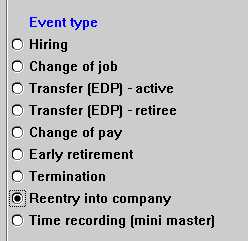
Table with single selection and radio buttons
Selection Methods
Technical restriction: For step loops, the system does not set any default radio buttons. Furthermore, the task must set the radio buttons itself when the user uses the scroll function.
Multiple Selection
Definition and Use
The user selects any number of objects (0 to n) in the table structure. The selection status of previously selected objects does not change when the user selects an object. Only entire logical lines can be selected, not fields or columns.
Appearance
If several lines can be selected simultaneously in a table structure (multiple selection), the selection fields are to be displayed as checkboxes.
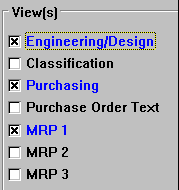
Table with multiple selection and checkboxes
In two-line table structures, checkboxes can only appear at the beginning of every logical line.
If a line is selected, it should be highlighted by the task. To achieve immediate selection highlighting, the
F9 functionality should be supported in addition to the mouse click.Exception: If the table structure is primarily used for entering bulk data, the entry mode does not require a checkbox. To select lines, the user then must enter the display or change mode in which the table structure must have a checkbox in front of every line.
Selection Methods
Individual Objects
Object Groups
These functions should be available via the
Edit menu.