 Functions of the R/3 Lock Concept
Functions of the R/3 Lock Concept
This section explains how the R/3 mechanism is implemented. It provides background information that will help you understand and apply the lock management concept. The specific options with regard to handling R/3 locks are described under
Managing Lock Entries.R/3 Lock Logic
If an R/3 transaction is to make changes to database objects, the programmer of the transaction must lock the objects first to prevent concurrent access and then release them again.
To do so, he or she must define and activate a lock object in the Data Dictionary (see
 Lock Objects in the Data Dictionary documentation). Activating a lock object causes the system to generate two function modules: one for locking the object, and one for releasing it. This procedure is described in detail under
Lock Mechanism in the ABAP Dictionary documentation.
Lock Objects in the Data Dictionary documentation). Activating a lock object causes the system to generate two function modules: one for locking the object, and one for releasing it. This procedure is described in detail under
Lock Mechanism in the ABAP Dictionary documentation.
Lock Server
In a distributed R/3 System, one lock server (also referred to as the enqueue server) manages the
lock table. This server runs on the central instance.If a lock is to be set in an application running on an instance other than the central instance (for example, on a different host), the lock request is transferred via the
dispatcher and message server to the dispatcher of the central instance, which then forwards it to the enqueue work process. This process then checks the lock table to determine whether the lock request collides with an existing lock (see also Lock Collisions). If this is the case, the request is rejected. Otherwise, the lock is set and an appropriate entry is made in the lock table.
The work processes on the central instance have direct access to the lock table functionality. This means that they do not have to send their lock requests via the dispatchers and message servers.
The graphic below shows the communication path in a distributed R/3 System with one central instance and additional instances.
Enqueue communication

Locks and R/3 Update
During the course of the transaction, the lock is transferred to the
update in R/3. This procedure is described in detail under
The Owner Concept and
Function Modules for Lock Requests. Locks that have been transferred to the update are stored both in the lock table and in a backup file so that they are not lost if the enqueue server fails. The backup flag is then set in lock management.
SAP Locks and Database Locks
The following graphic shows the relationship between SAP locks and database locks. The objective here, naturally, is to minimize the duration of a database lock. In addition, unlike database locks, an SAP lock can exist across several database LUW. The difference between SAP LUW and database LUW is described under
Functions of the Update Task.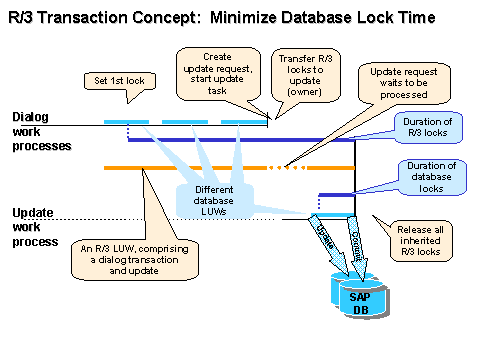
The top (solid) blue line represents an R/3 dialog transaction that comprises three screens (input windows); each screen corresponds to a database LUW (see
Functions of the Update Task). Once the user has made an input, the database LUW (light blue line) ends. Processing is then continued by a dialog work process. After the second user input, processing is completed and the dialog section of the SAP LUW is terminated.
The transaction does not have to be processed by the same dialog work process. With each screen, the dispatcher searches for a free work process to handle the processing.
In this example, an R/3 lock was requested in the first screen of the transaction - this lock remains in place (top dark blue line) until the application data has been changed on the database, that is, in most cases, until the R/3 update has been completed. This does not impair performance, since the lock is not a database lock.
The database lock (bottom dark blue line) is only set during the database LUW, in which the changes made in the R/3 System are actually updated (see
Functions of the Update Task).
Details on the method of operation of the lock concept are provided under:
The Owner Concept The Lock Table Lock Collisions Cumulation of Locks Questions and Answers Regarding Locks