 Lock Collisions
The check to determined whether a lock request collides with an existing lock is carried out in two steps: first, the system checks whether the lock request collides with an elementary lock in the
lock table. If this is the case, the system checks whether an owner collision exists. (The same owner can request a write lock more than once, for example. This is described under
Cumulation of Locks.)If a collision exists, the user of the dialog transaction receives a message indicating that the requested object is currently locked by a different user. In the case of non-dialog processes (such as batch inputs), the lock request is resubmitted later.
Collisions Between Elementary Locks
Two elementary locks collide if all of the following conditions are fulfilled:
- The name of the elementary lock (table in which the lock is to be set) is the same
- The lock argument is the same, or more precisely: the letters in each position are identical (the wildcard symbol (@) is identical to all letters)
- At least one element lock does not have lock mode S (read lock)
The following graphic contains examples of collisions between a lock request (left) and an existing lock (right).

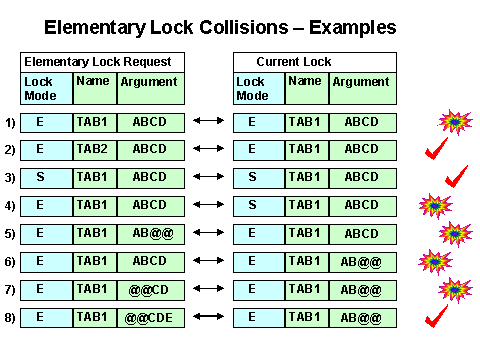
Write lock ABCD for table TAB1 collides with the existing write lock ABCD for table TAB1Write lock ABCD for table TAB2 does not collide with the existing write lock ABCD for table TAB1 and is accepted because the lock names are different
Read lock ABCD for table TAB1 does not collide with the existing read lock ABCD for table TAB1 and is accepted because both are read locks
Write lock ABCD for table TAB1 collides with the existing read lock ABCD for table TAB1Write lock AB@@ for table TAB1 collides with the existing write lock ABCD for table TAB1 because @=C and @=D.
Write lock ABCD for table TAB1 collides with the existing generic write lock AB@@ for table TAB1 because C=@ and D=@.
Write lock @@CD for table TAB1 collides with the existing write lock AB@@ for table TAB1 because @=A and @=B and C=@ and D=@.
Write lock @@CDE for table TAB1 does not collide with the existing write lock AB@@ for table TAB1 because the 5th letter in each case differs (E is not equal to _)
If the elementary locks do not collide, the lock request is added to the lock table as a new entry. If the elementary locks do collide, however, the system checks for an owner collision (described in the following section).
Owner Collision
If elementary locks collide, a decision is made whether to accept or reject the lock request based on the owner of the locks (see
The Owner Concept).An owner collision exists if one of the following conditions applies to an elementary lock collision:
- At least one owner is different
- The owners are identical but at least one lock has mode X (extended write lock, no cumulation, see also
 Lock Mode)
The following graphic shows examples of these situations, where O_x is an owner different to O_1 and O_2.
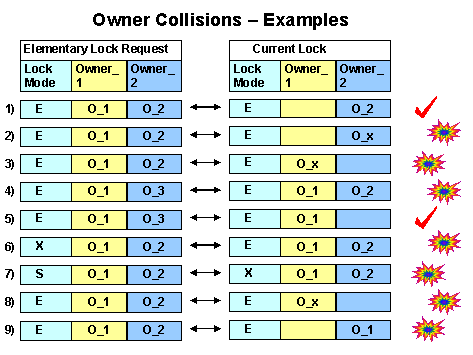
No owner is different, no lock in mode X => no collision
Owner_2 is different => collision
Owner_1 is different => collision
Owner_1 is the same but Owner_2 is different => collision
No owner is different, no lock in mode X => no collision
No owner is different, but the lock request has mode X => collision
No owner is different, but the existing lock has mode X => collision
Owner_1 is different => collision
Owner_2 is different => collision
An owner collision, therefore, implies an elementary lock collision. Lock requests are only rejected if an owner collision exists.
See also:
Cumulation of Locks
The Owner Concept