This topic gives you some examples of objects in the proposal pool and shows you the actions required to make the translation consistent with the proposal pool.
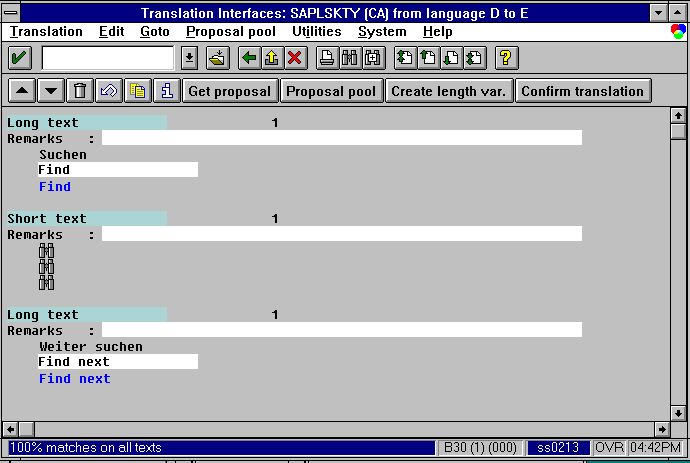
The above graphic shows an example of a text saved as a system standard. The example shows the status of the texts after saving.
- The blue text lines underneath the target texts are the best proposal available in the proposal pool.
- The best proposal for the Find icon is also displayed under the target text line.
- The figure 1 above the source text line means that one translation exists for the source texts in the proposal pool. This is therefore the system standard.
- The green bar highlighting the field names Short text and Long text indicate that these texts have been translated and are consistent with the proposal pool.
Possible actions:
In this case, no action is required because the source text and the respective translations are consistent with the proposal pool.
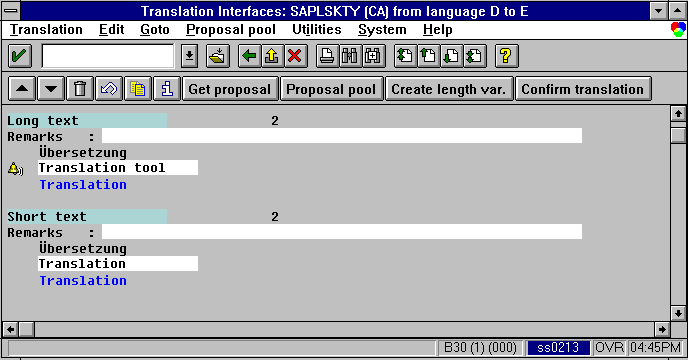
In the above example, the first object Übersetzung has been translated as Translation tool. The second object Übersetzung has been translated as Translation. This is the status after saving.
- The green colored bar highlighting the field names mean that both texts have been translated and are consistent with the proposal pool.
- The bell icon above the target text line means that this translation is an exception.
- The absence of a bell icon above the second target text line means that this is the system standard.
- The figure 2 above the source text line means that two translations exist for this text in the proposal pool.
- The blue text lines underneath the target texts are the best proposal available in the proposal pool.
Possible actions:
In this case, no action is required, as the exception is a text that is accepted by the proposal pool.
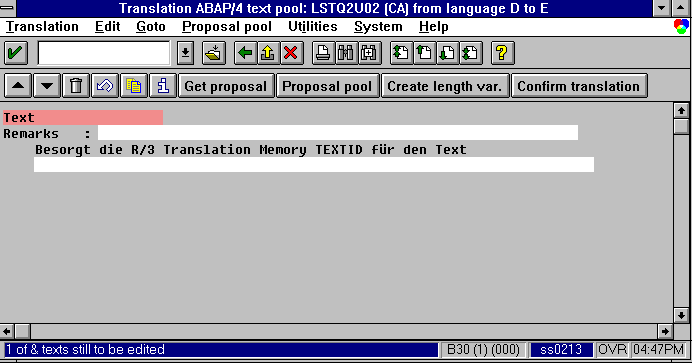
In the above example, the text has not been translated.
- The red colored bar highlighting the field name shows that this is a new text.
- The absence of a blue line of text below the source text shows that no best proposal exists for the text in the proposal pool.
- The absence of a figure above the source text line shows that no target texts exists for this source text in the proposal pool.
Possible actions:
Translate the source text or copy the proposal from the proposal pool, if one exists.
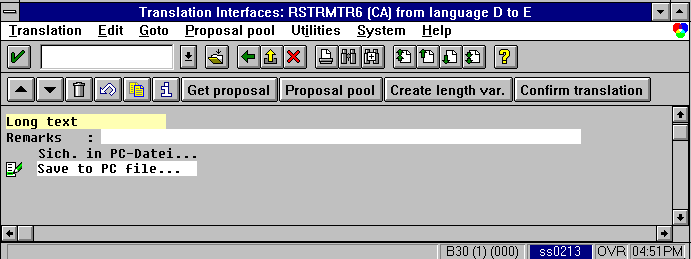
In the above example, the text Sich. in PC-Datei... has been translated as Save to PC file....
- The yellow colored bar highlighting the field name shows that the text has not been accepted by the proposal pool. This is the status before confirmation and saving.
- The Modified icon above the target text line shows that the text has been changed, or modified, and that a confirmation of the target text is required, unless you change it.
- The absence of a figure above the source text means that no proposals are available for this source text in the proposal pool.
- The absence of a blue text line below the source text shows that no best proposal exists in the proposal pool for this target text.
Possible actions:
To have the proposal pool accept this text, you must choose Confirm translation.
Alternatively, you can change the target text.
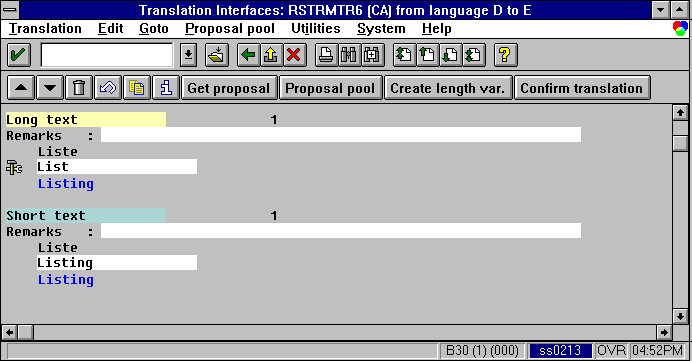
In the above example, the first text Liste has been translated as List. The second text Liste has been translated as Listing.
- The green colored bar highlighting the second field name shows that the object is consistent with the translation in the proposal pool and that this object has been translated by the system standard.
- The yellow colored bar highlighting the first field name shows that the object is an unaccepted text (inconsistent with the proposal pool).
- The blue text line underneath the target text is the best proposal available in the proposal pool.
- The figure 1 above the source text lines indicates that one target text exists for the source text in the proposal pool. This is by default the system standard.
- The hammer/spanner icon above the first target text line means that the text is inconsistent with the status of the proposal pool: in this case, inconsistent with the system standard defined in the next entry.
Possible actions:
An action is required. You can:
- Create a length variant for the first text, if you want to use this text
- Create an application standard or an exception, if you want to use this text.
- Copy the best proposal if you want to use the proposed text
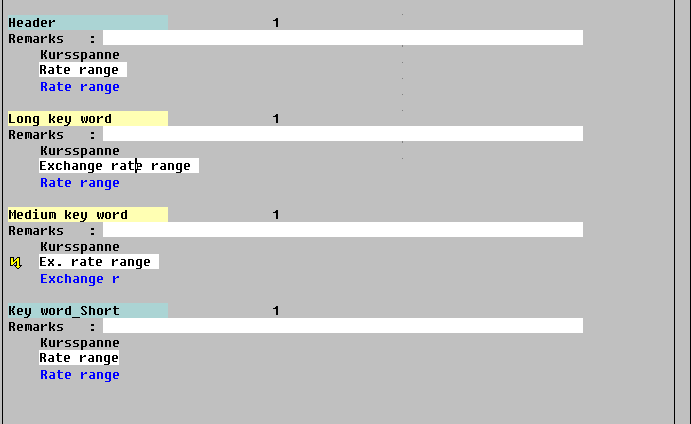
In the above example, the text Kursspanne has been translated in three different ways within the same object (here data element).
- The green colored bar highlighting the first field name shows that this text is consistent with the translation in the proposal pool and has been translated by the system standard.
This is also shown by the figure 1 above the source text.
- The yellow colored bar highlighting the second field name shows that this translation is unaccepted, in other words, inconsistent with the translation in the proposal pool and requires an action, such as creation of an application standard (if one does not exist for this application), an exception or a length variant.
- The yellow colored bar highlighting the third field name shows that this translation is unaccepted. The Lightning icon above the third text line shows an inconsistency with the previous text. This also requires an action, such as creation of an exception or a length variant of one of the texts.
- The blue text line underneath the target text is the best proposal available in the proposal pool.
Possible actions:
Identical source texts within the same application should have the same translations.
If this is not possible, texts should be created as length variants. Different texts should only be created as exceptions if no other solution is possible.
