FI Funds Management Payment Matching
FI Funds Management Payment Matching
Purpose
This procedure allows you to compare the changes in your bank and bank clearing accounts (documents in which commitment items with financial transaction 90 or 80 (bank) were posted to) with the updated payments in Fund Management. Transfers within these accounts are not considered. The graphic illustrates this principle:
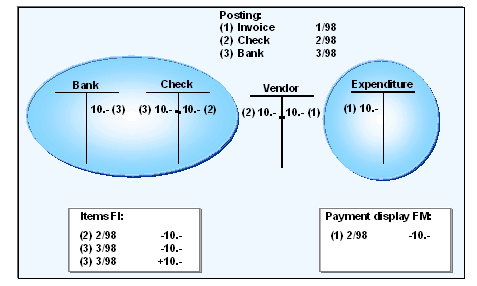
Payment matching checks the system as to whether all financial accounting payment documents (FI) have been updated with the corresponding amount and posting date in Funds Management (FM).
A comparison of this data is only necessary if you are working on a payment basis and want to ensure an exact correspondence between financial accounting and Funds Management.
In order to execute the payment matching, several
Programs are available which compare the data on a totals record and line item level.Prerequisites
You have program RFFMS200 for payment transfer (payment transfer with invoice reference) and program RFFMS201 (payment transfer without invoice reference) available for this. If the period-end closing was activated in Customizing, selection screen of program RFFMS201 will also automatically appear when you start program RFFMS200.
For more information about these programs, refer to the program documentation and
You must also consider that the financial accounting data and Funds Management data only match if other conditions, with regard to system setting and user activities, have been fulfilled. Otherwise, variances will occur which the programs will display accordingly. For more information, read
Prerequisites Payment Transfer.Process Flow
The payment matching process flow is described in the following if you are executing it for the first time. After that, you can decide which programs you want to use regularly for matching data.
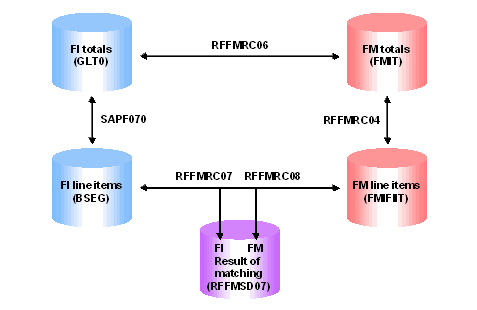
Report SAPF070 checks whether the FI line items match the FI totals items (compare tables BSEG and GLT0).
Report RFFMRC04 checks whether the FM totals items match the FM line items (compare tables FMIT and FMIFIIT).
If there is no error indicated for the totals, you can assume that the data matches. A further matching at line item level is not necessary.
Payment Matching