 Sets in Report Rows
Sets in Report Rows
When you define a report, you select a set as a row block for the report. A row block can consist of one or more physical rows.
For example, if you select a basic set containing account numbers as a row block, the report contains a physical row for each account number in the set.
The order in which values are defined within the set determines how data is sorted and how totals and subtotals are generated. The set hierarchy also determines the report structure and layout. For each set in the set hierarchy, the system creates a subtotal.

If you use a single-dimension set that contains only basic sets in a row block, the system creates subtotals for each basic set, as well as a grand total for the single-dimension set. The system also creates physical rows for each value in the basic sets in the row block.
The row block is the set defined on the Create Report: Rows screen; the physical rows are the detail levels within the set. You can use a basic set, key figure set, single-dimension set, or multidimension set as a row block.
The report in
The following graphic shows the multidimension set TD-CC-ACCT.
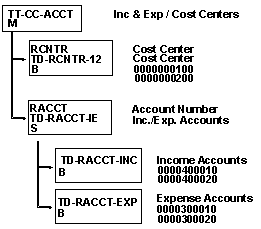
In the above graphic, the sets and set values contained in the multidimension set TD-CC-ACCT are displayed along with text describing the sets.
For each characteristic in a row block, you specify the level of detail that appears in the report rows. Each detail level contained in a basic set, key figure set, or single-dimension set is assigned a level number. The following graphic shows the levels of detail found in the set TD-CC-ACCT for the characteristic Account (single-dimension set TD-RACCT-IE).
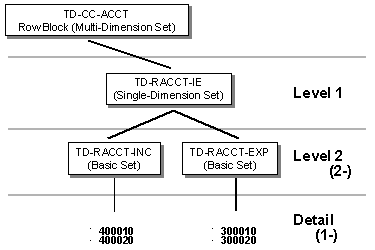
The multidimension set TD-CC-ACCT (row block) is at the top of the set hierarchy. The name that you assign to a multidimension set appears as the header for the physical rows contained in the report.
If you do not want to use the set text, you can also define your own text for the row block in the report lead column.
Level 1 consists of the single-dimension set TD-RACCT-IE. If you enter level 1 for this characteristic, you only see the sum of income and expense accounts in the report for the cost centers in basic set TD-RCNTR-12.
Level 2 (2-) includes the basic sets TD-RACCT-INC and TD-RACCT-EXP. The sets are ordered in the hierarchy in the same order as they appear in the single-dimension set TD-RACCT-IE. Both sets have the characteristic account. If you specify this detail level in a report, you only see:
The detail level (1-) includes the details of all the basic sets included for the report, that is, the income accounts, expense accounts, and cost center numbers.

The set that appears at the highest level of a characteristic is assigned the level 1.
For example, level 1 is assigned to the single-dimension set TD-RACCT-IE (see above graphic) because it leads the hierarchy of the characteristic account. Level 1 would also be assigned to the basic set TD-RCNTR-12, since it leads the hierarchy of the characteristic cost center.
You can only use the negative values 1- and 2- as detail levels. 1- displays only basic set values; 2- displays the basic set values and the total for the basic set.
You can use detail levels to highlight and underline totals and subtotals in a report, as well as display totals and subtotals in different colors.
The report in
Working with the Report Writer: Overview lists the following row information for the row block TD-CC-ACCT:If you reorder the set contents, the report contents are also reordered.
In the following graphic, the multidimension set TD-CC-ACCT was changed. Set TD-RACCT-IE is now in the first position, and set TD-RCNTR-12 is in the second position.
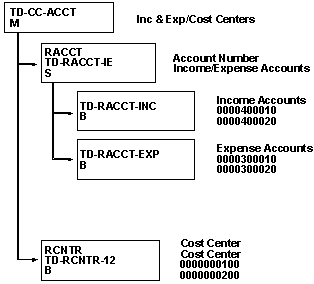
Level 1 still consists of single-dimension set TD-RACCT-IE and basic set TD-RCNTR-12. Set TD-RACCT-IE now appears before set TD-RCNTR-12, since in multidimension set TD-CC-ACCT the characteristic account has moved to position 1 and the characteristic cost center to position 2.
A report printed with this multi-dimension set as a row block would look like the following graphic. To see the differences that result from moving the characteristics in a multidimension set, compare this report to the report in
Working with the Report Writer: Overview.
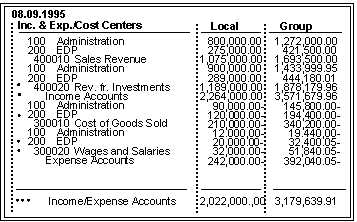
In this report you see that:
For more information on using sets in reports, see
Defining Rows.