 Periodic Processing: Rollups
Periodic Processing: Rollups
When you create a report in the FI-SL System, the Report Writer reads the ledgers that contain the data for your report. If the ledgers contain extensive records, system performance is slower. To improve system performance, you can create a rollup ledger that contains summarized and condensed data from one or more ledgers.
A rollup ledger is the summarization of the information from one or more ledgers (source ledgers) into a single ledger. Each record in the rollup ledger is a summary of the records in other ledgers.
You can further summarize data in a rollup ledger by only copying some dimensions from the source ledger(s), or by substituting one or more dimensions with a new dimension.
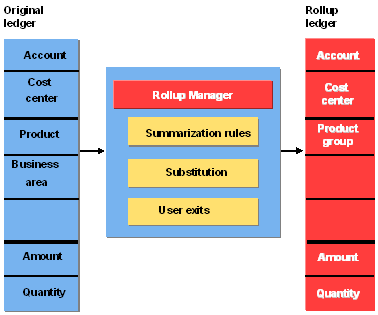
In the above graphic, data in the rollup ledger uses the dimensions Account, Cost Center, Product Group, Amount, and Quantity, although the source ledger contains the dimensions Account, Cost Center, Product, Business Segment, Amount, and Quantity. With this rollup ledger, you can report at the account, cost center, and product group level. The processing is faster because the dimension Business Segment has been summarized.
You define rollups using the Rollup function. Rollups use sets to select data for a rollup ledger (rollup action) and to select data to be deleted from a rollup ledger (reset action). You can also use sets in rollups to rollup data based on the set hierarchy. Using the Report Writer, you can create reports using the rollup ledger and, in the output report, drill down to the new data record that has been created as a result of the rollup execution.

You can also use an export rollup to distribute ledger data, for example from a local system to a central system. For more information, see
For more information about creating rollups, see
Creating a Rollup .