 History for Basic Data
Use
If you change master inspection characteristics and/or inspection methods that are referenced in a task list, material specification or certificate profile, this has the following effects:
- If you change basic data with history, the changes are not automatically made in the inspection plan, material specification or certificate profile.
- If you change basic data without history, the changes are automatically updated immediately in the inspection plan, material specification and in the certificate profile.
Prerequisites
If you want to use a history, the Inspection characteristics with history indicator, or the Inspection methods with history indicator (or both) must be set in
 Customizing
Features
Changing with history
You can change the following basic data with history:
- Master inspection characteristics
- Inspection methods
This has the following effects:
version for the changed master record that has the same validity period as the "old" version.
The "old" version of the master record continues to be used in the master inspection characteristic, inspection plan, material specification and/or the certificate profile, in which it was previously referenced.
If you create a new reference to the master record, the system automatically selects the new version of the master record. However, you can also enter the "old" version of the master record.
You can
replace the "old" version of a referenced master record by its new version. The new version, however, must have been released for use.
When you change a referenced master record, a dialog box appears automatically when you save, prompting you to replace the old version, provided that the Replace master inspection characteristic and/or Replace inspection method indicators have been set in
Customizing.

You can only replace master inspection characteristics in material specifications and task lists and inspection methods in task lists.
Changing without history
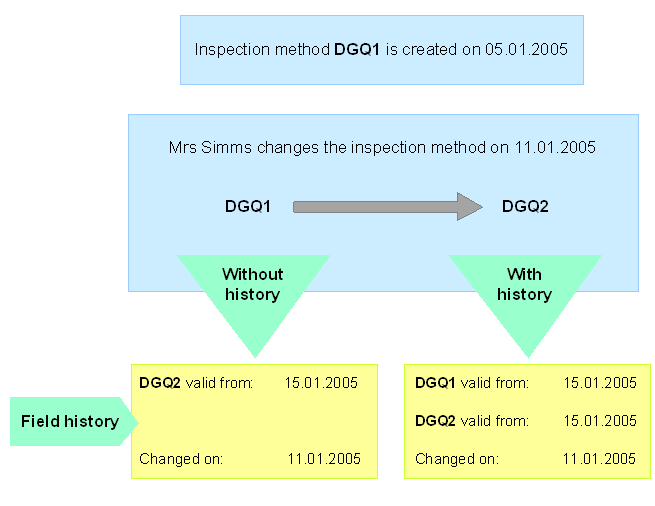
If you change a referenced master record without history, the changes are immediately effective in the master inspection characteristic, inspection plan, material specification or certificate profile.
Displaying the field history
In the history for master inspection characteristics, you can display a change history for individual data fields. The following applies:
- If you changed a master record with history, the system lists all changes made to the selected field, including the name of the user who changed the field, the date the field was changed, and all the previous values of the field.
- If you changed a master record without history, the system displays only the current value in the field.
Activities
You call the change transaction for master inspection characteristics or inspection methods.
You enter a valid-from date for the master inspection characteristic or inspection method.
You make the required changes.
You save your data.
The system automatically creates a new version of the master inspection characteristic or inspection method, if you have set the relevant indicator in Customizing.
To call the field history function, in the master inspection characteristic or inspection method, place the cursor on the required data field and choose Field history.
To show all changes to the short text, on the Other Languages screen of the master inspection characteristic or inspection method, choose Text history.
To display the assignment history of inspection methods to the master inspection characteristic, on the Assigned Inspection Methods screen in the master inspection characteristic, choose Assignment history.To display the assignment history of catalogs to the master inspection characteristic, on the Assigned Inspection Catalogs screen in the master inspection characteristic, choose Assignment history.
The system only displays the data that has already been saved in the database.
See also:
Editing a Sampling Procedure
Editing a Sampling Scheme
Creating or Changing a Dynamic Modification Rule
Creating or Changing a Master Inspection Characteristic
Creating or Changing an Inspection Method