Approval Process for Appropriation Requests
Approval Process for Appropriation Requests
Purpose
The Approval of Appropriation Requests process is a sequential approval process for planned investments that take the form of appropriation requests.
For more information on the Customizing settings needed for this process, see
Functions for the Approval Process .Process Flow
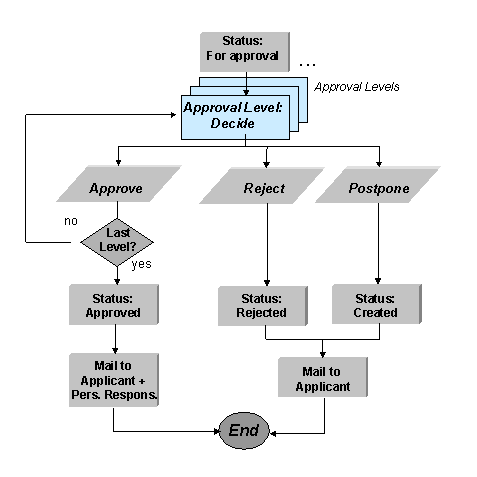
You control the approval process using approval levels, which you can define separately for each appropriation request type. You can define as many approval levels as you need. You assign a numerical key to each approval level. The number of this key then determines the sequence in which the approval levels are processed. The system processes the approval levels in ascending numerical order (for example, from 1 to 5). The system processes the first approval level (with the smallest numerical key) once the appropriation request has For approval status. The system then works through the approval levels sequentially. Once all the levels have been approved, the system sets Approved status in the last approval level (refer to
Status Management ).Approval Workflow
There is a person responsible for each workflow level. This person receives the appropriation requests that are assigned to her approval level as Workflow items in her office inbox, where she enters an approval decision. The system uses the partner master data of the appropriation request to determine the responsible person for the approval level.
The appropriation request is rejected or postponed as soon as one approval level rejects or postpones it. The appropriation request receives the new status, and the applicant is automatically informed by electronic mail. If the appropriation request is approved in the last approval level, it receives Approved status, and the system informs the applicant and the other responsible parties.
The system does not delete appropriation requests that were rejected or postponed. You can manually reset their status to For approval. This restarts the approval process from the beginning.
Manual Approval
You can also change the status to Approved in the master data transaction. However, this is no longer possible once approval levels have been defined for the appropriation request and the approval workflow has been activated in Customizing.