 Setting Up the Database System
Setting Up the Database System
Prerequisites
1. Make sure that you have activated the archiving of the online redo log files (mode ARCHIVELOG) in all databases.
See
2. Make sure that the control files are mirrored on separate disks.
See
3. Mirror the online redo log files on separate disks (at operating system level and/or using ORACLE resources). You can set this up, with Oracle support, when you install the database system.
See
4. Install online redo log files, offline redo logs files (online redo log files saved to the archive directory), and data files to separate disks.
See
5. Make sure that the block sizes (8K) of the database system and the operating system are the same. The AIX operating system is an exception, the block size of the database system must be 8K and the block size of the operating system must be 4K. Check the most important database parameters.
6. Familiarize yourself with the tablespace structure of the R/3 System. Monitor the critical tablespaces.
See
7. Check the size of the database blocks (a block is the unit in which data transmission between main memory and disk storage takes place). For security and performance reasons, the blocks of the Oracle database and of the operating system must be the same size. For the R/3 System, the Oracle blocks have a size of 8K. The block size of the operating system is reformatted to 8K during the installation of the R/3 System. (The AIX operating system is an exception with a block size of 4K.)
Structure
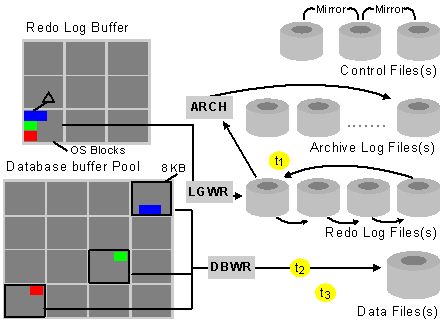
For more information on the ORACLE Parallel Server (OPS configuration), see the appropriate Oracle documentation and the SAP documentation.
Oracle Databases and Parallel Server Option