 Archiving of Consolidation Total Records and Journal Entries
Archiving of Consolidation Total Records and Journal Entries
Use
You use archiving for consolidation totals records and consolidation journal entries to remove mass data you no longer need in SAP Consolidation from the database. By storing such data in a database, you can reduce the data volume.
If your database contains a great number of journal entries, you can archive these data records on a regular basis. If your system has sufficient storage space, you only need to archive your data records once every fiscal year.
Features
SAP Consolidation has the following archiving objects:
With these two archiving objects, you can archive and delete journal entries and totals records according to your selections in
Variant Maintenance.It is not possible to read from the archive or to restore journal entries and totals records to the database.
Archiving
You can only archive journal entries if

The first quarter 2000 and all preceding fiscal years are closed.
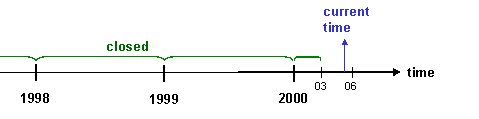
Consequently, with quarterly consolidation, you can archive the journal entries from the first quarter 2000 as well as those from all preceding fiscal years.
Totals records can only be archived if
For example, if you archive a totals record in May and create new postings in June, the system creates a new totals record. This would lead to a second totals record for the same time period, and thus to inconsistencies.

You should only archive totals records, when you do not need them any more for reporting purposes.
Delete
You have two options for starting the delete operation:
In both cases, the system first performs the archiving for safety reasons (this means, it writes the data to an archive file); the system deletes the data from your database only in the second step.
Further Information
You will find additional information in the hints documentation for each action. In the application menu, choose the symbol  , or choose Goto ®
Hints.
, or choose Goto ®
Hints.