 Budget Transfer Posting
Budget Transfer Posting
Use
In an area of responsibility, budget run low on a project, while on another project there is still sufficient budget. You can use transfer postings to provide a project with available budget from another project.
Prerequisites
The currency for a transfer posting must be allowed on both of the WBS elements involved. The WBS elements can belong to different projects or to the same one.
Features
You can differentiate between the following:
You cannot make transfer postings in every project status. The WBS elements involved must have a status that allows the business transaction Budget transfer posting.
There are three business transactions in transfer postings:
A transfer posting has the same procedure as a
supplement to a project or a return from a project except that you specify a sender and receiver WBS element, or year.Transfer postings between objects on lower hierarchy levels are also made by the system on the objects in the higher hierarchy levels.

During budgeting in the object currency, the following problems may occur during a transfer posting:
The system only regards budget line items in each object currency as the entered budget. Transfer postings that were made in other currencies are therefore not displayed on objects in higher hierarchy levels as entered values.
The system regards all budget line items as current budget.

To display the budget line items for a WBS element, choose Logistics
Enter the required data, and choose Continue or Original budget.
Choose the WBS element overview.
The following screen appears: Change Budget: WBS Element Overview.
Choose Extras
® Line items.
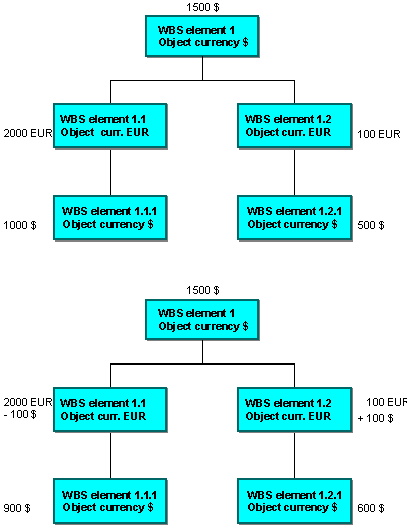
You have entered the following budget values on a work breakdown structure with two hierarchy branches, and five objects with different object currencies.
Now you make a transfer posting between two WBS elements on the lowest hierarchy level: 100 $ from WBS element 1.1.1 to WBS element 1.2.1. The current budget is now as follows on the work breakdown structure:
WBS elements 1.1 and 1.2 have EUR as their object currency. The transferred 100 $ is displayed in the line item report. The entered value of the WBS element 1.1 however, is still 2000 EUR and WBS element 1.2 is 100 EUR, as the system only includes the budget line items that were entered in EUR.
Activities
To transfer budget, choose Logistics or Accounting ® Project system ® Controlling ® Budgeting ® Transfer posting.
In the following initial screen: Transfer Budget: Initial Screen, you can enter a sender and receiver year as a default value for numerous, similar transfer postings. You can also specify whether the total values should be included in the sender WBS element.
Under Settings you can choose Double-row entry to switch from single to double row entry. The default is single row entry, which you can initially use to make entries in the WBS element sender and receiver fields, and to enter the amount and currency of the transfer posting for each transfer item. The other fields Sender year, Include total value, Text and Long text contain default entries. Therefore, you need to specify default values for single row entry.

If you want to enter individual sender WBS elements and / or years for each transfer item, then choose double-row entry.
Note that the sender and receiver year are two subsequent years.