External Scheduling in the Order
Use
You use this function in order processing in your company to plan field services using an external scheduling system.
Prerequisites
For more information on the prerequisites, see
External Scheduling.
Features
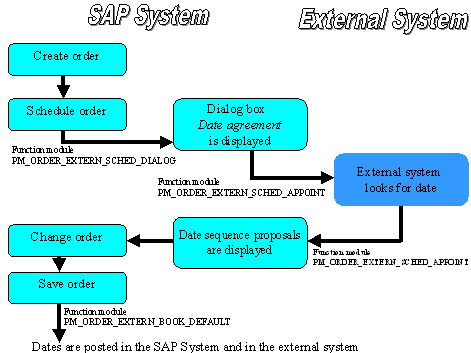
You create an order in the SAP System and schedule it.
- If you have assigned the function module
PM_ORDER_EXTERN_SCHED_DIALOG to the fixed value D in Customizing under Configure Communication, and entered the external scheduling system as the destination, the dialog box Scheduling agreement appears after the order has been scheduled.
You enter your desired dates and select proposed dates.
If you have assigned the function module
PM_ORDER_EXTERN_SCHED_APPOINT to the fixed value A in Customizing, the system calls the function module PM_ORDER_EXTERN_SCHED_APPOINT after you have selected the pushbutton Proposed dates.The external system looks for a suitable date, and the function module PM_ORDER_EXTERN_SCHED_APPOINT is called up again.
The SAP System proposes a list of dates, you select the most suitable ones, and return to the order processing screen.
After you have saved the order, the system calls up the function module
PM_ORDER_EXTERN_BOOK_DEFAULT.
- The system transfers the data asynchronously to the external scheduling system using transactional remote function calls. The dates are posted in the SAP System and in the external system.
The External Scheduling Process from a Technical Viewpoint