 External Scheduling
External Scheduling
Purpose
You use the external scheduling function in your company to plan field services using an external system.
Prerequisites
The following prerequisites must be met:
For more information on configuring communication, see the Implementation Guide (IMG) under Plant Maintenance and Customer Service ® Maintenance and Service Processing ® Maintenance and Service Orders ® Scheduling ® External Scheduling ® Configure Communication.
For more information on Remote Function Calls, see the SAP Library under Basis Components ® Basis Services/Communication Interfaces (BC-SRV) ® Remote Communications (BC-SRV-RC) ® The RFC API.
Process Flow
For more information on the settings for partners in Customizing, see
Depending on which application component you are working in, choose
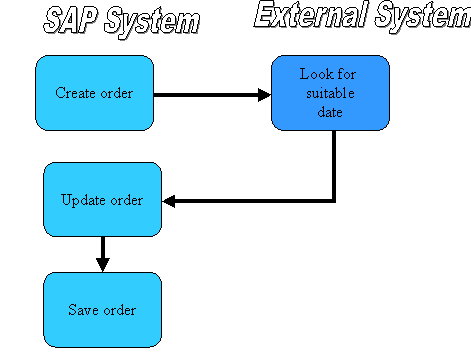
The External Scheduling Process from a Business Management Viewpoint
Result
Bi-directional communication between the SAP System and the external system by means of the
CS-SDL interface. The external system finds a suitable date and returns it to the SAP System.The information from the final confirmation that the task is completed is transferred to the external scheduling system as well as to the status information. The final confirmation of an operation, such as order completion for example, causes a reduction in requirements in the external scheduling system.
The SAP System forwards the following system statuses to the external scheduling system:
No distinction is made between technical and business completion. The SAP System sets the status Completed for the function Do not execute order.
The status can be either Created, Released, Completed, or Locked.
You can perform changes to the basic dates of the order and operation dates using the function Change order, as all the information on the order is available here.
Changes to the order data in the external scheduling system are not updated in the SAP System. However, you can display the actual situation of the external scheduling system using the graphical monitor in the SAP System.
If you change and schedule an order, the SAP System displays proposed dates from the external scheduling system for the modified dates.
If you perform changes to the dates in the SAP System or save the dates, the new dates are transferred to the external scheduling system. The dates are posted and any capacity problems displayed in the external scheduling system.