 Operational Protection
Operational Protection
Use
Protection which ensures that a technical object, which is managed as an item in an operational work clearance document, can only be tagged/untagged from certain
operational work clearance documents.After an operational protection has been set, tagging/untagging is only possible from those operational work clearance documents that are linked together directly by the superior
work clearance applications. These operational work clearance documents then form the protected area.
The operational protection can be used to protect the temporary untagging of a position of the operational work clearance document against other operational work clearance documents for test purposes.
Prerequisites

The operational protection always refers to the technical object and its assigned operational group.
Features
The operational protection can be used to create protected areas. A protected area is defined using the following criteria:
A technical object with operational protection can be tagged/untagged within the protected area. However, it is not possible to tag/untag the technical object outside of the protected area.
Example
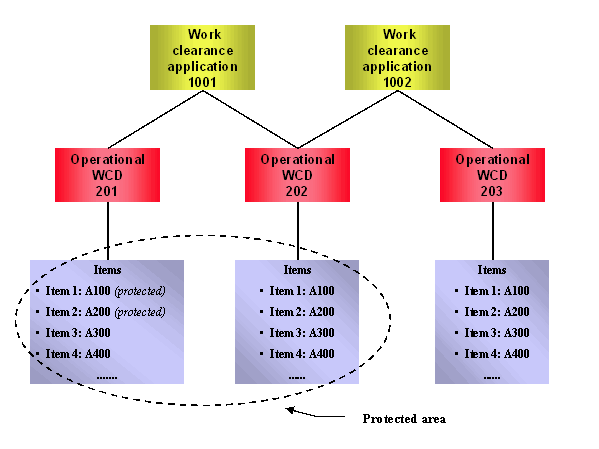
The protected area exists through the protection of items 1 and 2 (that is, technical objects A100 and A200) in operational work clearance document 201 and the linking of operational work clearance documents 201 and 202 using work clearance application 1001.
Technical objects A100 and A200 can only be tagged/untagged within the protected area, that is, in operational work clearance documents 201 and 202.
The operational work clearance documents 202 and 203 are linked together using work clearance application 1002. However, technical objects A100 and A200 can no longer be tagged/untagged from operational work clearance document 203.
Technical objects A300 and A400 can be tagged/untagged from all the operational work clearance documents.
This is a simplified example, in which the same operational group is assumed.