 Subsequent Processing for Promotions
Subsequent Processing for Promotions
Use
In a series of subsequent steps, the promotion is activated and a number of activities automatically initiated by the system, without any intervention being required by the user:
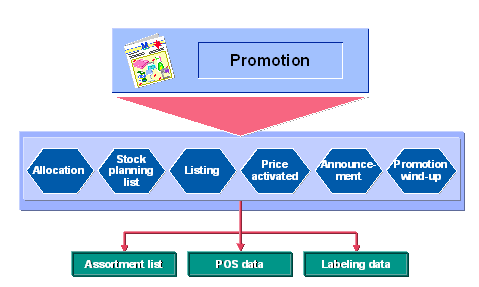
During subsequent processing you can still maintain data for each article on a site or site group basis. For example, if you know that you have stiff competition in a certain geographical area for similar articles, you can lower the price even further for stores within that area. You can also change the planned quantities of an article for each site at the same time.
If there is more than one supplier for an article, you can also maintain separate purchase prices for each one.
You can simulate allocations before confirming them. You specify a quantity and an allocation rule, then click the Simulate button. The system then displays each of the sites participating in the promotion and the actual amount of merchandise each site would get. If the results are not satisfactory, you can either try a different allocation rule or modify the results manually.

You can also do subsequent processing in the background in order to reduce runtimes. For more information, see
See also:
POS Interface - Outbound