 Assortment List Message Generation
Assortment List Message Generation
Cycle Control
The assortment list type divides articles subject to the same message creation cycles (i.e., the intervals in which a message is created and the lead time required) into groups. An article is assigned to one assortment list type at client level. The exact date on which an assortment list is created is calculated from the last creation date for the site plus the cycle time defined for the relevant assortment list type.
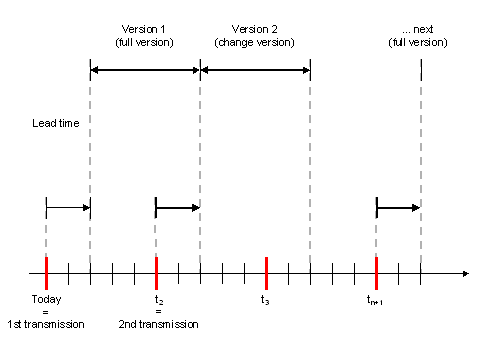
The recipient (site) of the message is assigned an assortment list profile that controls the assortment list mode (this determines how the message is used - for version management or for data interchange). You have the option of creating only an IDoc, passing data only to Version Management, or both.
Assortment list profiles comprise control parameters for assortment list creation and are assigned to sites.
Change Messages
Selecting Changes to Master Data
When master data is changed, change documents are created that track every change to every field. This allows changes to master data to be identified and passed on to the proper recipient during master data distribution. It is also possible to activate the creation of change pointers that only point to objects that have been changed.
An IDoc structure is assigned to a logical message category. There is a relationship between every field in an IDoc structure and the corresponding field in the change document. This enables you to select the relevant master data changes for every message category. The assortment list generation status is contained in the application log. For the change messages, the system selects all the change pointers that were created since the last correct assortment list generation. This prevents duplicate selection of change pointers.
Technical Procedure
Change pointers created for the assortment list are analyzed by the system. The system then reads the master data for the articles and recipients involved and creates the necessary IDocs. These IDocs are then transferred to the IDoc interface for export to external systems. The data is converted outside the SAP system and transmitted.
Selecting Articles
Change pointers are the triggers used to identify the objects for the change versions. During generation of an assortment list, the system selects those change pointers that were created after the last successful assortment list generation. When a change is planned for a future date, only those change pointers are selected that will have been activated by the end of the validity period of the assortment list. The system also has to select all older changes that had not been activated by the end of the last validity period but were activated/will be activated during the period in question. (This occurs without change pointers for conditions that were created at a point in the distant past.)
The following figure illustrates how change pointers are analyzed by the system:
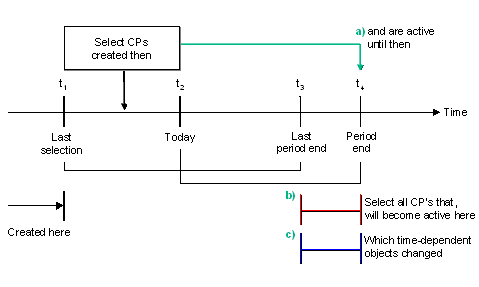
In analyzing the change pointers, the system produces a list of recipients, articles and dates.
When a full version is created, you have the option of limiting the articles selected not only to those relevant to the recipient but also to those relevant to a particular assortment list type. When you make a manual request, articles can be selected in accordance with even more criteria. The period of validity is determined in both cases by the parameters valid for the assortment list type.
Store Price Lists
You can assign price list types to merchandise categories at the store level. When generating the assortment list, the change analysis program includes price changes. If you change an article's price at the price list level, all stores that carry this article and use this price list type for this merchandise category will receive the price change for the article.

Suppose you have a merchandise category H&BA, which includes shampoo, and you assign price list type ZZZ to this merchandise category. If you change the price of a specific shampoo from $2.79 to $2.89, then all stores, which carry this shampoo and have this price list assigned to H&BA will receive the new shampoo price.
If you subsequently assign a different price list to a store's merchandise category, then the store will receive new prices for all articles within that merchandise category.
This makes it easier to maintain sales prices centrally for stores and store groups. When you make a change to one or more articles within a price list, the change analysis program automatically determines all stores which need to receive the price changes and the assortment list function will distribute the data accordingly.
See also
Sales Price Calculations.Data Preparation
A listing check is made of articles and recipients before the data is read. When an assortment list is generated, data that will become valid within the period in question is also read. A complete data record is prepared for each article and each recipient for each day for which a change is made to the master data. These data records are entered in the intermediate document. Segments in the intermediate document that are not required can be flagged as not required for preparation. No data is then prepared for these segments.
You can fill additional segments you have defined yourself in a customer enhancement (user exit). This enables you to incorporate user-specific data into the assortment list.
So that intermediate documents do not become too large (10,000 segments maximum), a number of intermediate documents can be created per recipient. Depending on the assortment list mode, the IDoc is either made available for transmission and/or passed Version Management.
Parallel Processing
It is possible to create assortment lists using parallel processing. You create one batch report on one server for all your assortment lists, but this one report triggers parallel tasks on multiple application servers. This distributes your system resources more evenly and significantly shortens the creation time.
You can specify whether you want to use:
If the maximum number of parallel tasks is reached, the program waits for a task to finish, then starts another task on that same server. The report output gives an overview of all started tasks, error messages from RFC, and created IDocs and versions.

If a parallel task cannot be started, the system creates the assortment lists in normal (serial) mode.
Application Logs
Because assortment lists are usually generated in the background on a periodic basis, information and warnings about the data preparation are contained in an application log.
From the POS Monitor, you can access the application logs for stores. Alternatively, you can display assortment lists and then branch to the corresponding application logs. To do this, drill down in the assortment list hierarchy until you get to the version level. The application log number is displayed on the right side of the screen. Click on this number to jump to the corresponding application log.
You can also access the application logs by displaying the assortment list cycle. When you select a desired line, the system displays the assortment list generation history (that is, the most recent assortment lists for the selected customer and assortment list type). Every line in this list refers to a generation of the corresponding assortment list, even in cases where a change version contains no entries because no relevant changes to the data had been made. Here again you can click on the application log number to access the application log itself. Within the application log, you can do either of the following:
From here you can also jump to the general application log for the entire run. This way you can see all messages that were generated, not just those restricted to a particular customer.
For a description of each of the IDoc segments:
As you expand the tree, the system displays an explanation for each node.
See also:
Pricing Reorganizing Status Tables and Change Pointers