 MultiProvider Reporting in the Delta Load Scenario
Use
You use this scenario when running reports for consolidation systems that have large volumes of data.
Using an additional virtual InfoProvider increases performance because the data is staged beforehand via data mart. (Compare the use of one virtual InfoProvider described in Data Staging in the Virtual InfoProvider .) In this way, when the MultiProvider query is executed, the system needs to stage only the reporting data that has not yet been staged by the data mart.
If a large volume of data is involved, the delta load scenario better improves performance as compared to the MultiProvider scenario with an additional virtual InfoProvider, which uses the period as a selection criterion (see MultiProvider Reporting with an Additional Virtual InfoProvider ). The delta load scenario minimizes the data volume the system needs to stage for reporting when the MultiProvider query is executed.
Integration
You can generate the complete delta load scenario in the Consolidation Workbench.
Prerequisites
In the data basis, you have assigned the InfoCube for totals records, and (if applicable) the InfoObject catalogs for characteristics and key figures. (See the “Field Catalog” section in Data Basis .)
Features
The following figure illustrates this scenario:
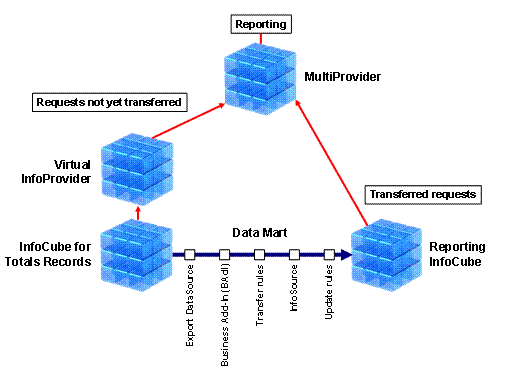
First, the system reads the consolidation data from the InfoCube for totals records and transfers it to the reporting InfoCube using the data mart . Here, consolidation-specific staging of data does not take place in the virtual InfoProvider, but rather in a Business Add-In (BAdI). The reporting InfoCube serves as the basis for reporting.
When the MultiProvider query is executed, the virtual InfoProvider merely stages the consolidation data that has not yet reached the reporting InfoCube and been released for reporting.
The MultiProvider provides a centralized and uniform means of access to all of the data staged in the reporting InfoCube and the virtual InfoProvider.
Data Filtering Using Requests
The delta load scenario uses a technique called “request” for filtering the data that the MultiProvider derives from the reporting InfoCube and the virtual InfoProvider.
The InfoCube for totals records collects the new postings in an open request. Each request has a limit of 50,000 data records. Once this limit is exceeded, the system closes the request and creates a new request. The system writes any subsequent postings to the new request. The system can transfer the closed request to the reporting InfoCube via the next data mart.
When subsequent entries are posted in past periods, the system adds only the affected data records to the open request. This is another advantage over MultiProvider reporting with an additional virtual InfoProvider, in which only complete periods can be transferred.
Structure of the InfoProviders
The virtual InfoProvider has the same structure as the InfoCube for totals records, but has the following additional characteristics:
Reporting mode ( 0BCS_REPMOD )
Reference fiscal year ( 0BCS_REFYR )
Reference period ( 0BCS_REFPER )
SEM-BCS Request ID (0BCS_REQUID)
The system uses this characteristic to identify the requests in the virtual InfoProvider. In contrast to transactional InfoCubes, virtual InfoProviders have no request ID (0REQUID).
As an alternative, you can also add the characteristic
Fiscal Year/Period
(
0FISCPER
) to the virtual InfoProvider. For more information, see the section “Reports with Combined Characteristic ‘Fiscal Year/Period’” under
Reporting with BI Queries
.
The reporting InfoCube has the same structure as the virtual InfoProvider, but without the SEM-BCS request ID (0BCS_REQUID). The request ID (0REQUID) is used to identify the requests.
Reporting Logic
You configure the reporting logic for the data mart in the InfoPackage you create for the export DataSource. (See the section “Creating an InfoPackage and Initializing the Delta Process”.) When doing this, you deploy the following characteristics:
Reporting mode (0BCS_REPMOD)
Reference fiscal year/period (0BCS_REFYP7)
The characteristic is a seven-character numeric string. The first four digits reflect the reference year, and the last three digits reflect the reference period.
The system adds this additional characteristic when the delta load scenario is generated for the export DataSource. (See the section “Generating the Delta Load Scenario”.) Afterwards, the characteristic is available as a selection criterion in InfoPackage maintenance.
This characteristic is not contained in the reporting InfoCube, the virtual InfoProvider, and hence the MultiProvider. It exclusively serves as a selection criterion for the data mart between the InfoCube for totals records and the reporting InfoCube.
Reporting Mode
You use this characteristic to determine whether, and how, reporting interprets the consolidation data.
How the data is staged for reporting is described in detail in Data Staging in the Virtual InfoProvider .
The following table shows how the reporting mode affects the interpretation of the data:
Reporting Mode |
Interpretation |
|---|---|
No reporting logic |
– |
Standard |
The system takes the following into consideration in each period: posting levels and accounting techniques; the structure of the hierarchy of consolidation groups or units; and dates of first consolidation and divestiture accounting. |
Purchase Method |
Same as reporting mode
|
Restatements |
If you do
not
use the
For more information on the
|
How theReference Fiscal Year/PeriodCharacteristic is Used
Whether you make a selection for the
Reference Fiscal Year/Period
characteristic depends on the reporting mode and how the time-dependent navigation attributes are used in the InfoCube (see
Tab Page: Attributes
).
With reporting mode
Restatement
(0BCS_REPMOD=’R’) you
must
make a selection for
Reference Fiscal Year/Period.
You do
not
make a selection for
Reference Fiscal Year/Period
with the following reporting modes:
No Reporting Logic
(0BCS_REPMOD=’N’)Standard
(0BCS_REPMOD=’S’)Purchase Method
(0BCS_REPMOD=’P’)
Updating of the Reporting InfoCube
When implementing the delta load scenario, you need to initialize the delta process. (See the section “Creating an InfoPackage and Initializing the Delta Process”.) When this is done, the system transfers the closed requests via data mart from the InfoCube for totals records to the reporting InfoCube.
The initialization of the delta process depends on the reporting mode:
If reporting mode
Restatement
is used, you always initialize the delta process when you prepare for a new closing; you do this after the consolidation unit hierarchies have changed. Otherwise, you use delta updates to perform the updates.If the other reporting modes are used, you initialize the delta process once only. Afterwards, you only use delta updates to update the reporting InfoCube. You use the
Scheduler
to schedule the delta updates.
Closing an Open Request in the InfoCube for Totals Records
You can close the currently-open request in the InfoCube for totals records, thereby making it available for updating the reporting InfoCube. To do this, youuse function module
RSAPO_CLOSE_TRANS_REQUEST
in the ABAP Function Builder (transaction SE37).
MultiProvider Queries
When MultiProvider queries are executed, the system uses SAP Exits to first determine the following request IDs:
SAP Exit
0S_CSRQ
returns the request ID (0REQUID) that is used by the MultiProvider to choose the requests already transferred to the reporting InfoCube.SAP Exit
0S_BCSRQ
returns the request ID (0BCS_REQUID). This is used by the virtual InfoProvider to choose the requests in the InfoCube for totals records that the system has not yet transferred to the reporting InfoCube.
Therefore, your MultiProvider queries must fulfill the following conditions:
You need to have created the characteristics 0REQUID and 0BCS_REQUID as global filters in the query definition.
SAP Exit variable
0S_CSRQ
is assigned to characteristic 0REQUID.SAP Exit variable
0S_BCSRQ
is assigned to characteristic 0BCS_REQUID.
SAP Business Content contains predefined MultiProvider queries , which you can use as templates for your query definitions.
Activities
First, you generate the delta load scenario. Then you initialize the delta load. When this is done, the system transfers the closed requests via data mart from the InfoCube for totals records to the reporting InfoCube. (See also Transfer of Transaction Data for the Data Mart Interface .)
Generating the Delta Load Scenario
To generate the delta load scenario, do the following:
Go to the process view of the Consolidation Workbench, choose

Data Model

Data Basis
 , and go to the
Data Streams
tab page.If you have not yet generated the virtual InfoProvider, select the
Generated
indicator in the row assigned to theTotals Records
data stream to the left of theVirtual InfoProvider
column. You can specify a name for the virtual InfoProvider in theVirtual InfoProvider
column.Select the
Generated
indicator to the left of theInfoCube for Reporting (Delta Load)
column. You can specify a name for the reporting InfoCube in theInfoCube for Reporting (Delta Load)
column.Select the
Generated
indicator to the left of theMultiProvider for Reporting (Delta Load)
column. You can specify a name for the MultiProvider in theMultiProvider for Reporting (Delta Load)
column.Save the data basis.
The system generates the delta load scenario with the following instances:
Export DataSource for the InfoCube for totals records and the InfoSource
Export DataSource and InfoSource contain the name of the InfoCube with prefix
8
(for example, the name80BCS_C11
for InfoCube0BCS_C11
).Transfer rules between the export DataSource and the InfoSource
Reporting InfoCube with additional characteristics
Update rules between the InfoSource and the reporting InfoCube
Virtual InfoProvider with additional characteristics
MultiProvider for the reporting InfoCube and the virtual InfoProvider
The system does not generate an InfoPackage.
Finally, you create the InfoPackage for the export DataSource, and initialize the delta process.
Creating an InfoPackage and Initializing the Delta Process
To create an InfoPackage and initialize the delta process, do the following:
Select the export DataSource in an object tree of the Data Warehousing Workbench, and choose
Create InfoPackage
in the context menu. Assign a name (as desired) to the InfoPackage.The
Scheduler (Maintain InfoPackage)
screen appears.Make your settings for the InfoPackage on the tab pages
Data Selection, Processing,
andData Targets
. (See the section “InfoPackage with Transaction Data” under Procedure for SAP Systems .) Recommendation
On the
Data Selection
tab page, we recommend that you make the following settings only: the reporting mode, and – if applicable – a selection for theReference Fiscal Year/Period
characteristic (see the section “How theReference Fiscal Year/Period
Characteristic is Used”); however, do not make selections for other characteristics.You make your selections for other characteristics in the MultiProvider queries.
End of the recommendation.The default reporting mode is
Standard
unless you specify otherwise. If you want to use additional reporting mode in your MultiProvider queries (for example,Purchase Method
) in addition to reporting modeStandard
, you must also explicitly set up reporting modeStandard
.Initialize the delta process.
Select the indicators
Initialize Delta Process
andInitialize with Data Transfer
on theUpdate
tab page.On the
Schedule
tab page, run the initialization either immediately or later on in the background (see Scheduling an InfoPackage ).
After you start the initialization, the system transfers the closed requests via data mart from the InfoCube for totals records to the reporting InfoCube.
When this is finished, you schedule the delta updates. For more information, see Tab Page: Update .