 Reporting with BI Queries
After completing the consolidation tasks, you can analyze your consolidated data by means of BI queries.
SAP delivers a variety of predefined queries as BI Content that you can use. You can use the reporting results of a query for external business reports and quarterly statements or for internal purposes within your organization, depending on what a query is used to analyze and depending on the level of detail of its results. The queries you can use include:
Balance Sheet with Prior Year Comparison
Quarterly, and
You can create your own custom queries to meet your specific requirements or you can use the delivered queries as templates for your own custom modifications.
Integration
There are two ways you can create reports:
With predefined queries available in the BI Content of SAP NetWeaver Business Warehouse (SAP NetWeaver BW)
With your own queries, which you define with the BEx Query Designer in SAP NetWeaver BW
Features
You can analyze the totals data contained in the InfoCube for totals records as follows:
For business reports you use the predefined virtual InfoProviders 0BCS_VC10 or 0BCS_VC11. The virtual InfoProviders are based on the corresponding InfoCubes for totals records.
For technical reports (such as database lists), you can define queries directly on top of the InfoCube for totals records (InfoCubes 0BCS_C10 and
0BCS_C11). The BI Content provided also includes examples of technical reports (such as the query
 Note
NoteAs an alternative, you can use your own InfoCubes (that you may have created) either with references to or as copies of the InfoCubes delivered in BI Content.
End of the note.
Business Reports
The figure below illustrates how the totals data of the InfoCube for totals records is evaluated with the help of a virtual InfoProvider:
You define a query on top of the virtual InfoProvider (or you use an existing query).
The function module that belongs to the virtual InfoProvider submits the query with its selection conditions to the corresponding SEM-BCS programs.
The SEM-BCS programs adjust the selection conditions and select the totals data from the InfoCube.
The SEM-BCS programs interpret the totals data that is read from the InfoCube.
The SEM-BCS programs return the results to the virtual InfoProvider.
The report is output in the BW system.
Dynamic Data Staging
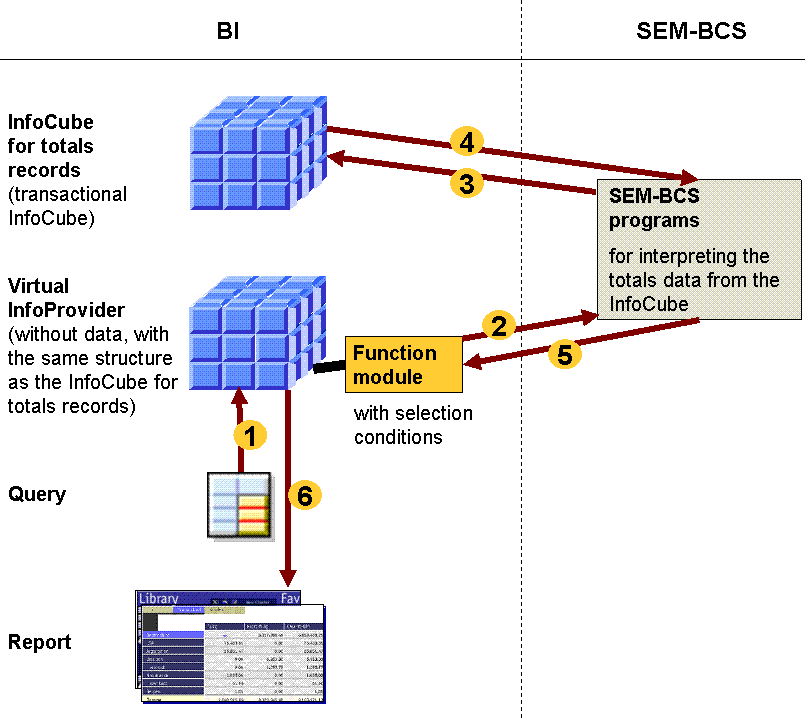
As the figure illustrates, the reporting function does not directly access the InfoCube for totals records. Instead, the system indirectly accesses the totals records through the virtual InfoProvider. The reason for this is that the totals records created in SEM-BCS and stored in the InfoCube require supplementary data for reporting. When a query is run, this supplementary data is provided by programs that have been delivered by SAP and assigned to the virtual InfoProvider. For more information, see
Use of Hierarchies
To portray the hierarchical structure of your consolidation units, you can use one of the characteristic hierarchies defined in SAP NetWeaver BW as a presentation hierarchy in the query. Hierarchies exist for the characteristic with the role consolidation unit
and the characteristic with the role Consolidation Group
.
Which characteristic hierarchy you choose as the presentation hierarchy affects how the results are shown in the report. For example, if you choose a hierarchy of consolidation units, any data records with postings to higher posting levels (such as two-sided eliminations or consolidation of investments postings) are not listed under the consolidation groups they belong to. To show such postings correctly, you need to choose a hierarchy for the consolidation group (and not the consolidation unit) as the presentation hierarchy.
Technical Reports
In addition to business-oriented reports, you can create reports that have more of a technical nature. For example, you can create summarized overviews of the data contained in the InfoCubes for totals records. For more information, see Technical Reports.
Reports with Combined Characteristic "Fiscal Year/Period"
The fiscal year and period are the only time characteristics of the two InfoCubes delivered by SAP: 0BCS_C10 and 0BCS_C11 (along with their corresponding virtual InfoProviders 0BCS_VC10 and 0BCS_VC11). However, for reporting purposes you may want to use the combination of both characteristic values in the "Fiscal Year/Period" characteristic (0FISCPER), which has been created for this purpose. To do this, you simply add characteristic 0FISCPER as a time characteristic to the relevant virtual InfoProvider. You then include the characteristic in your queries and use it in your reports.
Note
Adding characteristic 0FISCPER to the virtual InfoProvider is sufficient. As long as you need the characteristic only for reporting purposes, it does not need to be added to the underlying InfoCube or the consolidation data basis.
System upgrades overwrite any changes you make to BI Content. However, since the change described here only affects the virtual InfoProvider (and not the InfoCube), such an upgrade does not cause loss of data. After an upgrade, to be able to use a query that includes characteristic 0FISCPER, you need to add the characteristic to the virtual InfoProvider again.