 Creating FPM Configurations
You use this procedure to create User Interface (UI) configurations for the Personnel & Organization
Web Dynpro master data application which is based on the Floorplan Manager for Web Dynpro ABAP (FPM).
You create the required UIBB component configurations:
Form Component Configuration:
FPM_FORM_UIBB_GL2
You use the form UIBB component configuration to make available all the fields you want to edit in the Web Dynpro master data application. These fields are visible when you are in the table view in the details area of the screen and when you choose
Edit
in the dataset view:
Figure 1: Form Configuration for Edit View
 Note
NoteThis figure and the following figures in this section show examples of FPM configurations for the employee object type.
End of the note.You also use the form UIBB component configuration to create a short profile for an object (employee, organizational unit, and position) that you want to display in the Web Dynpro master data application. In the employee short profile, these fields are visible next to the photo, the employee name, and the personnel number. In the profile page for organizational units or positions, these fields are visible next to the icon for the respective object type and the ID of the organizational unit or position.

Figure 2: Form Configuration for Short Profiles
List Component Configurations:
FPM_LIST_UIBB_ATS
You use the list UIBB component configuration to display tables and lists in the Web Dynpro application:

Figure 3: List Configuration for Table View
Some complex infotypes require additional list UIBB configurations for repeat/line structures, for example for the wage types used in
Payroll
infotypes such as the Basic Pay infotype (0008):
Figure 4: List Configuration for Repeat/Line Structures
Form Repeater Component Configuration:
FPM_FORM_REPEATER_UIBB
You use the form repeater UIBB component configuration to produce another view of the data. We recommend inserting the most important fields in this view. You see these fields when you are in the dataset view.
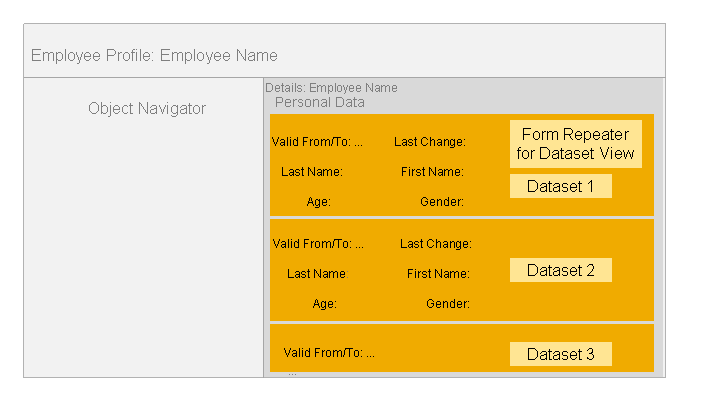
Figure 5: Form Repeater Configuration for Dataset View
You need an extra form repeater UIBB component configuration if you want to display a biz card for the infotype on the object profile page:

Figure 6: Form Repeater Configuration for Biz Card on Object Profile Page
Prerequisites
The infotype is decoupled. For more information, see Decoupling Infotypes.
NoteFor decoupling an infotype containing employee master data, perform the activities in Customizing for
Personnel & Organization
under
Personnel Management

Personnel & Organization
Infotypes
Infotypes for Employees
Decouple Infotype
 .End of the note.
For Infotypes for Employee Data:
In Customizing for
Personnel & Organization
, you have executed the report Edit Infotype Objects in BOL Model HRPAD for the infotype. The report is available under Personnel Management
Personnel & Organization
Infotypes
Infotypes for Employees
Adjust Infotypes in HRPAD Model
.For Infotypes for Organization Data:
You have added the infotype manually to the
HRPD
BOL model.
Procedure
Create the required FPM configurations for the master data application. For detailed step-to-step procedures for each configuration type, refer to the relevant sections:
Test your configurations. For more information, see Testing FPM Configurations.
More Information
For more background information regarding the Floorplan Manager, look for Floorplan Manager for Web Dynpro ABAP in the documentation of SAP NetWeaver at http://help.sap.com .
.