 Processing Individual Scales
Use
You can process individual scales as well as standard ones.
Prerequisites
You have maintained a standard scale in Customizing.
Procedure
Choose

Master Data

Commission Contract
Change.

Enter the
contract number
.Choose the
Performance-Related Remuneration
tab page.Choose a performance-related remuneration agreement.
Choose a value from the
Performance-Related Agreements
screen.Double-click on the value.
Select a row.
Choose
Individual.
Process the individual scale.
Choose
Back.
Activate the commission contract.
Save your entries.
Result
The commission contract shows the data for the individual scale.
Example
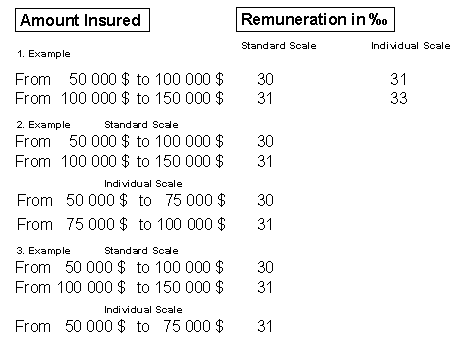
In the personalized scale, you change the following:
The remuneration for the existing scale levels in the first example.
The scale levels in the second example.
The scale levels and remuneration in the third example.