 Status Management
Use
Subdividing into budgeting phases
Status management in the budget control system (BCS) allows you to subdivide the budgeting in Funds Management into successive budgeting phases. The individual budgeting phases differ in that only certain budget processes can be executed ( Budgeting Process in combination with a Budget Type or a Budget Type Group ). Each phase is mapped in the system as a status. Whereas you define all required statuses and the executable budgeting activities for each status in Customizing, you select the current valid status(es) in the current fiscal year in the menu of Funds Management.
Authorization control of budgeting
You can also define a different authorization allocation for each status in status management. This enables you to assign an authorization group to each status and define specific user roles for budgeting in the budget control system by using the authorization concept.
Prerequisites
You have already created budget types in the Customizing of Funds Management in section BCS budgeting.
Activities
You define the required status in the Customizing of Funds Management, under

Budget Control System (BCS)

BCS Budgeting
Control Budgeting Flow
Maintain Status
 .
.
You define the status valid at a particular time in the menu of Funds Management, under
Budgeting
Budget Control System (BCS)
Version
Assign Status to a Version.
Example
The following graphic depicts the chronological order of the individual budgeting phases. The permitted activities are characterized in each phase by one or more statuses.
Sequence of budgeting phases
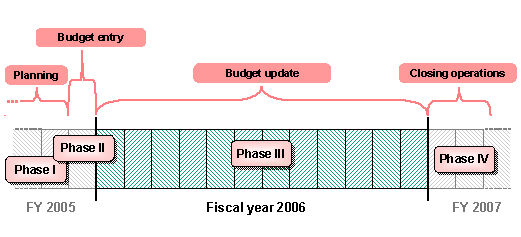
Only budgeting processes are shown in the example, not budget types, in order to simplify the content. In phases I, II and IV, only one status is selected. Phase III is different in that two statuses are selected. This allows you to control different authorizations in the budgeting process at the same time.
Budgeting phases and assigned status
Phase |
Status |
Permitted budgeting processes |
Auth. grp |
I |
Planning |
|
A |
II |
Budgeting 1 |
|
A |
III |
Budgeting 2a |
|
A |
Budgeting 2b |
|
B |
|
IV |
Close |
|
A |
The planning for the following fiscal year 2006 takes place in
Phase I
. This planning phase takes place over a long time in fiscal year 2005. In this time period, you can only enter plan data in which only the
Prepare
process is allowed.
Phase II
replaces Phase I at the end of 2005. Budget data is generated from the transferred plan data via a mass run. Budget data can also be entered manually. In this phase only the
Enter
process is allowed.
Phase III
takes place over the entire fiscal year 2006. This phase is different in that the activities are restricted to budget updates. The processes
Supplement, Return
and
Transfer
are now allowed. The budget supplement should only be executed by certain employees (group B). This special user role is possible with budgeting status 2b.
Phase IV
includes the closing operations of fiscal year 2006. In this phase only the
Carryover
process is permitted, in order to carry forward residual budget into the following fiscal year (2007).