 Multi-Level Budget Structures
In the area of master data, hierarchies describe how a public sector organization views the following relationships:
Of its own internal organization
How the nature of expenditure is structured
How the pyramid of goals is defined
In budgeting , the hierarchy defines the permissible account assignments, the paths of financing for activities, and control relations that have to be followed between account assignments.
In the case of postings , hierarchies control the permissible account assignments also. A flexible availability control as the check between budget and postings depends on hierarchical definitions where to check the budget for a given posting assignment.
For reporting , hierarchies enable users to look at the data from many different viewpoints.
For authorizations , hierarchies explain how an area of responsibility is formed. Comparing hierarchies over time enables the interested party to take part in the evolution of public sector structures. The graphic below gives an overview of the participating processes and their role with regard to multi-level budget structures:
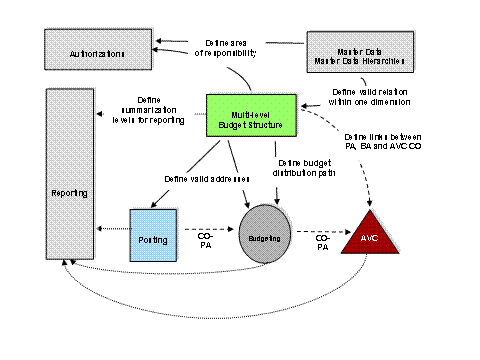
The multi-level budget structure in Funds Management (FM) is a feature you can use to establish and validate control relationships in budgeting and define how the resulting budget data appears in reporting.
Implementation Considerations
Before you begin using multi-level budget structures, there are several activities in FM Customizing you must maintain.
Activate the multi-level budget structure.
To do this, go to Customizing and choose

Public Sector Management

Funds Management Government
Master Data
Use of Account Assignment Elements
Budget Structure (BCS)
Multi-Level Budget Structure -> Activate Multi-Level Budget Structure
 .
.
Create a budget structure or select an existing budget structure, as described in the onlinedocumentation.
Activate the multi-level budget structure by setting the
Hierarch. BudStruc.
indicator.Define hierarchy settings for FM account assignment elements (FMAA elements).
To do this, go to Customizing and choose
Public Sector Management
Funds Management Government
Master Data
Use of Account Assignment Elements
Budget Structure (BCS)
Multi-Level Budget Structure -> Activate Multi-Level Budget Structure
For your specified multi-level budget structure, define the roles of FM account assignmentelements activated in budgeting.
On the second level, define the sorting sequence for FM account assignment elements that have hierarchical roles.
Integration
The multi-level budget structure is an integral part of budgeting in the Budget Control System (BCS).
Features
You can generate and process multi-level budget structures using the multi-level budget structure maintenance transactions.
For a full list of the features in multi-level budget structure processing, see Working with the Multi-Level Budget Structure .
You can use multi-level budget structures for budget distribution in the Budgeting Workbench (BWB).