 Kanban Replenishment
Use
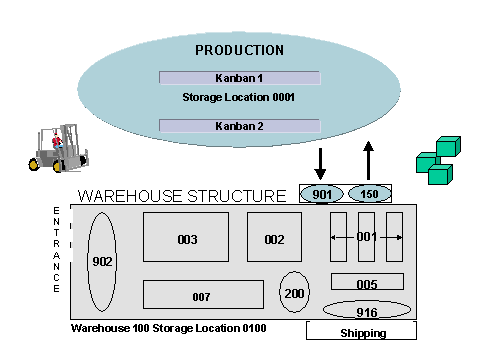
The WM-PP interface supports material staging for production using classic kanban production control. Here, you organize the replenishment from the warehouse to production using containers in the production work center. As soon as you set the container to empty in the system, the system triggers Kanban replenishment.
Prerequisites
You have set up the WM-PP interface.
A separate kanban storage location is defined, which is not managed by WM and therefore differs from WM-managed replenishment storage locations.
A kanban interim storage area with storage bin is defined in the WM-managed warehouse.
In the standard system, storage type 150 is set up as a kanban interim storage area.
You have defined the kanban replenishment strategy with control type
transfer requirements from a storage location controlled by WM
in Customizing forProduction
under
KANBAN

Replenishment Strategies
Define Stock Transfer Strategies
 .
.
Kanban replenishment strategy 0006 is defined in the standard delivery and is specially defined for kanban replenishment from a WM-managed warehouse.
If you want the system to create a transfer order from the transfer requirement automatically, set the indicator
Automatic TO Creation
in the replenishment strategy.You have set up a suitable replenishment movement type for kanban in Customizing for
Warehouse Management
under Activities
Transfers
Define Movement Types
.
Movement type 350 is defined for kanban replenishment in the standard system.
Movement type 350 is assigned to the interim storage type and the stock transfer movement type for stock transfer from the WM-managed replenishment storage location to the kanban storage location is defined in Customizing for
Warehouse Mangement
under Interfaces
Define Kanban
Storage Location Control in Warehouse Management
.
In the standard system, storage type 311 is set up as a stock transfer movement type. The system transfers all stock in the kanban storage type to the kanban storage location using stock transfer movement type 311, since the kanban storage type is specifically assigned to the kanban storage location.
You have created a kanban control cycle for the material that is to be staged under
Production
Kanban
Control Cycle
Create
.
The control cycle contains all of the information on the interface between the kanban storage location and the WM-managed storage location.
The material to be staged is defined for both the kanban storage location (consumer) and the WM storage location (source).
Kanban Replenishment
Process Flow
You trigger kanban replenishment by setting a kanban to empty.
For more information, see Triggering the Kanban Signal.
For each requested kanban container, the system creates one transfer requirement (TR) with one item.
The system uses the data on the kanban storage type defined in the control cycle, and the kanban production storage bin in the TR.
The system confirms the TR number to the kanban. You can therefore display the corresponding replenishment TR from the kanban display.
You can display the transfer requirements for the request.
Choose Logistics
Logistics Execution
Internal Warehouse Processes
Transfer Requirement
Display
from the SAP menu.
The following information is available:
The requirement number consists of the requirement type J (kanban/JIT) and the actual requirement number, which corresponds to the kanban number.
If the kanban indicator is set, it means that this TR is planned for kanban replenishment.
The system takes the destination storage type (kanban interim storage type) from the kanban control cycle.
If the
Automatic TO Creation
indicator is set, the system creates the corresponding transfer order (TO) when the TR is created.
You create transfer orders for the staging TRs in the WMS.
If the
Automatic TO Creation
indicator is set, the system creates the corresponding transfer order (TO) automatically in the background when the TR is created. For more information, see Automatic Creation of TOs for Transfer Requirement.You confirm the transfer orders to verify that the kanban material was indeed taken to the production supply area.
The system updates the kanban in PP and sets the status of the kanban to full.

Alternatively, you can set the kanban to full in production first, which leads the system to confirm the open TO in the background and post the material movement.
 Caution
If the system cannot confirm the TO in the background, it flags the kanban and you receive an error message. In this case, you confirm the TO manually and then correct the kanban.
End of the caution.You execute the posting change from the WM-managed storage location to the kanban storage location.
Normally, the posting change occurs automatically when the TO is confirmed.
To execute the posting change of the replenishment material manually, choose Logistics
Logistics Execution
Internal Whse Processes
Posting Change
Direct to Bin Stock Posting Change
Storage Location to Storage Location
.