 Ordering
Purpose
In ordering, the system carries out the procurement transaction for the requirements that were automatically determined (by requirements planning, store orders, allocation tables, promotions and sales orders) or manually created for your stores, distribution centers and customers. The requirements exist in the system either in the form of purchase requisitions or as purchase orders, for which you have to enter details such as the vendor or the delivery date.
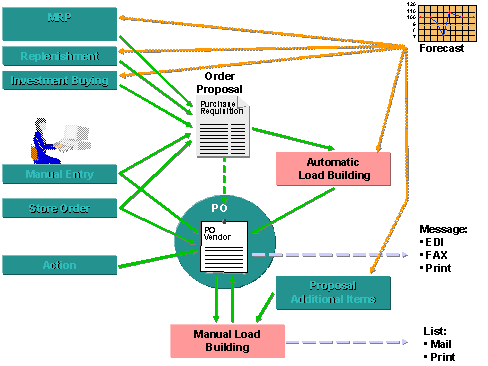
You procure the merchandise in one or more steps. You can place a purchase order with an external vendor, your own distribution center or, in exceptional cases, a store. Stock transfers within your own company and return deliveries are also handled in purchase orders.

Integration
In SAPRetail, purchase orders are generated by requirements planning. They are also generated as follow-on documents from store orders or the replenishment process. They can be entered manually or generated automatically from purchase requisitions.
The purchase orders created can be used as a basis for processing subsequent goods receipts, for invoice verification and for subsequent settlement.
Features
Ordering includes a number of functions to help you create, optimize, and monitor purchase orders.
You use purchase requisitions to manually enter requirements. Purchase requisitions can also be created indirectly by other components in the ERP system.
See also: MM - Purchasing: Purchase Requisitions
The source of supply can be determined automatically by the system.
See also: Supply Source Determination
Request for quotation (RFQ) management enables you to obtain quotations from a number of different vendors and select the most favorable one. Existing outline agreements (scheduling agreements or contracts) are also taken into consideration.
See also: MM - Purchasing: Requests for Quotation and Quotations
To ensure the best possible economic results, the system can determine an optimized order quantity. It does this by using certain rules to round off the order quantity to full packs or the purchase order off to full loads.
See also: Order Optimizing
You can create purchase orders referencing other documents in the system (for example, contracts, purchase requisitions or requests for quotations).
See:
MM - Purchasing: Purchase Orders
MM - Purchasing: Vendor Outline Agreements
You can specify that, for example, depending on the value of the goods on order or the merchandise category concerned, a purchase order can only be placed if it has already been approved (and released) by the employee responsible. You can adapt the release procedure to suit your own requirements.
MM - Purchasing: Release Procedures
Analysis, printing, and other functions allow you to monitor the delivery dates of all your orders right up to final delivery.
See:
MM - Purchasing: Text Entry, Print Functions and Message Transmission
MM - Purchasing: Analyses in Purchasing
MM - Purchasing: Conditions and Price Determination
MM - Purchasing: Procurement with Confirmations
MM - Purchasing: Other Functions
See also:
Background Processing: Ordering
Integration of Customs Duties SAP GTS Simulation in SAP Retail