
FUIListPickerFormCell
open class FUIListPickerFormCell : FUIInlineValidationTableViewCell, FUIPickerFormCellThe reusable UI component implemented as an UITableViewCell to display a key-value pair property, which is integrated with a FUIListPicker controller for displaying a list of values.
### Single-line version

### Multi-line version
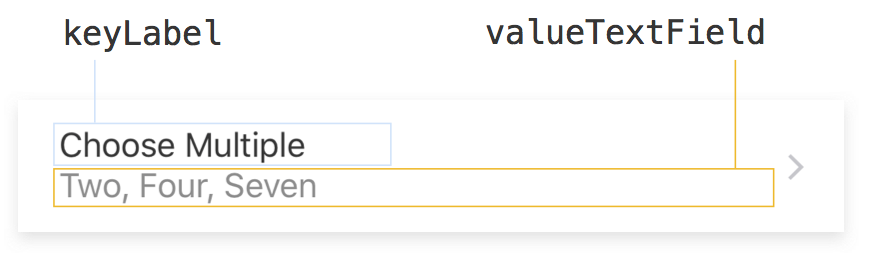
The developer should set the following properties on the cell, in their implementation of UITableViewDataSource cellForRow(at:) function:
keyName: The key name of the property.value: The default selections.valueOptions: The list of optional values user may choose from.allowsMultipleSelection: Indicates if user can select multiple values. Default is true, meaning by default user may select multiple values.isEditable: If the selection(s) could be modified or not. The default is true.listPicker: TheFUIListPickerfor thisFUIListPickerFormCell.
Note that the display of the selections in the valueLabel is the
responsibility of the developer if the dataSource property of the listPicker
is set. Developer is to set the text of the valueLabel to reflect the selections.
Otherwise, if developer sets valueOptions and leaves dataSource of listPicker to nil,
then the text in valueLabel will be set internally.
Here are the code snippets in app’s UITableViewController implementation:
(The app’s UITableViewController needs to be a subclass of FUIFormTableViewController.)
        var propValue7: [Int] = [1, 3, 6]
        var valueOptions7 = ["One", "Two", "Three", "Four", "Five", "Six", "Seven"]
        var listPickerDataSource7 = StringListPickerDataSource(options: valueOptions7)

        override func viewDidLoad() {
            super.viewDidLoad()
            self.tableView.register(FUIListPickerFormCell.self, forCellReuseIdentifier: FUIListPickerFormCell.reuseIdentifier)
            // ...
        }

        override func tableView(_ tableView: UITableView, cellForRowAt indexPath: IndexPath) -> UITableViewCell {
            // ...
            let cell = tableView.dequeueReusableCell(withIdentifier: FUIListPickerFormCell.reuseIdentifier, for: indexPath) as! FUIListPickerFormCell
            cell.keyName = "Choose Multiple"
            cell.value = propValue7
            cell.allowsMultipleSelection = true
            cell.valueLabel.text = descriptionForSelectedStrings(valueOptions7, at: propValue7) // See below

            cell.listPicker.dataSource = listPickerDataSource7
            cell.listPicker.searchResultsUpdating = listPickerDataSource7
            cell.listPicker.isSearchEnabled = true
            cell.listPicker.prompt = "Please select multiple items"

            cell.listPicker.searchBar?.isBarcodeScannerEnabled = true
            cell.listPicker.searchBar?.barcodeScanner?.scanMode = .EAN_UPC
            cell.listPicker.searchBar?.barcodeScanner?.scanResultTransformer = { (scanString) -> String in
                return self.transformStringToSearchBar(scanResultString: scanString)
            }
            // MARK:  implement onChangeHandler
            cell.onChangeHandler = { [weak self] newValue in
                self.propValue3 = newValue
            }
            return cell
            // ...
        }

        func descriptionForSelectedStrings(_ options: [String], at indexes: [Int]) -> String {
            return options.enumerated().filter({ (index, element) -> Bool in
                return indexes.contains(index)
            }).reduce ("") { string, element in
                return string.isEmpty ? element.1 : "\(string), \(element.1)"
            }
        }
## Theming
Supported UILabel class paths:
 fdlFUIListPickerFormCell_keyLabel {}
 fdlFUIListPickerFormCell_keyLabel-disabled {}
 fdlFUIListPickerFormCell_valueLabel {}
Supported UILabel properties:
 font-color: (Color)
 font-style: (UIFontTextStyle)
Supported UIView class paths:
fdlFUIListPickerFormCell_selectedBackgroundView {}
Supported UIView properties:
background-color: (Color)
-
The default cell reuse identifier.
Declaration
Swift
open class var reuseIdentifier: String { get } -
The value type is String array.
Declaration
Swift
public typealias ValueType = [Int] -
The value is the selected indexes to the items in the list. This property is not used when
ListPicker‘sisDataSourceRequiringUniqueIdentifiersis true.Declaration
Swift
public var value: [Int] -
If
ListPicker‘sisDataSourceRequiringUniqueIdentifiersis true, this property is the selected UUID strings.Declaration
Swift
public var uuidValues: [String] -
Implementation of change handler. Is invoked on changes to the
valueproperty.Declaration
Swift
public var onChangeHandler: (([Int]) -> Void)? -
If
ListPicker‘sisDataSourceRequiringUniqueIdentifiersis true, this is the handler to be invoked whenuuidValueschanged.Declaration
Swift
public var onUuidChangeHandler: (([String]) -> Void)? -
A property value indicates the display mode for list picker table view controller.
Declaration
Swift
@available(*, deprecated, message: "No longer needed.") public var hierarchyPickerType: FUIHierarchyListPickerType -
Indicates if this cell is editable or not, that is, the selections could be changed or not. The default is true.
Declaration
Swift
public var isEditable: Bool { get set } -
isEnabledandisEditableare in sync.Declaration
Swift
override public var isEnabled: Bool { get set } -
The key name of the property.
Declaration
Swift
@IBInspectable public var keyName: String? { get set } -
The array of the valid options.
Declaration
Swift
public var valueOptions: [String] -
The
FUIListPickerfor thisFUIListPickerFormCell.Declaration
Swift
public var listPicker: FUIListPicker! -
This property indicates if to present the list picker modally or not. The default is false.
Declaration
Swift
public var presentsListPickerModally: Bool -
Indicates if user can select multiple values.
Default is true, meaning by default user may select multiple values.
Declaration
Swift
public var allowsMultipleSelection: Bool { get set } -
Indicates if empty selection is allowed.
Default is true, meaning by default user does not need to select an item.
Declaration
Swift
public var allowsEmptySelection: Bool -
The UILabel holds the key name string.
Declaration
Swift
@IBOutlet public private(set) weak var keyLabel: UILabel! { get } -
The
UILabelthat holds the selected value strings.Declaration
Swift
@IBOutlet public private(set) weak var valueLabel: UILabel! { get } -
If this property is true, the cancel button will be shown on the right side of the navigation bar to let user undo the change when tapped.
The default is false. That is, the cancel button will not be shown.
Declaration
Swift
public var isUndoEnabled: Bool -
If
isTrackingLiveChangesis true, thenonChangeHandleroronUuidChangeHandlerwill be invoked for every selection and de-selection.Otherwise, the handler will be invoked only after the
FUIListPickeris dismissed.Note that
isTrackingLiveChangesis treated as false ifisUndoEnabledis true.Defaults to
false.Declaration
Swift
public var isTrackingLiveChanges: Bool -
Specifies if the picker is to be dimissed after selection.
If this property is true and
allowsMultipleSelectionis false, the picker will be dismissed after user made a selection. The default is false.Declaration
Swift
public var isPickerDismissedOnSelection: Bool -
This property specifies if the
valueLabelshould always below thekeyLabelor not.The default is false.
Declaration
Swift
public var alwaysShowValueTextOnBottom: Bool
-
The
FUIListPickerTableViewControllerassociated with thisFUIListPickerCollectionViewCell.Declaration
Swift
public private(set) var listPickerTableViewController: FUIListPickerTableViewController! { get }