
Troubleshooting
Response to Malfunctions
Error While Saving POS Transactions
A transaction (receipt) resulting from a selling and payment procedure which cannot be saved completely in the database is marked as incorrect and saved in a directory for further analysis later.
POS Client Does Not Start
Check the log files of the application. The following problems may occur:
- Wrong Java configuration in the wrapper.conf
- Wrong configuration of application parameters
- The application configuration is not stored in the application directory:
- Verify if the Infoclient is running. To do so, check the log file: sm_infoclient.log
- Check the Infoclient configuration under: \sm.infoclient\config\sm_infoclient_bridge.properties
POS Client Does Not Operate as Expected
- Check the configuration parameters
- POS Server is not running
- POS Thin Client: POS Service is not running
Malfunction Analysis: Access to POS Database
Remote Access
As a local database is only created for the deployment variant POS Full Client, this section refers to this deployment variant only.
The "Embedded Server" of Apache Derby must have been activated. It starts a network server to enable the remote access by database tools. The Derby Network Client JDBC driver is used for this purpose.
This remote access is set in the standard configuration and enables a connection to the database to be established for analysis purposes if the POS Client is running. In the event of security concerns, disable this remote access by configuration.
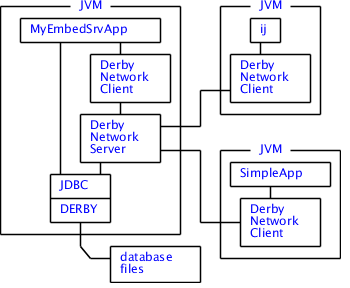
POS Configuration
Configuration file: clientSystem.properties
| Parameter | Description |
|---|---|
|
SystemConfig.systemProperties.1.propertyKey=derby.drda.startNetworkServer
SystemConfig.systemProperties.1.propertyValue=false |
Remote access enabled/disabled Possible values: true | false |
|
SystemConfig.systemProperties.2.propertyKey=derby.drda.portNumber
SystemConfig.systemProperties.2.propertyValue=1527 |
Port number for accessing the DB server |
| SystemConfig.systemProperties.3.propertyKey=derby.user.sa
SystemConfig.systemProperties.3.propertyValue=posderbypass |
User name and password (without encryption) - NOT RECOMMENDED Note:
Use your own secure credentials (user/password)! |
|
SystemConfig.systemProperties.4.propertyKey=derby.user.sa_encrypted
SystemConfig.systemProperties.4.propertyValue=hg0JDC/GeOzqus/GzTLWOQ== |
User name and password (with encryption) - RECOMMENDED Note:
Use your own secure credentials (user/password)! |
Check in the log file whether the Server is running: ${pos.root.dir}/log/derby.log.
If the Embedded Server was started for remote access, the following information appears in the log:
Thu Feb 26 12:32:36 CET 2015 : Apache Derby Network Server 10.10.2.0 - (1582446) was started and is ready to accept connections on port 1527.Access with Database Tool
| Database URL | jdbc:derby://localhost:1527/artsdb |
| Driver | org.apache.derby.jdbc.ClientDriver |
| User name | See "POS Configuration" |
| Password | See "POS Configuration" |