Exporting Diagrams to Red Hat Decision Manager Projects on GitHub
SAP Signavio allows you to export process and decision models directly to Red Hat Decision Manager projects at GitHub. Like this, you can seamlessly integrate diagrams that have been modeled with SAP Signavio into your Red Hat Decision Manager projects.
Process models are exported and uploaded as BPMN 2.0 XML files and all linked decision models are exported and uploaded as DRL files.
-
To start an export, select a BPMN diagram in the explorer and choose
 Import/Export
  Export RedHat files to GitHub
 .
. -
You need to select exactly one diagram. The export will include all linked DMN and BPMN diagrams.
-
In case you haven't configured the GitHub integration yet, you need to authorize SAP Signavio to push to your GitHub repositories.
Otherwise, proceed at section Pushing diagrams to Red Hat Decision Manager projects.
-
Choose Authorize.
-
You are forwarded to GitHub, where you need to grant SAP Signavio permission to push to your repositories.
-
Re-enter your password to confirm. Upon successful authorization, the following page will be displayed.
Now you can go back to the explorer and export the diagrams to GitHub.
Pushing Diagrams to Red Hat Decision Manager Projects
To start an export, select a BPMN diagram in the explorer and choose Import/Export Export RedHat files to GitHub.
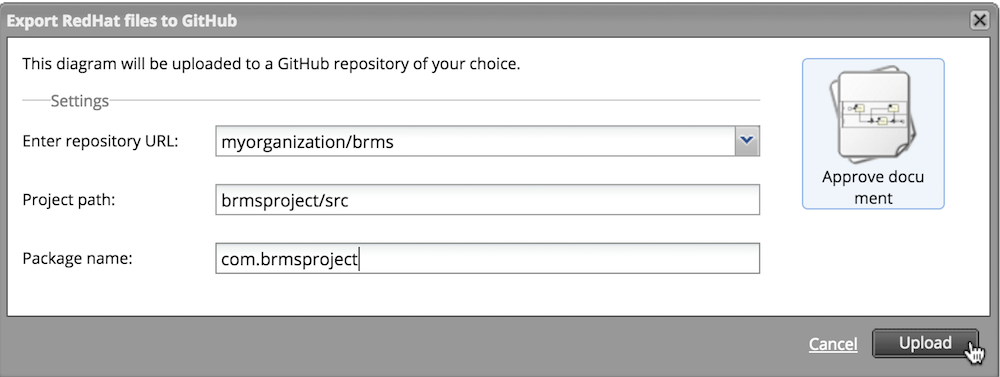
Now, configure the following parameters:
-
The repository you want to push to
-
The project path (within the repository)
-
The name of the Java package that will be created
Choose Upload to push the files to your repository:
The files are pushed by your user to the default branch (for example main). The commit message is signavio upload .
An information dialog will inform you about the successful export.