Using Advanced Literal Expressions (Functions in DMN Decision Elements)
If you have modeled Decision Model and Notation (DMN) diagrams, you are likely familiar with DMN expressions for decision logic, as explained in Model a decision.
For more information, see Chapter 9 in the OMG PDF document: Decision Model and Notation .
.
Using Literal Expressions in Decision Tables
Here are the steps to create decision logic for determining a discount based on the total sum of purchased items.
-
Create the Purchased items data input element.
The input should be a list of numbers (type currency).
-
Create a decision element and label it Determine discount.
-
Connect the decision element to the data input element.
-
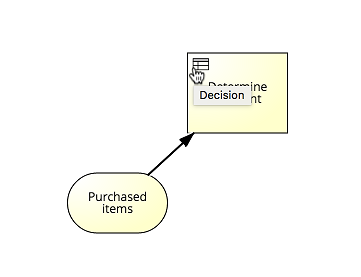
Choose the table icon (Decision) in the upper left corner of the decision element to open the Decision Table Editor.
-
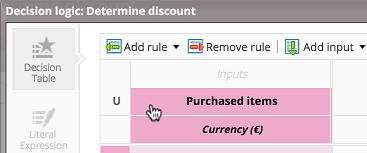
Select the header and delete the input reference in the table to be able to insert a literal expression.
-
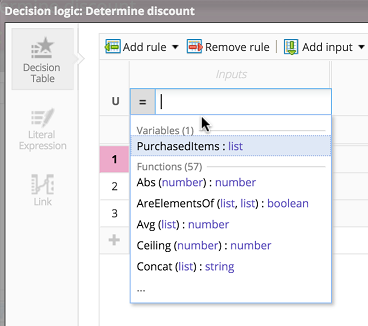
Type in =.
The system displays available variables and functions.
-
Type in Sum and select the Sum function.
-
Insert the variable PurchasedItems as a parameter of Sum.

-
Insert the literal expression Sum(PurchasedItems).
As a result, the decision logic's input data is the sum of all purchased items. You can further define the decision logic.

Using Literal Expressions Instead of Decision Tables
You can also use literal expressions instead of decision tables. Split a decision into two connected elements: one with a decision table and one with literal expression logic.

Here, Calculate total sum and Determine discount are two separate decision elements.
-
The first element calculates the total sum of purchased items.
-
The second element determines the discount based on the total sum.
-
Open the decision table editor and switch to the Literal expressions tab.
-
There, insert the literal expression to calculate the sum of items.

As a result, the decision element returns the sum of items as a data output and can be referenced by the following decision element.
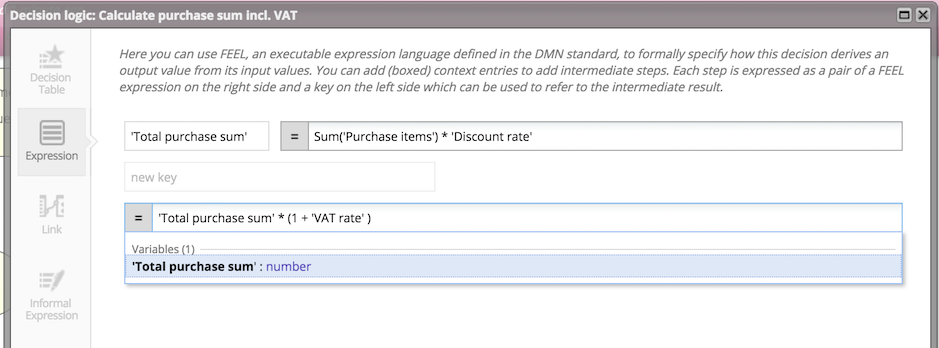
In a complex literal expression, you can define variables, known as boxed contexts, and reference them in our decision function to improve the readability of a literal expression.
Documentation of all Literal Expressions
This section lists all available literal expressions, grouped by operation type.
Arithmetic Operations
|
Name |
Literal Expression |
Description |
Example |
|---|---|---|---|
|
Abs |
Abs(number):NUMERIC |
Returns the absolute value of a number. |
Abs(-5) returns 5. |
|
Ceiling |
Ceiling(number):NUMERIC |
Returns a number rounded up to the next integer. |
Ceiling(1.3) returns 2. |
|
Count |
Count([num1 ,num2, num3]):NUMERIC |
Returns the number of elements of the given list. |
daysCount(["item1", "item2", "item3"]) returns 3. |
|
Floor |
Floor(number):NUMERIC |
Returns a number rounded down to the next integer. |
Floor(1.6) returns 1. |
|
Integer |
Integer(number): NUMERIC |
Returns the integer part of a number. |
Integer(1.34) returns 1. |
|
Modulo |
Modulo(divident, divisor):NUMERIC |
Returns the remainder of the divident divided by the divisor. |
Modulo(4, 3) returns 1. |
|
Percent |
Percent(number):NUMERIC |
Returns the number divided by 100. |
Percent(10) returns 0.1. |
|
Power |
Power(base, exponent):NUMERIC |
Returns the base raised to the power of the exponent. |
Power(2, 3) returns 8. |
|
Product |
Product([factor1, factor2, factor3]):NUMERIC |
Returns the product of a list of factors. |
Product([2, 3, 4]) returns 24. |
|
Round |
Round(number,digits):NUMERIC |
Returns a number rounded to the corresponding number of digits. |
Round(3.44,1) returns 3.4. |
|
RoundDown |
RoundDown(number, digits):NUMERIC |
Returns a number rounded down to the corresponding number of digits. |
RoundDown(1.3674, 2) returns 1.36. |
|
RoundUp |
RoundUp(number, digits):NUMERIC |
Returns a number rounded up to the corresponding number of digits. |
Abs(1.344, 2) returns 1.35. |
|
Sum |
Sum([number1, number2, number3]):NUMERIC |
Returns the sum of a list of values. |
Sum([1, 2, 3, 4, 5]) returns 15. |
Date and Time Operations
|
Name |
Literal Expression |
Description |
Example |
|---|---|---|---|
|
Date |
Date(year, month, day):DATE |
Returns a date using the standard parameters of a date: year, month, day |
Date(2015, 12, 25) returns 2015-12-25. |
|
DateTime |
DateTime(day, month, year, hour, minute, second, hourOffsett):DATE |
Returns the dateTime using the standard parameters of a data time. The last parameter 'hourOffset' is optional. |
DateTime(25, 12, 2015, 12, 15, 0, 1) returns 2015-12-24T12:15:00.000+01:00. |
|
Day |
Day(datetime):NUMERIC |
Returns the day part of a datetime. |
Day(2015-12-24T12:15:00.000+01:00) returns 24. |
|
DayAdd |
DayAdd(datetime, days to add):DATE |
Returns the date plus the provided number of days. |
DayAdd(2015-12-24T12:15:00.000+01:00, 1) returns 2015-12-25T12:15:00.000+01:00. |
|
DayDiff |
DayDiff(datetime1, datetime2):NUMERIC |
Returns the amount of full |
DayDiff(2015-12-24T12:15:00.000+01:00, 2015-12-25T12:15:00.000+01:00) returns 1. |
|
Hour |
Hour(datetime):NUMERIC |
Returns the hour part of a datetime. |
Hour(2015-12-24T12:15:00.000+01:00) returns 12. |
|
HourDiff |
Hour(time):NUMERIC |
Returns the amount of full hours between two dates. |
HourDiff(2015-12-24T12:15:00.000+01:00, 2015-12-24T14:15:00.000+01:00) returns 2. |
|
Minute |
Minute(time):NUMERIC |
Returns the minute part of a datetime. |
Minute(2015-12-24T12:15:00.000+01:00) returns 15. |
|
MinutesDiff |
MinutesDiff(datetimes1, date2times):NUMERIC |
Returns the amount of full minutes between two dates. |
MinutesDiff(2015-12-24T12:15:00.000+01:00, 2015-12-24T13:15:00.000+01:00) returns 60. |
|
Month |
Month(datetime):NUMERIC |
Returns the month part of a datetime. |
Month(2015-12-24T12:15:00.000+01:00) returns 12. |
|
MonthAdd |
MonthAdd(datetime, months_to_add):DATE |
Returns the datetime plus the number of months. |
MonthAdd(2015-10-10T12:15:00.000+01:00, 1) returns 2015-11-10T12:15:00.000+01:00. |
|
MonthDiff |
MonthDiff(datetime1, datetime2):NUMERIC |
Returns the amount of full months between two dates. |
MonthDiff(2015-10-10T12:15:00.000+01:00, 2015-11-10T12:15:00.000+01:00) returns 1. |
|
Now |
Now():DATE |
Returns current datetime. |
Now() could have returned 2015-11-10T12:15:00.000+01:00. |
|
Today |
Today():DATE |
Returns the current date. |
Today() could have returned 2015-11-10. |
|
Weekday |
Weekday(datetime):NUMERIC |
Returns a number (1 to 7) representing the day of the week. |
weekday(2016-02-09T12:15:00.000+01:00) returns 3. |
|
Year |
Year(datetime):NUMERIC |
Returns the year part of a datetime. |
Year(2016-02-09T12:15:00.000+01:00) returns 2016. |
|
YearAdd |
YearAdd(datetime, years_to_add):DATE |
Returns the datetime plus the number of years. |
YearAdd(2016-02-09T12:15:00.000+01:00, 1) returns 2017-02-09T12:15:00.000+01:00. |
|
YearDiff |
YearDiff(datetime1, datetime2):NUMERIC |
Returns the amount of full years between two dates. |
YearDiff(2016-02-09T12:15:00.000+01:00, 2017-02-09T12:15:00.000+01:00) returns 1. |
List Operations
|
Name |
Literal Expression |
Description |
Example |
|---|---|---|---|
|
Append |
Append(list, element): LIST |
Adds the element to a copy of the provided list. Returns the manipulated copy. |
Append([2.5, 5.8, 4.3], 6.7) returns [2.5, 5.8, 4.3, 6.7]. |
|
AppendAll |
AppendAll(list1, list2): LIST |
Adds all elements from the second provided list to a copy of the first one. Returns the manipulated copy. |
AppendAll([2.5, 5.8, 4.3], [2.1, 3.5, 7.4]) returns [2.5, 5.8, 4.3, 2.1, 3.5, 7.4]. |
|
AreElementsOf |
AreElementsOf(list1, list2): BOOLEAN |
Determines whether list2 contains all elements of list1. |
AreElementsOf(["item2, item3"], ["item1", "item2", "item3"]) returns true. |
|
ContainsOnly |
ContainsOnly(list1, list2): BOOLEAN |
Determines whether list1 contains only elements of list2. |
ContainsOnly(["item1", "item2"], ["item2", "item3"]) returns false. |
|
Flatten |
Flatten(list): list |
Returns a flattened list. Will flatten all nested lists to a single list. |
Flatten([[1, 2], [3, 4], [5, 6]]) returns [1, 2, 3, 4, 5, 6]. |
|
NotContainsAny |
NotContainsAny(list1, list2): BOOLEAN |
Determines whether list1 contains any element of list2. |
NotContainsAny(["item1", "item2"], ["item2", "item3"]) returns false. |
|
Remove |
Remove(list, element): LIST |
Removes the specified element from the specified list. This expression is available only in the Literal Expressions Editor (not in the Decision Table Editor). |
Remove(["item1", "item2"], "item1") returns ["item2"]. |
|
RemoveAll |
RemoveAll(list1, list2): LIST |
Removes all elements of list2 from list1. This expression is available only in the Literal Expressions Editor (not in the Decision Table Editor). |
Remove(["item1", "item2", "item3"], ["item1", "item2"]) returns ["item3"]. |
|
SortAsc |
SortAsc(list): list |
Returns the list sorted in ascending order. |
SortAsc([3, 1, 2]) returns [1, 2, 3]; SortAsc(["c", "a", "b"]) returns ["a", "b", "c"]. |
|
SortDesc |
SortDesc(list): list |
Returns the list sorted in descending order. |
SortDesc([3, 1, 2]) returns [3, 2, 1]; SortDesc(["c", "a", "b"]) returns ["c", "b", "a"]. |
|
Union |
Union(list1, list2,...): list |
Merges two or more lists into a single list and removes all duplicate values. |
Union([1,2,3,4], [4,5,6]) = [1,2,3,4,5,6]. |
|
Zip |
Zip(attributes, values1, ..., valuesN): LIST |
Assembles a list of objects out of a list of attributes and multiple lists of values. |
Zip(["id", "value"], [23a3e98, c45da1b], [40, 120]) returns [{id: 23a3e98, value: 40},{ id: c45da1b, value: 120}]. |
Statistical Operations
|
Name |
Literal Expression |
Description |
Example |
|---|---|---|---|
|
Avg |
Avg([number1, number2, number3]):NUMERIC |
Returns the average of the values of the given list. |
Avg([3,5]) returns 4. |
|
Max |
Max([number1, number2, number3]):NUMERIC |
Returns the maximum value of the given list. |
Max([5, 4, 10]) returns 10. |
|
Median |
Median([number1, number2, number3]):NUMERIC |
Returns the median value of the given list. |
Median([2, 5, 10, 12, 34, 35]) returns 11. |
|
Min |
Min([number1, number2, number3]):NUMERIC |
Returns the minimum value of the given list. |
Min([5, 4, 10]) returns 4. |
|
Mode |
Mode([number1, number2, number3]):NUMERIC |
Returns the most frequently occurring value of the given list. Returns the first (most left) most frequent value, if several values occur most frequently (e.g. two values appear each two times). |
Mode([1, 2, 4, 4, 5, 6]) returns 4. |
Text Handling
|
Name |
Literal Expression |
Description |
Example |
|---|---|---|---|
|
Concat |
Concat([text1, text2, text3]):TEXT |
Returns the concatenation of the given list of text values. |
Concat(["Hello ", "World", "!"]) returns "Hello World!". |
|
Contains |
Contains(text, substring): BOOLEAN |
Determines whether text contains the substring. |
Contains("Hello World!", "o World") returns true. |
|
EndsWith |
EndsWith(text, suffix): BOOLEAN |
Determines whether text ends with the suffix. |
endsWith("Hello World!", "!") returns true. |
|
IsAlpha |
IsAlpha(text):BOOLEAN |
Determines whether the text contains only alphabetic characters (A-Z, a-z). Umlauts and similar characters (e.g.Ä, Å ß) must not be included. |
IsAlpha("abcdefg5") returns false. |
|
IsAlphanumeric |
IsAlphanumeric(text):BOOLEAN |
Determines whether the text contains only alphanumeric characters (A-Z, a-z, 0-9). Umlauts and similar characters (e.g. Ä, Å ß) must not be included. |
isAlphanumeric("abcdefg5") returns true. |
|
IsNumeric |
IsNumeric(text):BOOLEAN |
Determines whether the text is a valid number containing only plus or minus sign, digits, commas, and decimal points. |
IsNumeric("2.3.5") returns false |
|
IsSpaces |
IsSpaces(text):BOOLEAN |
Determines whether the text contains only spaces. |
IsSpaces(" ") returns true. |
|
Left |
Left(text, num_chars):TEXT |
Returns the character sequence of the length num_chars from the start of a text string. |
Left("Hello World!", 5) returns "Hello". |
|
Len |
Len(text):NUMERIC |
Returns the number of characters in a text string. |
Len("five") returns 4. |
|
Lower |
Lower(text):TEXT |
Returns the text string with all letters converted to lowercase. |
Lower("UPPER") returns upper. |
|
Mid |
Mid(text, start, num_chars):TEXT |
Returns the character sequence of the length num_chars from the corresponding starting position of a text string. |
Mid("Hello World!", 6, 5) returns "World". |
|
Number |
Number(text):NUMERIC |
Returns the numerical value represented in the text string. Only a period (.) is allowed as a separator. |
Number("5") returns 5. |
|
Number (Default Value) |
Number(text, default_value):NUMERIC |
Returns the numerical value represented in the text string. Only a period (.) is allowed as a separator. Returns default_value if unable to convert text into number. |
Number("5,5", 10) returns 10 (Number("5.5", 10) returns 5.5). |
|
Right |
Right(text, num_chars):TEXT |
Returns the character sequence of the length num_chars from the end of a text string. |
Right("Hello World!", 7) returns "World!". |
|
StartsWith |
StartsWith(text, prefix): BOOLEAN |
Determines whether text starts with the prefix. |
StartsWith("Hello World!", "Hello") returns true. |
|
SubstringAfter |
SubstringAfter(string, string): string |
Returns the part of the first given string that is located after the given second string. |
SubstringAfter("Hello World","Hello ") returns "World". |
|
SubstringBefore |
SubstringBefore(string, string): string |
Returns the part of the first given string that is located before the given second string. |
SubstringBefore("Hello World"," World") = "Hello". |
|
Text |
Text(num, format_text):TEXT |
Returns a numeric value as a text string in a specific format. The format is specified by the placeholders # and 0 and a decimal point.. |
Text(1, "#.000") returns "1.000". |
|
TextOccurrences |
TextOccurrences(find_text, within_text):NUMERIC |
Returns the number of occurrences of find_text within within_text. |
TextOccurrences("can", "Can you can a can as a canner can can a can?") returns 6. |
|
Trim |
Trim(text):TEXT |
Returns the text string with all spaces removed except single spaces between words. |
Trim("Hello World! ") returns "Hello World!". |
|
Upper |
Upper(text):TEXT |
Returns the text string with all letters converted to uppercase. |
Upper("lower") returns "LOWER". |
Logical Operators
|
Name |
Literal Expression |
Description |
Example |
|---|---|---|---|
|
Not |
Not(boolean): BOOLEAN |
Negates the input boolean. |
Example: Not(true) returns false. |