 Intermediate Documents for Scheduling Agreements
Purpose
When a customer sends in a document by Electronic Data Interchange (EDI), it is converted into an intermediate document with SAP format before being introduced into the SAP System.
Process Flow
 Example
The following process flow diagram uses delivery schedules as an example:
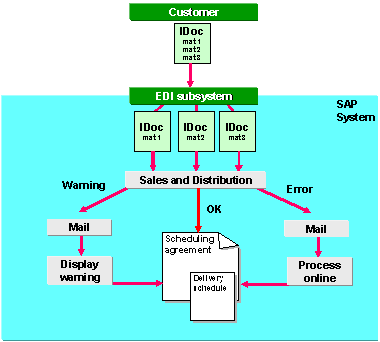
Example Process Flow
The following documents sent by EDI are processed similary:
The process flows as follows:
The customer normally sends several material numbers and their corresponding schedule lines in one delivery schedule.
The EDI subsystem attached to the system converts the delivery schedule to SAP format and divides the delivery schedule up to create one IDoc per material number.
EDI Basis reviews the control record in the IDoc. According to these records, and your settings in Customizing for EDI, each IDoc is transferred by workflow to a function module in
Sales and Distribution
, such asIDOC_INPUT_DELINS
.The system processes each IDoc in the background, taking into account any special features that you have specified in Customizing. It uses criteria in the IDoc to determine the sold-to party and the related scheduling agreement. For more information, see Special Features for Delivery Schedules and Assigning a Sold-to Party.
To find the scheduling agreement, the system checks the following:
Customer/material number
Customer number
Customer plant
Purchase order number or unloading point, if you have activated the check in Customizing (see Special Features for Delivery Schedules).
Usage indicator, if you have entered one in the scheduling agreement header (see Creating Scheduling Agreements).
General text (field
KTEXT
) Note
NoteThe system only checks items that have not been rejected. If this search is unsuccessful, the system also checks on the basis of the customer/material number only.
End of the note.
Result
If processing is successful, the system creates or updates the delivery schedule in the scheduling agreement. The IDoc is sent back to EDI-Basis which updates the status records.
If the system cannot find the scheduling agreement or if an error occurs in processing, the system determines the employee responsible and sends an e-mail (see Determining Notification Recipients). This person can then do the following:
Switch to the scheduling agreement change mode (transaction VA32) and find the scheduling agreement manually by entering the criteria in the further search criteria section of the change screen. If necessary, change the scheduling agreement to correspond to the IDoc.
Process the IDoc manually in order to review all of the data in the different steps of the IDoc and correct it if necessary.
Create a new scheduling agreement if the IDoc is correct and there is no existing scheduling agreement.
To display the IDoc for the current delivery schedule, choose DlvSch.Hdr
on the delivery schedule tabstrip. Then choose 
Edit

Curr. IDoc for dlv.sched.
 .
.
More Information
For information on Customizing settings for incoming IDocs for component suppliers, see Controlling Inbound EDI.
For more information on EDI in general, see IDoc Interface / Electronic Data Interchange.
For information on EDI specific to Sales and Distribution, see Electronic Data Interchange / IDoc Interface (SD-EDI).