 Follow-On Assessment
Use
If you want to repeat a risk assessment after a specific period or conditions have changed, you can start a follow-on process using the
follow-on assessment
function.
When you create a follow-on assessment you limit the validity of the original risk assessment (by assigning it a version) and it can no longer be edited. The historical data is thus retained and can be accessed at any time.
 Note
Note
The
Handling of Follow-On Assessments
Business Add-In (BAdI) is available in the IMG for
Industrial Hygiene and Safety
. Here you can specify the process flow before and after creating follow-on assessments, for example, with preceding checks and subsequent locking of the editing.
Integration
In the
Reporting
(EHS-IHS-REP) component under
Utilities
, you can create an overview of
all
versions
of a risk assessment.
Prerequisites
You must have completed the risk assessment for which you want to create a follow-on assessment. This means you must have filled out the value assignment after check .
You can create only one follow-on assessment per day.
Features
Assigning a Version to the Original Risk Assessment
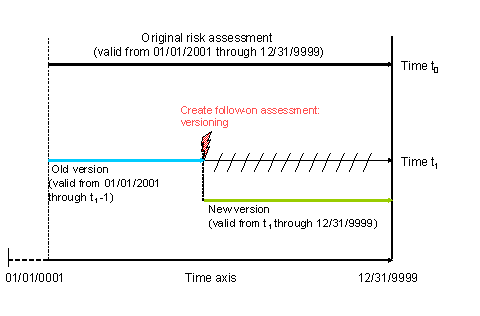
Creating a follow-on assessment means that the original risk assessment is split into two versions. The validity of the original risk assessment (old version) is then limited to the date and time t 1 . The validity of the new version begins from the date and time t 1 and is unlimited (validity end 12/31/9999).
Depending on the key date you use to later call the risk assessment, you will either be shown the “historical” version or the new version of it.
Note
If you require another follow-on assessment you can only create one for the new version.
 Recommendation
Call the
administration information on the risk assessment from the
Extras
menu. Here you will find an overview of the complete change history of the data record.
The following figure illustrates the principle of versions:
Transferring Header Data and Amounts
When you create the follow-on assessment, the header data and amounts are transferred from the existing assessment.
The data for the risk analysis and the safety measures is unassessed and can therefore be edited again.
Activities
You create a follow-on assessment by choosing

Follow-on assessmt
in the
Edit Risk Assessment: Assessment
screen for the required risk assessment.