 Returns and Repairs Processing (CS)
Purpose
Returns and repairs processing provides you with a wide range of functions for managing all the necessary activities which repairing goods for a customer entails, from registering the repair request from the customer through to billing the customer for the services performed.
Process Flow
Repair Registration
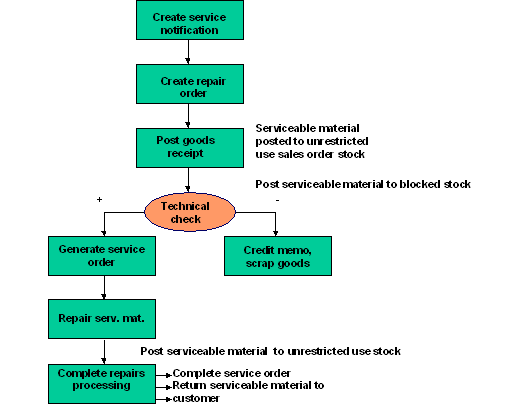
Create the Repair Order :
The customer informs you that he has goods that he would like you to repair. You record the details of the customer's repair request as the main item in a repair order. You enter the Serviceable material and, depending on the repair order type, a suitable Service Product as well.
Repairs processing can also be initiated by a service or quality notification. You use the Action Box in the notification to create a repair order automatically. For more information on repairs processing using quality notifications, see Repairs Processing Using Quality Notifications .
You can start repairs processing by sending the customer a service estimate for the costs of the repairs. For more information, see the Service Estimate .
Create a return order item for the serviceable materials:
The return order item is created automatically on the basis of the Repair Procedure assigned to the repair request item in the repair order.
The customer either sends you the serviceable materials or you arrange to pick them up. When you receive the serviceable materials, you post goods receipt for the appropriate quantity.
If inspection lot processing has been activated for the serviceable material, an inspection lot is created automatically for the repair order. For more information, see Repairs Processing Using Inspection Lots in QM
Post goods movement
The serviceable materials are posted as sales order stock.
If you are not using inspection lot processing, the serviceable materials are assigned to unrestricted use stock. We recommend that you post the serviceable materials to blocked stock for the duration of the repairs. Use movement type
344/E
to make this posting.If you are using inspection lot processing, the serviceable materials are assigned to inspection stock for the duration of the repairs.
Perform the technical check
Once you have posted goods receipt, you perform a technical check on the serviceable materials and decide what actions need to be taken to fulfill the customer's repair request.
You can perform the technical check in one of the following ways:
If you are working with inspection lots, use the inspection lot that is created automatically when you post goods receipt.
If you used a notification to initiate repairs processing, use the action box in the notification.
If you are simply working with the repair order, perform the check manually.
The results of the technical check are reported back to the repair order. The actions, which need to be taken as a result of the technical check, are recorded as sub-items of the repair request item. Possible actions include:
Perform repairs
Scrap the goods
Send temporary replacement
Depending on how you perform repairs processing, the switch from the repair registration stage to the repair start stage occurs:
During inspection lot processing
The actions are generated automatically when the results of the inspection lot are reported back to the repair order unless manual intervention is required.
During returns delivery processing
The system proposes the possible actions when you call the change order function. You select the appropriate actions for the subsequent stage of repairs processing.
Repair Start
The service technician repairs the serviceable materials for which a repair item has been created. He refers to the service order that was created automatically for the repair item to obtain the following essential information:
The materials required to perform the repairs
The tasks to be performed
The costs (for example, labor hours) involved
Loaner items (for example, for temporary replacements) become relevant for delivery and are included in the delivery due list.
The serviceable materials for which a scrap item has been created can be scrapped.
Repair Completion Confirmation
The service technician reports that he has completed the necessary repairs for the repair items in the repair order by:
Posting the repaired serviceable materials to unrestricted use stock using movement type
343/E
Updating the status of the service order to "technically completed"
The repair order status is updated accordingly.
 Note
Note
If you perform the repairs without using a service order, you must update the repair order status manually.
The system creates a delivery item for returning the serviceable materials to the customer.
The system may also create a pick-up item to arrange the return of any temporary replacements the customer may have had.
When you perform resource-related billing, a debit memo request item is entered automatically in the repair order.
Results
Delivery items are included in the delivery due list and the repaired serviceable materials are returned to the customer. When you post goods issue, stock is adjusted accordingly.
Loaner items can be returned to you with a returns delivery.
For information on creating a returns delivery, see Posting Goods Receipt for Serviceable Materials .
The debit memo request item is included in the billing due list. The system creates a debit memo on the basis of the debit memo request item.
Costs collected in the service order and the repair order sub-items are settled to the repair request item. The data is forwarded to profitability analysis.