 Repair Procedure
Definition
Set of rules according to which actions are generated in the repair order.
It is assigned in Customizing to the item categories that are relevant for repairs processing and is adopted in the repair request item in the repair order.
Structure
The repair procedure contains the following control elements:
Stages
They represent the various phases of repairs processing.
Actions
They represent the activities that need to be performed to fulfill the customer repair request.
You define repair procedures in the Customizing activity Define repair procedures.
By assigning actions to stages, you set up the rules according to which the system determines what actions are required during a particular phase of repairs processing.
In addition, you specify for each combination of stage and action whether the required actions are
Actions that the system proposes automatically when a particular stage of repairs processing begins
Actions that are generated automatically on the basis of repair codes that inspection lots, notifications or service orders report back to the repair order
Actions that require approval and must be created manually
The following indicators have been defined for these purposes:
Default
In Customizing for the repair procedure, you set this indicator for combinations of stages and actions that do not involve inspection lots or services orders and, for which you require an action to be generated automatically. For example, at the repair registration stage, you require a return order item to be generated automatically. You activate this indicator for the stage 101
(repair registration) and the action101
(return goods). In the repair order, a return order item is generated automatically when you create a repair request item.
Repair code
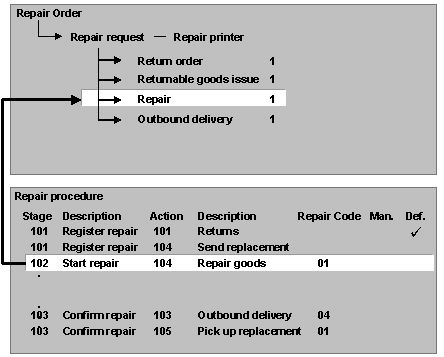
Repair codes represent the information that the service technician reports back to the repair order after performing the technical check or completing the repairs. In Customizing for the repair procedure, they are assigned to combinations of stages and actions that involve inspection lots or service orders. The code initiates the generation of the appropriate action.
 Example
.
Manual
If you use the manual indicator in the repair procedure, you always activate it in conjunction with the Repair code
indicator. The Manual
indicator prevents particular actions from being generated automatically when repair codes are reported back to the repair order from inspection lots, notifications and service orders. If you do not set the Manual
indicator for a combination of stage and action to which a repair code is assigned, the system automatically generates the appropriate action on the basis of the repair code.
Example
If the technical check determines that goods cannot be repaired and should be scrapped, you need to contact the customer to find out whether you can scrap the goods or whether he wants the goods returned to him. In this case, you do not want the system to automatically create an action for scrapping the goods. Therefore, you need to activate the Manual
indicator for the stage 101
(repair start) and the action 107
(scrap goods). When the system reads the repair code that the inspection lot reports to the repair order, it determines that the scrap item is required. The system then checks the corresponding stage and action in the repair procedure and determines that the scrap item cannot be generated automatically. It does not generate that or any other required actions automatically. It does not update the status of the repair request item.
To continue repairs processing, you must clarify whether the customer wants you to scrap the goods or return them to him. You must then create the required actions manually on the Repairs
screen.