 Media Issue Generation
Use
This function generates media issue master records based on the entries in the issue sequence for a media product that are preselected for generation.

If the media product master is
synchronized
with the product master in
Periodical Sales and Distribution
, the system only updates the media issues that are in an issue sequence.
Date Specifications from Template Issue
When generating the media issue master records, the system copies the master data required for each new media issue from the template issue specified in each entry in the issue sequence. The following media-specific date specifications relative to the publication date are copied into the new master records:
Segment MARA
Initial shipping date
Initial publication date
Publication period type (copied as daily publication period type, publication period is the publication date)
Segment MARC
Material staging date
Planned goods arrival date (The actual goods arrival date and time are copied as blank values.)
Latest possible purchase order date
Start of return notification
End of return notification
Start of return delivery
End of return delivery
Segment MVKE
Start of returns
End of returns
Initial shipping date
Start of sales period
End of sales period
Latest delivery date
Latest possible recall date
Prerequisites
The following settings must be made in Customizing:
You must specify whether or not
product synchronization is to take place for
each material type under
SAP Media
→
Master Data
→
Product
→
Media Product Master
→
Basic Settings
→
Material Types
→
Product Synchronization.
You must define the
maximum number of media issues that can be created (immediately) when an issue sequence is saved in dialog processing, under
SAP Media
→
Master Data
→
Product
→
Media Product Master
→
Media Issue Generation
→
Define Control Parameters for Issue Sequence
To avoid runtime problems, you should only create a small number of media issues in dialog.
Features
Function |
Features |
|---|---|
Automatic generationof media issues when the issue sequence is saved |
Media issue generation is
triggered for
Immediate generationof a limited number of media issues when the issue sequence is saved If the number of preselected entries does not exceed the maximum number of media issues defined in Customizing (see
Generation of media issues in background processing If you have selected more than the maximum number of media issues allowed for generation in the issue sequence, the system displays a dialog box in which you can choose between the following options:
Creationof media issue master records in the media product master Display log of media issue generation |
Generation of media issues in dialog processing |
Selectionof the media issues to be created according to the following criteria (depending on the function accessed):
Creationof media issue master records in the media product master Optional: Test run (The system creates a log of the function without actually creating master records in the media product master.)
Note that the test run is not available for
Display log of media issue generation |
Activities
Media Issue Generation from the Issue Sequence
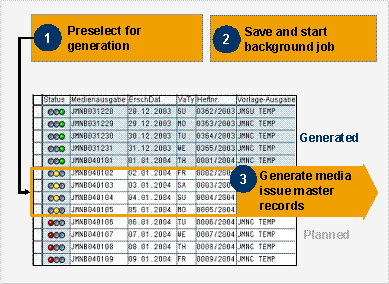
The new entries in the issue sequence created using a rule contain only planned media issues at first (status
Planned
, red traffic light s
ymbol). Master records do not exist in the media product master for the planned media issues. You must perform the following steps before master records can be generated automatically for media issues:
Preselectthe entries for generating the media issues
To create media issue master records for the planned entries in the issue sequence, preselect the entries in question in the issue sequence. To do this, select the desired entries and choose
Create Selected Media Issues
. The entries are assigned the status
Preselected
(yellow traffic light symbol).
See also: Issue Sequence Editing
Savethe issue sequence
When you save the issue sequence, the system creates master records for the preselected media issues automatically. Generation takes place immediately or in a background job, depending on the number of entries preselected.
Entries for which media issue master records have been created are assigned the status
Active
(green traffic light symbol ) in the issue sequence.
To access a list of media issues that are not assigned, choose
Environment
in the menu bar. This information allows you to check that one media issue exists for the media product on a publication date.
To access log display, choose
Logs of Media Issue Generation.
The following diagram illustrates the processing steps that you must perform in the issue sequence so that you can generate media issue master records.
Generating Media Issues from the Issue Sequence for the Media Product
Media Issue Generation in Dialog Processing
To execute the function in dialog processing, choose
Logistics
→
Media Sales and Distribution
→
Media Product Sales and Distribution
→
Master Data
→
Media Product Master
→
Issue Sequence
→
Generate Media Issues
→
For an Issue Sequence
or
For Several Issue Sequences
or
Logistics
→
Media Sales and Distribution
→
Press Distribution
→
Master Data
→
Media Product Master
→
Issue Sequence
→
Generate Media Issues
→
For an Issue Sequence
or
For Several Issue Sequences
on the
SAP Easy Access
screen.
When you execute generation, the system copies the following data from the template media issue:
Material master
Material short texts
Plant segments
Storage locations
Production resources/tools
Units of measure for material
Material valuation
Tax classification for material
Material data per warehouse number
Material data per storage type
Change document structure for material master/product group
Sales areas
MRP areas
Material long texts
ID codes
Business partner assignments
Classification

You can define media-specific default date specifications (according to the template media issue) according to your company’s requirements using the Business Add-In ISM_ISSUE_DATES_SET.
Purchasing info records (as the basis for purchase order quantity planning)
Displaying Generation Logs
To access the generation logs from the
Issue Sequence
screen, choose
Logs of Media Issue Generation.
To execute the function in dialog processing, choose
Logistics
→
Media Sales and Distribution
→
Media Product Sales and Distribution
→
Master Data
→
Media Product Master
→
Issue Sequence
→
Generate Media Issues
→
Display Log of Media Issue Generation
or
Logistics
→
Media Sales and Distribution
→
Press Distribution
→
Master Data
→
Media Product Master
→
Issue Sequence
→
Generate Media Issues
→
Display Log of Media Issue Generation
on the
SAP Easy Access
screen.