WDCOOrderItems
Definition
A Web Dynpro component that displays an order list of office items and their total price, and enables purchasers to edit and complete their order.
Use
This component is displayed in either of the following scenarios:
- In the first step of the Order Office Material process if the purchaser has chosen to order items by their order number;
- In step Display Selected Items if the purchaser has chosen to order the displayed (see the diagram of the Order Form List block in Scenario: Order Office Material ).
Structure
The following aspects of the component's structure are relevant for its implementation:
- Basic data (such as name, package, and so on)
- Component controller
- Interface controller
- User interface
Basic Data
|
Name |
WDCOOrderItems |
|
Package |
com.sap.caf.eu.gp.example.ordermat.wdco.orderitems |
|
Implemented Interfaces |
IGPWebDynproCO (com.sap.caf.eu.gp.co.webdynpro) |
|
Used Web Dynpro Components |
CContext (com.sap.caf.eu.gp.example.ordermat.wdco) |
Component Controller
The WDCOOrderItems component controller implements the functionality that the component provides.
Properties
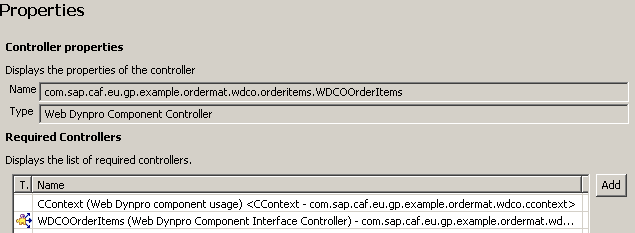
The interface controllers of the following components are required:
- CContext
- WDCOOrderItems
Component Controller: Properties
Context
The context of the component controller contains a structure - ItemsList, with value attributes defined for each attribute of the selected items. These include:
- name
- ordernumber
- price
- priceAsString
- currency
- unit
- quantity
In addition, the following attributes are defined for specific implementation purposes, which are discussed later in the Implementation section.
- displayOnly
- hideCompleteButton
- purchaserFirstName
- purchaserLastName
Component Controller: Context

Methods
The following methods are declared:
- complete() - this method is used in the implementation of the onActionCompleteOrder() event in view VOrderItems (see section User Interface)
- createDescription(java.util.Locale locale) - this method is used in the implementation of the getDescription() method in the interface controller (see section Interface Controller)
- execute(com.sap.caf.eu.gp.co.api.IGPExecutionContext context) - this method is used in the implementation of the execute() method in the interface controller (see section Interface Controller)
Component Controller: Methods

Implementation
The implementation of the component controller implies adding the relevant logic in the methods that are declared:
- Implementing method createDescription()
In this method, the basic data, the input and output parameters, and the result states for the callable objects are defined.
The implementation of the method is the same as the implementation of the createDescription() method in the WDCODisplaySelectItems component controller. For more information, see WDCODisplaySelectItems .
The following aspects are specific to the method implementation in this component:
- Some of the parameters are defined with multiplicity 1…1. The multiplicity implies that the parameters are not lists, and are required.
Method createDescription()
publiccom.sap.caf.eu.gp.co.api.IGPTechnicalDescription createDescription( java.util.Locale locale ) {
//@@begin createDescription() GPWebDynproResourceAccessor resourceAccessor = new GPWebDynproResourceAccessor(m_TextAcc); IGPTechnicalDescription technicalDescription = GPCallableObjectFactory.newTechnicalDescription( "CO_TEXT", "CO_DESC", resourceAccessor, locale); try {
//INPUT: //get root input IGPStructureInfo input = technicalDescription.getInputStructureInfo(); //add item structure to root input IGPStructureInfo itemsStructureIn = input.addStructure(CContextInterface.STRUCTURE_ITEMS); itemsStructureIn.setMultiplicity(IGPStructureInfo.MULITIPLICITY_0_N); //add attributes to item structure itemsStructureIn.addAttribute(CContextInterface.PARAM_ORDER_NUMBER, IGPAttributeInfo.BASE_STRING); itemsStructureIn.addAttribute(CContextInterface.PARAM_NAME, IGPAttributeInfo.BASE_STRING); itemsStructureIn.addAttribute(CContextInterface.PARAM_UNIT, IGPAttributeInfo.BASE_STRING); itemsStructureIn.addAttribute(CContextInterface.PARAM_CURRENCY, IGPAttributeInfo.BASE_STRING); itemsStructureIn.addAttribute(CContextInterface.PARAM_PRICE, IGPAttributeInfo.BASE_DOUBLE); itemsStructureIn.addAttribute(CContextInterface.PARAM_QUANTITY, IGPAttributeInfo.BASE_SIGNED_INT); //add attribute "displayOnly" to root structure IGPAttributeInfo displayOnlyAttIn = input.addAttribute(CContextInterface.PARAM_DISPLAY_ONLY, IGPAttributeInfo.BASE_BOOLEAN); displayOnlyAttIn.setMultiplicity(IGPAttributeInfo.MULITIPLICITY_1_1); //add attribute "disableCompleteButton" to root structure IGPAttributeInfo disableCompleteButtonIn = input.addAttribute(CContextInterface.PARAM_DISABLE_COMPLETE_BUTTON, IGPAttributeInfo.BASE_BOOLEAN); disableCompleteButtonIn.setMultiplicity(IGPAttributeInfo.MULITIPLICITY_1_1); //OUTPUT: //get root output IGPStructureInfo output = technicalDescription.getOutputStructureInfo(); //add items structure to root output IGPStructureInfo itemsStructureOut = output.addStructure(CContextInterface.STRUCTURE_ITEMS); itemsStructureOut.setMultiplicity(IGPStructureInfo.MULITIPLICITY_0_N); //add attributes to item structure itemsStructureOut.addAttribute(CContextInterface.PARAM_ORDER_NUMBER, IGPAttributeInfo.BASE_STRING); itemsStructureOut.addAttribute(CContextInterface.PARAM_NAME, IGPAttributeInfo.BASE_STRING); itemsStructureOut.addAttribute(CContextInterface.PARAM_UNIT, IGPAttributeInfo.BASE_STRING); itemsStructureOut.addAttribute(CContextInterface.PARAM_CURRENCY, IGPAttributeInfo.BASE_STRING); itemsStructureOut.addAttribute(CContextInterface.PARAM_PRICE, IGPAttributeInfo.BASE_DOUBLE); itemsStructureOut.addAttribute(CContextInterface.PARAM_QUANTITY, IGPAttributeInfo.BASE_SIGNED_INT); //add parameter purchaserLastName IGPAttributeInfo attributeInfoUserName = output.addAttribute(CContextInterface.PARAM_PURCHASER_NAME, IGPAttributeInfo.BASE_STRING); attributeInfoUserName.setMultiplicity(IGPStructureInfo.MULITIPLICITY_1_1); //add parameter purchaserFirstName IGPAttributeInfo attributeInfoUserFirstName = output.addAttribute(CContextInterface.PARAM_PURCHASER_FIRST_NAME, IGPAttributeInfo.BASE_STRING); attributeInfoUserFirstName.setMultiplicity(IGPStructureInfo.MULITIPLICITY_1_1); //add attribute "displayOnly" to root structure IGPAttributeInfo displayOnlyAttOut = output.addAttribute(CContextInterface.PARAM_DISPLAY_ONLY, IGPAttributeInfo.BASE_BOOLEAN); displayOnlyAttOut.setMultiplicity(IGPAttributeInfo.MULITIPLICITY_1_1); } catch (GPInvocationException e) {
String localizedMessage = m_TextAcc.getText("ERROR_CREATING_TECHNICAL_DESC");
wdThis.wdGetWDCOOrderItemsInterfaceController().wdFireEventTechnicalException(new GPTechnicalCallableObjectException(logger, localizedMessage, e)); } //result states IGPResultStateInfo completed = technicalDescription.addResultState(RESULT_STATE_COMPLETED); completed.setDescriptionKey("RESULTSTATE_COMPLETED_DESC");
return technicalDescription; //@@end } |
- Implementing method execute()
The framework calls this method when the callable object is executed as a part of a process at runtime. The input data is retrieved and the values are set in the component controller's context.
The implementation of the method is the same as the implementation of the createDescription method in the WDCOSelectedItems component controller. For more information, see WDCOSelectedItems .
The following aspects are specific to the method implementation in this component:
- To set the values for the purchaser's name and first name, the component uses the Web Dynpro APIs and retrieves the data for the user that is logged on to the application.
Method execute()
publicvoid execute( com.sap.caf.eu.gp.co.api.IGPExecutionContext context ) {
//@@begin execute() m_context = context; try {
//get items list node IPublicWDCOOrderItems.IItemsListNode itemsListNode = wdContext.nodeItemsList(); //get root structure IGPStructure input = m_context.getInputStructure(); //get input structure "item" of type list Collection inputParams = input.getStructures(CContextInterface.STRUCTURE_ITEMS); //process input structure for (Iterator iter = inputParams.iterator(); iter.hasNext();) {
IGPStructure structure = (IGPStructure) iter.next(); IPublicWDCOOrderItems.IItemsListElement element = itemsListNode.createItemsListElement(); element.setOrderNumber(structure.getAttributeAsString(CContextInterface.PARAM_ORDER_NUMBER)); element.setName(structure.getAttributeAsString(CContextInterface.PARAM_NAME)); element.setUnit(structure.getAttributeAsString(CContextInterface.PARAM_UNIT)); element.setCurrency(structure.getAttributeAsString(CContextInterface.PARAM_CURRENCY)); element.setQuantity(structure.getAttributeAsInt(CContextInterface.PARAM_QUANTITY)); double price = structure.getAttributeAsDouble(CContextInterface.PARAM_PRICE); element.setPrice(price); //format price for ui String priceAsString = new DecimalFormat("#0.00").format(price);
element.setPriceAsString(priceAsString); wdContext.nodeItemsList().addElement(element); } //process root parameter "displayOnly" of type boolean wdContext.currentContextElement().setDisplayOnly(input.getAttributeAsBoolean(CContextInterface.PARAM_DISPLAY_ONLY)); //process root parameter "disableCompleteButton" of type boolean wdContext.currentContextElement().setHideCompleteButton(input.getAttributeAsBoolean(CContextInterface.PARAM_DISABLE_COMPLETE_BUTTON)); } catch (GPInvocationException e) {
String localizedMessage = m_TextAcc.getText("ERROR_PROCEEDING_PARAMETERS");
wdThis.wdGetWDCOOrderItemsInterfaceController().wdFireEventTechnicalException(new GPTechnicalCallableObjectException(logger, localizedMessage, e)); } //get firstName and lastName of current user for output try {
IUser purchaser = WDClientUser.getCurrentUser().getSAPUser(); wdContext.currentContextElement().setPurchaserFirstName(purchaser.getFirstName()); wdContext.currentContextElement().setPurchaserLastName(purchaser.getName()); } catch (WDUMException e) {
String localizedMessage = m_TextAcc.getText("ERROR_GETTING_USER_INFORMATION");
wdThis.wdGetWDCOOrderItemsInterfaceController().wdFireEventTechnicalException(new GPTechnicalCallableObjectException(logger, localizedMessage, e)); } //@@end } |
- Implementing method complete()
This method reads the attribute values from the component controller's context, and sets the values of the callable object's output parameters. For that purpose, the com.sap.caf.eu.gp.structure.api.IGPStructure interface is used. To set the actual value of an output parameter, you retrieve the root output structure, and then use method addStructure() to add a sub-structure, and setAttributeValue() to set the value.
Finally, the result state is set to RESULT_STATE_COMPLETED.
Method complete()
publicvoid complete( ) {
//@@begin complete() try {
//get root structure IGPStructureoutput = m_context.getOutputStructure(); IPublicWDCOOrderItems.IItemsListNodeitemsListNode = wdContext.nodeItemsList(); for(int i=0, size=itemsListNode.size(); i<size; i++){
IGPStructure itemsStructureOut = output.addStructure(CContextInterface.STRUCTURE_ITEMS); IPublicWDCOOrderItems.IItemsListElement itemsListElem = itemsListNode.getItemsListElementAt(i); itemsStructureOut.setAttributeValue(CContextInterface.PARAM_ORDER_NUMBER, itemsListElem.getOrderNumber()); itemsStructureOut.setAttributeValue(CContextInterface.PARAM_NAME, itemsListElem.getName()); itemsStructureOut.setAttributeValue(CContextInterface.PARAM_CURRENCY, itemsListElem.getCurrency()); itemsStructureOut.setAttributeValue(CContextInterface.PARAM_PRICE, itemsListElem.getPrice()); itemsStructureOut.setAttributeValue(CContextInterface.PARAM_QUANTITY, itemsListElem.getQuantity()); itemsStructureOut.setAttributeValue(CContextInterface.PARAM_UNIT, itemsListElem.getUnit()); } //purchaser name output.setAttributeValue(CContextInterface.PARAM_PURCHASER_NAME, wdContext.currentContextElement().getPurchaserLastName()); //purchaser first name output.setAttributeValue(CContextInterface.PARAM_PURCHASER_FIRST_NAME, wdContext.currentContextElement().getPurchaserFirstName()); //set parameter "displayOnly" to false so that the user can remove items from the list if approver rejects the order output.setAttributeValue(CContextInterface.PARAM_DISPLAY_ONLY, false); m_context.setResultState(RESULT_STATE_COMPLETED); m_context.processingComplete(); } catch (GPInvocationException e) {
String localizedMessage = m_TextAcc.getText("ERROR_SETTING_PARAMETERS");
wdThis.wdGetWDCOOrderItemsInterfaceController().wdFireEventTechnicalException(new GPTechnicalCallableObjectException(logger, localizedMessage, e)); } catch (EngineException e) {
String localizedMessage = m_TextAcc.getText("ERROR_SETTING_PARAMETERS");
wdThis.wdGetWDCOOrderItemsInterfaceController().wdFireEventTechnicalException(new TechnicalException(logger, localizedMessage, e)); } //@@end } |
Interface Controller
The implementation of the interface controller is the same as is one described for the WDCODisplaySelectItems component.
User Interface
The user interface of the component is implemented in view VOrderItems. The view is embedded in WebDynproCO that has been created when adding the implemented interface.
Properties
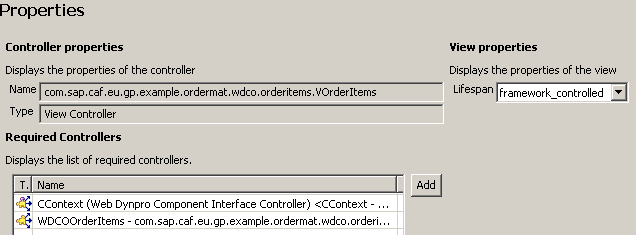
The following component controllers are required for the implementation of the user interface part:
- CContext
- WDCOOrderItems
View VOrderItems: Properties
Context
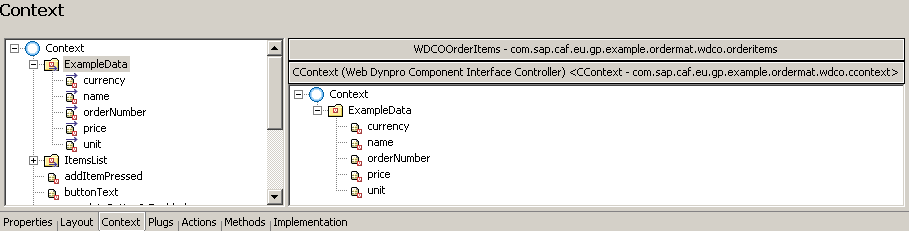
In the context of the view, the following structures and attributes are created:
- Structure ExampleData , which contains the attributes:
- name
- orderNumber
- price
- currency
- unit
The structure and its attributes are mapped to the relevant elements in the context of the CContext component controller.
View VOrderItems: Context (ExampleData)
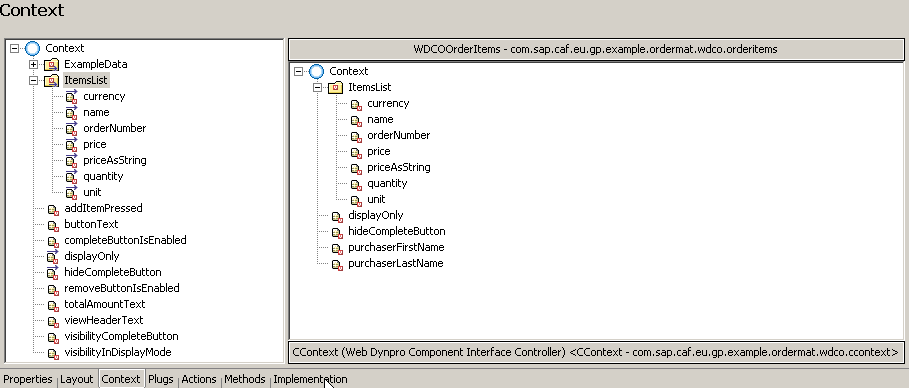
- Structure ItemList , which contains the attributes:
- name
- ordernumber
- price
- priceAsString
- currency
- unit
- quantity
The structure and its attributes are mapped to the relevant elements in the context of the WDCOOrderItems component controller.
In addition, other attributes are defined in the root structure for specific implementation purposes. The following are mapped to the relevant attributes in WDCOOrderItems' component controller context:
- displayOnly
- hideCompleteButton
View VOrderItems: Context (ItemsList and other attributes)
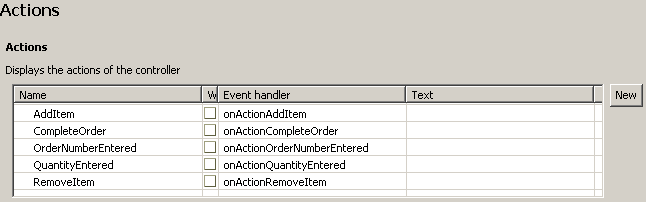
Actions
The following actions are defined for this view.
- AddItem
- CompleteOrder
- OrderNumberEntered
- QuantityEntered
- RemoveItems
The action usage is discussed in the Layout section below. The implementation of the event handlers is further shown in the Implementation section.
View VOrderItems: Actions
Layout
The view's layout includes the following UI elements:
- Header - contains the page header. It is dynamically set in the page's wdDoModifyView() method using the viewHeaderText context attribute.
- TextView - contains some explanatory text about the data that is displayed on the page.
- Table - the office materials to be ordered are displayed in the table. To populate the table with data, you set the value of the dataSource table property to the ItemsList structure in the view's context.
A column is created for each item attribute that should be displayed. The column's text view links to the relevant attribute in the ItemsList structure, which contains the output data.
The first and the last columns contain input fields, in which the purchasers can enter the order number of the item, and the required quantity respectively. The input fields are linked to the relevant attributes in the view's context ( orderNumber and quantity in structure ItemsList). In addition, they reference the OrderNumberEntered and QuantityEntered actions, so that a specific behaviour can be implemented when the user enters input in either of the fields. The implementation of the relevant event handlers is discussed in the Implementation section below.
- Table header - displays the total order price; for that purpose, the caption references the totalAmountText context attribute, whose value is computed in the wdDoModifyView() method of the page.
View VorderItems: Layout (Table)

- Buttons:
- Add Item - the button references the AddItem action in its Event property, so that the relevant event handler is invoked when the button is chosen. The event handler implementation is described in the Implementation section below.
- Remove Item - the button references the RemoveItem action in its Event property, so that the relevant event handler is invoked when the button is chosen. In addition, the button uses the removeButtonIsEnabled attribute defined in the view's context in the enabled property. The implementation of the event handler and the use of the attribute are described in the Implementation section below.
- Update Table Row - the button references the OrderNumberEntered action in its Event property, so that the relevant event handler is invoked when the button is chosen. In addition, the button uses the removeButtonIsEnabled attribute defined in the view's context in the enabled property. The implementation of the event handler and the use of the attribute are described in the Implementation section below.
- Complete Order - the button references the CompleteOrder action in its Event property, so that the relevant event handler is invoked when the button is chosen. In addition, the button uses the removeButtonIsEnabled and the visibilityCompleteButton attributes. The implementation of the event handler and the use of the attribute are described in the Implementation section below.
Implementation
In the Implementation tabstrip the following methods are implemented:
- wdDoModifyView()
The method sets the default state of the UI elements - for example, it defines which buttons are enabled when the page is initially loaded. In addition, the total order price is calculated, and the value is set for the totalAmountText context attribute.
- onActionAddItem()
This event handler adds a new element to the context structure ItemsList. The quantity is set to 1 by default. Initially, the structure does not contain any other data.
Method onActionAddItem()
publicvoid onActionAddItem(com.sap.tc.webdynpro.progmodel.api.IWDCustomEvent wdEvent ) {
//@@begin onActionAddItem(ServerEvent) //add new element to context node ItemsList IPrivateVOrderItems.IItemsListNode nodeItemsList = wdContext.nodeItemsList(); IPrivateVOrderItems.IItemsListElement itemsListElement = nodeItemsList.createItemsListElement(); itemsListElement.setQuantity(1); nodeItemsList.addElement(itemsListElement); //@@end } |
- onActionCompleteOrder()
The event handler checks the quantity input, and if it is correct, the output data is set by means of calling the complete() method of the component controller. If input is missing or incorrect, the Complete Orderbutton is disabled.
Method onActionCompleteOrder()
publicvoid onActionCompleteOrder(com.sap.tc.webdynpro.progmodel.api.IWDCustomEvent wdEvent ) {
//@@begin onActionCompleteOrder(ServerEvent) boolean allInputForQuantityIsPositive = this.checkInputForQuantity(); if(allInputForQuantityIsPositive){
wdThis.wdGetWDCOOrderItemsController().complete(); } else{
//disable Complete Order button wdContext.currentContextElement().setCompleteButtonIsEnabled(false); } //@@end } |
- onActionOrderNumberEntered()
This event handler enables the user to enter an order number, and update the remaining fields of the table row by choosing the Update Table Row button.
The method checks if the entered order number is available, and if so, it retrieves the data for the relevant element from the context structure ExampleData (the structure is mapped to the ExampleData structure in the CContext component). Then the values are set for the relevant attributes of the element in the ItemsList structure and respectively displayed in the table.
Method onActionOrderNumberEntered()
publicvoid onActionOrderNumberEntered(com.sap.tc.webdynpro.progmodel.api.IWDCustomEvent wdEvent ) {
//@@begin onActionOrderNumberEntered(ServerEvent) IWDTextAccessor textAccessor = wdComponentAPI.getTextAccessor(); IWDMessageManager messageManager = wdComponentAPI.getMessageManager(); //check if order number is available -> if yes provide additional data of the item String orderNumber = wdContext.currentItemsListElement().getOrderNumber(); IPrivateVOrderItems.IExampleDataNode exampleDataNode= wdContext.nodeExampleData(); for(int i=0, size=wdContext.nodeExampleData().size(); i<size; i++){
IPrivateVOrderItems.IExampleDataElement exampleDataElement = exampleDataNode.getExampleDataElementAt(i); if(exampleDataElement.getOrderNumber().equals(orderNumber)){
IPrivateVOrderItems.IItemsListElement itemsListElement = wdContext.currentItemsListElement(); itemsListElement.setName(exampleDataElement.getName()); itemsListElement.setCurrency(exampleDataElement.getCurrency()); itemsListElement.setUnit(exampleDataElement.getUnit()); double price = exampleDataElement.getPrice(); itemsListElement.setPrice(price); //format price for ui String priceAsString = new DecimalFormat("#0.00").format(price);
itemsListElement.setPriceAsString(priceAsString); return; } } //entered order number is not available -> report message IPrivateVOrderItems.IItemsListElement itemsListElement = wdContext.currentItemsListElement(); messageManager.reportInvalidContextAttributeException( itemsListElement, itemsListElement.node().getNodeInfo().getAttribute(CContextInterface.PARAM_ORDER_NUMBER), textAccessor.getText(TEXT_ORDER_NUMBER_NOT_AVAILBALE), true); //@@end } |
- onActionQuantityEntered()
The implementation is analogous to the implementation of the onActionQuantityEntered() event handler in WDCOSelectedItems .
- onActionRemoveItems()
The implementation is analogous to the implementation of the onActionRemoveItems() event handler in WDCOSelectedItems .
Integration
For more information about the component's usage in the process, see Order Items .