WDCOSelectedItems
Definition
A Web Dynpro component that displays a list of office items, and enables purchasers to confirm or cancel an order.
Use
This component is displayed in the Order Office Material process once the user has indicated that he or she will not add more items to the order list (see the diagram of the Order From List block in Scenario: Order Office Material ).
Structure
The following aspects of the component's structure are relevant for its implementation:
- Basic data (such as name, package, and so on)
- Component controller
- Interface controller
- User interface
Basic Data
|
Name |
WDCOSelectedItems |
|
Package |
com.sap.caf.eu.gp.example.ordermat.wdco.selecteditems |
|
Implemented Interfaces |
IGPWebDynproCO (com.sap.caf.eu.gp.co.webdynpro) |
|
Used Web Dynpro Components |
CContext (com.sap.caf.eu.gp.example.ordermat.wdco) |
Component Controller
The WDCOSelectedItems component controller implements the functionality that the component provides.
Properties
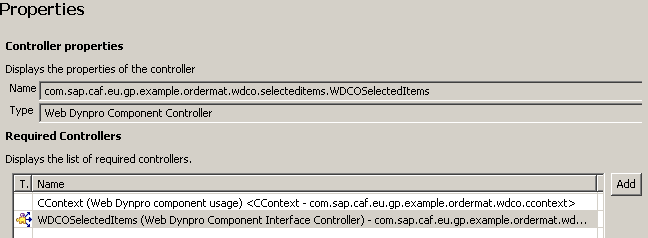
The interface controllers of the following components are required:
- CContext
- WDCOSelectedItems
Component Controller: Properties
Context
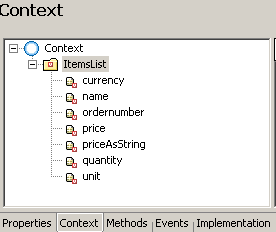
The context of the component controller contains a structure - ItemsList, with value attributes defined for each attribute of the selected items. These include:
- name
- ordernumber
- price
- priceAsString
- currency
- unit
- quantity
Component Controller: Context
Methods
The following methods are declared:
- cancel() - this method is used in the implementation of the onActioncancel event in view VSelectedItems (see section User Interface)
- createDescription(java.util.Locale locale) - this method is used in the implementation of the getDescription method in the interface controller (see section Interface Controller)
- execute(com.sap.caf.eu.gp.co.api.IGPExecutionContext context) - this method is used in the implementation of the execute method in the interface controller (see section Interface Controller)
- order() - this method is used in the implementation of the onActionorderItems event in view VSelectItems (see section User Interface)
- removeItem() - this method is used in the implementation of the onActionremoveItems event in view VSelectItems (see section User Interface)
Component Controller: Methods

Implementation
The implementation of the component controller implies adding the relevant logic to the methods that are declared:
- Implementing method createDescription()
In this method, the basic data, the input and output parameters, and the result states for the callable objects are defined.
The implementation of this method is the same as the implementation of the createDescription method in the WDCODisplaySelectItems component controller. For more information, see WDCODisplaySelectItems .
The following aspects are specific to the method implementation in this component:
- An output parameter displayOnly with multiplicity 1…1 is defined. The multiplicity implies that the parameter is not a list, and that it is required.
- In this component, two result states are defined - RESULT_STATE_ORDER and RESULT_STATE_CANCEL. They are used in the implementation of the order() and cancel() methods respectively. At runtime, the process flow is defined by the result state reached - if it is RESULT_STATE_ORDER, theOrder Items action is displayed; otherwise, the process is completed.
Method createDescription()
publiccom.sap.caf.eu.gp.co.api.IGPTechnicalDescription createDescription( java.util.Locale locale ) {
//@@begin createDescription() GPWebDynproResourceAccessor resourceAccessor = new GPWebDynproResourceAccessor(m_TextAcc); IGPTechnicalDescription technicalDescription = GPCallableObjectFactory.newTechnicalDescription( "CO_TEXT", "CO_DESC", resourceAccessor, locale); try {
//INPUT: //get root input IGPStructureInfo inputStructureInfo = technicalDescription.getInputStructureInfo(); //add item structure to root input IGPStructureInfo inputItemStructureInfo = inputStructureInfo.addStructure(CContextInterface.STRUCTURE_ITEMS); inputItemStructureInfo.setMultiplicity(IGPStructureInfo.MULITIPLICITY_0_N); //add attributes to item structure inputItemStructureInfo.addAttribute(CContextInterface.PARAM_ORDER_NUMBER, IGPAttributeInfo.BASE_STRING); inputItemStructureInfo.addAttribute(CContextInterface.PARAM_NAME, IGPAttributeInfo.BASE_STRING); inputItemStructureInfo.addAttribute(CContextInterface.PARAM_UNIT, IGPAttributeInfo.BASE_STRING); inputItemStructureInfo.addAttribute(CContextInterface.PARAM_CURRENCY, IGPAttributeInfo.BASE_STRING); inputItemStructureInfo.addAttribute(CContextInterface.PARAM_PRICE, IGPAttributeInfo.BASE_DOUBLE); //OUTPUT: //get root output IGPStructureInfo outputStructureInfo = technicalDescription.getOutputStructureInfo(); //add items structure to root output IGPStructureInfo outputItemStructureInfo = outputStructureInfo.addStructure(CContextInterface.STRUCTURE_ITEMS); outputItemStructureInfo.setMultiplicity(IGPStructureInfo.MULITIPLICITY_0_N); //add attributes to item structure outputItemStructureInfo.addAttribute(CContextInterface.PARAM_ORDER_NUMBER, IGPAttributeInfo.BASE_STRING); outputItemStructureInfo.addAttribute(CContextInterface.PARAM_NAME, IGPAttributeInfo.BASE_STRING); outputItemStructureInfo.addAttribute(CContextInterface.PARAM_UNIT, IGPAttributeInfo.BASE_STRING); outputItemStructureInfo.addAttribute(CContextInterface.PARAM_CURRENCY, IGPAttributeInfo.BASE_STRING); outputItemStructureInfo.addAttribute(CContextInterface.PARAM_PRICE, IGPAttributeInfo.BASE_DOUBLE); outputItemStructureInfo.addAttribute(CContextInterface.PARAM_QUANTITY, IGPAttributeInfo.BASE_SIGNED_INT); //add parameter to indicate if next action should only display the items IGPAttributeInfo attributeInfoDisplayOnly = outputStructureInfo.addAttribute(CContextInterface.PARAM_DISPLAY_ONLY, IGPAttributeInfo.BASE_BOOLEAN); attributeInfoDisplayOnly.setMultiplicity(IGPStructureInfo.MULITIPLICITY_1_1); } catch (GPInvocationException e) {
String localizedMessage = m_TextAcc.getText("ERROR_CREATING_TECHNICAL_DESC");
wdThis.wdGetWDCOSelectedItemsInterfaceController().wdFireEventTechnicalException(new GPTechnicalCallableObjectException(logger, localizedMessage, e)); } //result states IGPResultStateInfo order = technicalDescription.addResultState(RESULT_STATE_ORDER); order.setDescriptionKey("TEXT_RS_ORDER");
IGPResultStateInfo cancel = technicalDescription.addResultState(RESULT_STATE_CANCEL); cancel.setDescriptionKey("TEXT_RS_CANCEL");
returntechnicalDescription; //@@end } |
- Implementing method execute()
The framework calls this method when the callable object is executed as a part of a process at runtime.The input data is retrieved and the values are set in the component controller's context.
Method execute()
publicvoid execute( com.sap.caf.eu.gp.co.api.IGPExecutionContext context ) {
//@@begin execute() m_context = context; //get input items try {
Collection inputItems = null; IGPStructure inputStructure = null; inputStructure = m_context.getInputStructure(); inputItems = inputStructure.getStructures(CContextInterface.STRUCTURE_ITEMS); if(inputItems == null){
return; } IPublicWDCOSelectedItems.IItemsListNode itemNode = wdContext.nodeItemsList(); IPublicWDCOSelectedItems.IItemsListElement itemElement; for (Iterator iter = inputItems.iterator(); iter.hasNext();) {
//get input item structure and fill context IGPStructure item = (IGPStructure) iter.next(); String orderNumber = item.getAttributeAsString(CContextInterface.PARAM_ORDER_NUMBER); String name = item.getAttributeAsString(CContextInterface.PARAM_NAME); String unit = item.getAttributeAsString(CContextInterface.PARAM_UNIT); String currency = item.getAttributeAsString(CContextInterface.PARAM_CURRENCY); double price = item.getAttributeAsDouble(CContextInterface.PARAM_PRICE); itemElement = itemNode.createItemsListElement(); itemElement.setOrdernumber(orderNumber); itemElement.setName(name); itemElement.setUnit(unit); itemElement.setCurrency(currency); itemElement.setPrice(price); itemNode.addElement(itemElement); //format price for ui String priceAsString = new DecimalFormat("#0.00").format(price);
itemElement.setPriceAsString(priceAsString); } } catch (GPInvocationException e) {
String localizedMessage = m_TextAcc.getText("ERROR_GETTING_PARAMETERS");
wdThis.wdGetWDCOSelectedItemsInterfaceController().wdFireEventTechnicalException(new GPTechnicalCallableObjectException(logger, localizedMessage, e)); } //@@end } |
- Implementing method cancel()
This method only sets the result state of the callable object to RESULT_STATE_CANCEL, and indicates that the execution of the callable object is completed by calling the execution context's method processingComplete() .
Method cancel()
publicvoid cancel( ) {
//@@begin cancel() try {
m_context.setResultState(RESULT_STATE_CANCEL); m_context.processingComplete(); } catch (GPInvocationException e) {
String localizedMessage = m_TextAcc.getText("ERROR_SETTING_RESULTSTATE");
wdThis.wdGetWDCOSelectedItemsInterfaceController().wdFireEventTechnicalException(new GPTechnicalCallableObjectException(logger, localizedMessage, e)); } catch (GPEngineException e) {
String localizedMessage = m_TextAcc.getText("ERROR_SETTING_RESULTSTATE");
wdThis.wdGetWDCOSelectedItemsInterfaceController().wdFireEventTechnicalException(new GPTechnicalCallableObjectException (logger, localizedMessage, e)); } //@@end } |
- Implementing method removeItem()
This method deletes a selected item from the order list. The entry is removed from the component controller's context, so that it is not added to the output parameter values when the order method is invoked.
Method removeItem()
publicvoid removeItem( int index ) {
//@@begin removeItem() IPublicWDCOSelectedItems.IItemsListElement selectedElement = wdContext.nodeItemsList().getItemsListElementAt(index); wdContext.nodeItemsList().removeElement(selectedElement); //@@end } |
- Implementing method order()
This method reads the attribute values from the component controller's context, and sets the values of the callable object's output parameters. For that purpose, the com.sap.caf.eu.gp.structure.api.IGPStructure interface is used. To set the actual value of an output parameter, you retrieve the root output structure, and then use method addStructure() to add a sub-structure, and setAttributeValue() to set the value.
Finally, the result state is set to RESULT_STATE_ORDER.
Method order()
publicvoid order( ) {
//@@begin order() //get all still existing entries of context and fill output structure IGPStructure outputStrucure = m_context.getOutputStructure(); try{
IGPStructure outputItemStructure = null; for(int i=0, itemSize=wdContext.nodeItemsList().size(); i<itemSize; i++){
String ordernumber = wdContext.nodeItemsList().getItemsListElementAt(i).getOrdernumber(); String name = wdContext.nodeItemsList().getItemsListElementAt(i).getName(); String unit = wdContext.nodeItemsList().getItemsListElementAt(i).getUnit(); String currency = wdContext.nodeItemsList().getItemsListElementAt(i).getCurrency(); int quantity = wdContext.nodeItemsList().getItemsListElementAt(i).getQuantity(); double price = wdContext.nodeItemsList().getItemsListElementAt(i).getPrice(); outputItemStructure = outputStrucure.addStructure(CContextInterface.STRUCTURE_ITEMS); outputItemStructure.setAttributeValue(CContextInterface.PARAM_ORDER_NUMBER, ordernumber); outputItemStructure.setAttributeValue(CContextInterface.PARAM_NAME, name); outputItemStructure.setAttributeValue(CContextInterface.PARAM_UNIT, unit); outputItemStructure.setAttributeValue(CContextInterface.PARAM_CURRENCY, currency); outputItemStructure.setAttributeValue(CContextInterface.PARAM_QUANTITY, quantity); outputItemStructure.setAttributeValue(CContextInterface.PARAM_PRICE, price); } //displayOnly outputStrucure.setAttributeValue(CContextInterface.PARAM_DISPLAY_ONLY, true); //result states m_context.setResultState(RESULT_STATE_ORDER); m_context.processingComplete(); } catch (GPInvocationException e) {
String localizedMessage = m_TextAcc.getText("ERROR_SETTING_PARAMETERS");
wdThis.wdGetWDCOSelectedItemsInterfaceController().wdFireEventTechnicalException(new GPTechnicalCallableObjectException (logger, localizedMessage, e)); } catch (GPEngineException e) {
String localizedMessage = m_TextAcc.getText("ERROR_SETTING_PARAMETERS");
wdThis.wdGetWDCOSelectedItemsInterfaceController().wdFireEventTechnicalException(new GPTechnicalCallableObjectException (logger, localizedMessage, e)); } //@@end } |
Interface Controller
The implementation of the interface controller is the same as is described for the WDCODisplaySelectItems component.
User Interface
The user interface of the component is implemented in the view VSelectedItems. The view is embedded in WebDynproCO that has been created when adding the implemented interface.
Properties
The WDCOSelectedItems component controller is required for the implementation of the user interface part.
View VSelectedItems: Properties

Context
In the context of the view, a structure ItemsList is created with the same value attributes as the structure in the component controller (see section Component Controller). The structure and the attributes are mapped to the ones available in the component controller's context.
In addition, two value attributes - orderButtonEnabled and removeButtonEnabled , are defined. They are used in the implementation part, so that certain checks can be performed. The orderButtonEnabled attribute is set to true by default in the wdDoModifyView() method of the page. The removeButtonEnabled indicator is also set to true, unless there are no items on the order list.
View VSelectedItems: Context

Actions
The following actions are defined for this view.
- QuantityEntered
- cancel
- orderItems
The action usage is discussed in the Layout section below. The implementation of the event handlers is further shown in the Implementation section.
View VSelectedItems: Actions

Layout
The layout of the view includes the following UI elements:
- Header - contains the heading of the page
- TextView - contains an explanatory text about the data that is displayed on the page
- Table - the selected office materials with their attributes are displayed in a table. To populate the table with data, you set the value of the dataSource table property to the ItemsList structure in the view's context.
View VSelectedItems: Layout (Table Properties)

In addition, a column is defined for each item attribute that should be displayed, and the relevant value attribute from the view context is referenced in the text property of the column's TextView. In the next column, an input field for the required quantity is included, and the element is linked to the QuantityEntered action. The implementation of the relevant event handler is discussed in the Implementation section below.
View VSelectedItems: Layout (Column Properties)

- Buttons
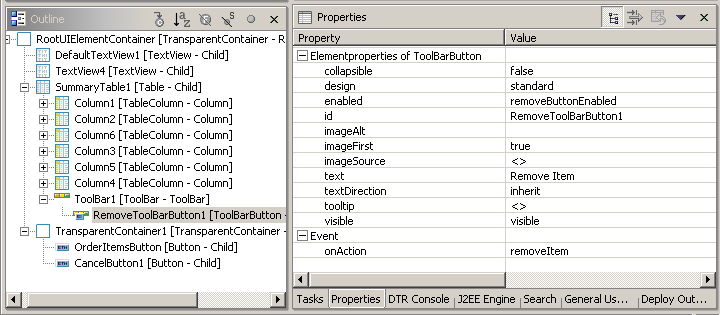
- Remove Item - the button references the removeItem action in its Event property, so that the relevant event handler is invoked when the button is chosen. In addition, the button uses the removeButtonEnabled attribute defined in the view's context in the enabled property. The implementation of the event handler and the use of the attribute are described in the Implementation section below.
View VSelectedItems: Layout (Remove Item Button)
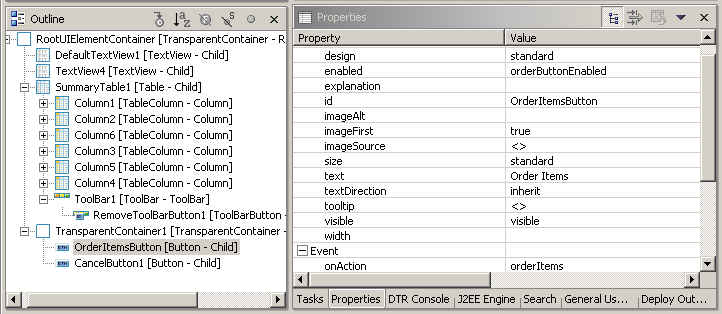
- Order Item - the button references to the orderItem action, so that its event handler is invoked when the button is chosen. In addition, the button uses the orderButtonEnabled attribute defined in the view's context. The implementation of the event handler and the use of the attribute are described in the Implementation section below.
View VSelectedItems: Layout (Order Items Button)
- Cancel - the button references the cancel action, so that the relevant event handler is invoked when the button is chosen. The event handler implementation is described in the Implementation section below.
View VSelectedItems: Layout (Cancel Button)

Implementation
In the Implementation tabstrip the following event handlers are implemented:
- onActionQuantityEntered()
This event handler checks whether the required quantity is specified for all items on the order list. If the quantity for any of the items is less than or equal to zero, the Order Items button is disabled by setting the orderButtonEnabled indicator to false , and the user gets an error message. The input check is done in the private method checkInputForQuantity() .
Method onActionQuantityEntered()
publicvoid onActionQuantityEntered(com.sap.tc.webdynpro.progmodel.api.IWDCustomEvent wdEvent ) {
//@@begin onActionQuantityEntered(ServerEvent) boolean allInputForQuantityIsPositive = this.checkInputForQuantity(); if(allInputForQuantityIsPositive){
wdContext.currentContextElement().setOrderButtonEnabled(true); } else{
wdContext.currentContextElement().setOrderButtonEnabled(false); } //@@end } //@@begin others privateboolean checkInputForQuantity(){
IWDTextAccessor textAccessor = wdThis.wdGetAPI().getComponent().getTextAccessor(); IWDMessageManager messageManager = wdThis.wdGetAPI().getComponent().getMessageManager(); booleanallQuantityEntriesArePositive = true; for(int i=0, size=wdContext.nodeItemsList().size(); i<size; i++){
IPrivateVSelectedItems.IItemsListElement itemsElement = wdContext.nodeItemsList().getItemsListElementAt(i); int quantity = itemsElement.getQuantity(); if(quantity<=0){
//report message to user that there are invalid values entered for field "quantity" messageManager.reportInvalidContextAttributeException( itemsElement, itemsElement.node().getNodeInfo().getAttribute(CContextInterface.PARAM_QUANTITY), textAccessor.getText(TEXT_ENTER_QUANTITY), true); return false; } } return true; } |
- onActioncancel()
This event handler cancels the order and completes the execution of the callable object. The method invoked is the component controller's cancel() method.
Method onActioncancel()
publicvoid onActioncancel(com.sap.tc.webdynpro.progmodel.api.IWDCustomEvent wdEvent ) {
//@@begin onActioncancel(ServerEvent) wdThis.wdGetWDCOSelectedItemsController().cancel(); //@@end } |
- onActionorderItems()
This method checks whether the quantity input is correct, and adds the items of the order list to the callable object output. For that purpose, the event handler calls the component controller's order() method. If input is missing or incorrect, an error message is displayed and the Order Items button is disabled by setting the orderButtonEnabled indicator to false .
Method onActionorderItems()
publicvoid onActionorderItems(com.sap.tc.webdynpro.progmodel.api.IWDCustomEvent wdEvent ) {
//@@begin onActionorderItems(ServerEvent) boolean allInputForQuantityIsPositive = this.checkInputForQuantity(); if(allInputForQuantityIsPositive){
wdThis.wdGetWDCOSelectedItemsController().order(); } else{
wdContext.currentContextElement().setOrderButtonEnabled(false); } //@@end } |
- onActionremoveItems()
This method removes the selected item from the context, and in addition, checks the quantity input and enables or disables the Order Items button in accordance with the input validity.
Method onActionremoveItems()
publicvoid onActionremoveItem(com.sap.tc.webdynpro.progmodel.api.IWDCustomEvent wdEvent ) {
//@@begin onActionremoveItem(ServerEvent) IPrivateVSelectedItems.IItemsListElement currentItemsListElement = wdContext.nodeItemsList().currentItemsListElement(); wdContext.nodeItemsList().removeElement(currentItemsListElement); boolean allInputForQuantityIsPositive = this.checkInputForQuantity(); if(allInputForQuantityIsPositive){
wdContext.currentContextElement().setOrderButtonEnabled(true); } else{
wdContext.currentContextElement().setOrderButtonEnabled(false); } //@@end } |
Integration
For more information about the component's usage in the process, see Display Selected Items .