 Open-To-Buy (OTB)
Use
One of the most important aims in the seasonal procurement processes is to use the available budget as efficiently as possible.
The cross-system application Open-To-Buy helps you to do this in the following ways:
You can map your retail planning in SAP BI using Business Planning and Simulation (BPS) to plan budgets. You can define the budgets flexibly and adjust them to suit your requirements. (The budgets are represented in the system by a unique budget number ).
When you have finished planning, you can transfer the budgets to SAP ECC.
The system takes the planned budgets into account in Purchasing in SAP ECC, for example, in the OTB checkwhen creating or changing a purchasing document.
Prerequisites
In order for the cross-system scenario with
planned data transfer
from SAP BI to
SAP ECC
and the OTB check in Purchasing in
SAP ECC
to take place, you have made the necessary cross-system settings to configure the budget processes (for the OTB application) in Customizing in the BI system and the ERP system.
In addition to the OTB application, the Price Planning Workbench (PPW) application also uses flexibly defined budgets. Both applications therefore use common Customizing settings in SAP BI and SAP ECC. In addition, OTB and the PPW both use the Release Workbench or the Budget Monitor for the planned data transfer to make the planned budgets available to the operational applications in SAP ECC.
Process Flow
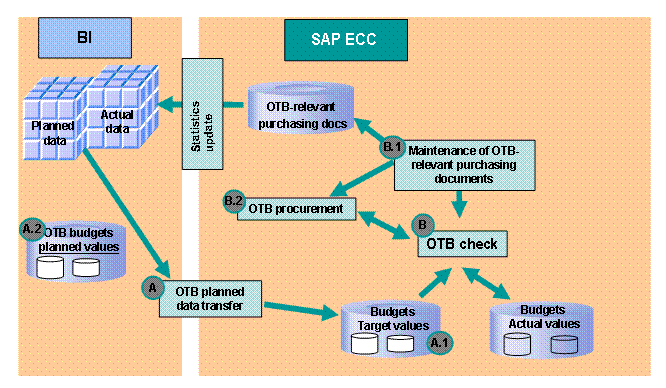
You define budgets with planned key figures in Customizing in SAP BI with reference to the Content (InfoCubes) used. Using the Release Workbench or the Budget Monitor, you export the planned values (see A in graphic) to SAP ECC as target values (see A1). The system also saves the transferred planned values in SAP BI in transactional DataStore objects (see A2).
If OTB-relevant purchasing documents were created or changed (see B1) – directly or using OTB Procurement (see B2) – the system determines the relevant budget number and whether there is sufficient budget available in the OTB check (see B). The system compares the target values transferred from planning with the exhausted actual values of purchasing documents that have already been created. If there is sufficient budget available, you can save the purchasing document and the system updates the exhausted actual value accordingly.
If there is not sufficient budget available, you can procure budget in OTB Procurement by changing other documents, or overrun the budget on purpose using a special release. You cannot change the target values for budgets in SAP ECC. The only way you can change target values is by retransferring the planned data from SAP BI, for example, after the plan has been revised.
You can extract the current document data to SAP BI for the revision of the plan and for reporting. An enhancement of the purchasing documents with regard to the extraction of the required OTB-relevant fields
Budget Type
andBudget Number
from SAP ECC is available.
Overview of the OTB Core Process
See also:
Reorganization of the Budget Processes in SAP BI and SAP ECC