 Rehiring following Retirement
You can use Rehiring following Retirement to process the business case that employees reenter the company on the date after they leave the company, and retain the same personnel number.
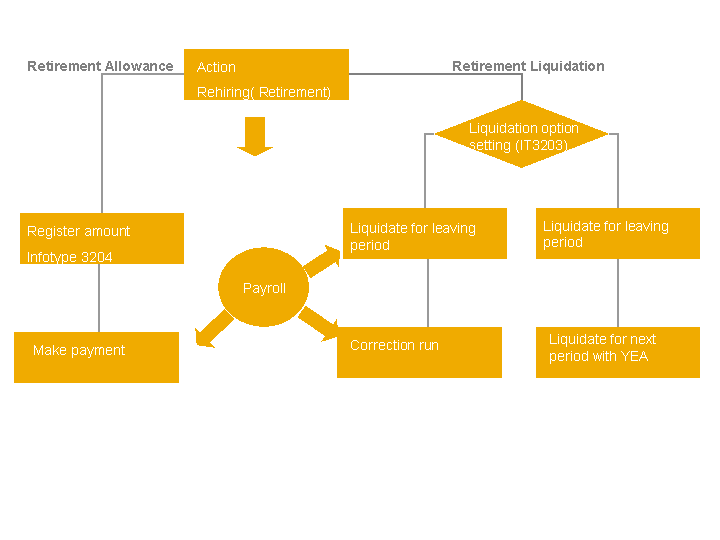
The figure below shows the Rehiring following Retirement functions :
Integration
Rehiring following Retirement enables you to use the Retirement Allowance
(3204) infotype to store the retirement allowance information. Therefore, you can choose either the Additional Payment
(0015) infotype or infotype 3204 to record
the employee’s retirement allowance data. Each infotype has the respective business calculation logic for retirement allowance. Therefore, the system does not support the combined usage of infotype 0015 and infotype 3204 to store the retirement allowance for one employee.
Rehiring following Retirement provides you with a correction run to pay the difference of the retirement liquidation amount that is caused by retroactive accounting. Therefore, you can use the payroll run with the Retirement Liquidation 0007
payroll reason and
a correction run Retirement Liquidation Correction 0013
payroll reason to reconcile the liquidation amount. If you do so, you don’t need to use the next period liquidation Retirement Liquidation with YEA 0008
payroll reason to calculate the
difference.
Prerequisites
To use the Rehiring following Retirement function, you must activate Rehiring following Retirement in Customizing for Payroll for Japan under Rehiring following Retirement->Activate Rehiring following Retirement.
The standard system contains the settings required to use Rehiring following Retirement in Customizing for Rehiring following Retirement for Payroll for Japan under Rehiring following Retirement. If the settings do not meet your requirements, you can change them as required.
You can use a Business Add-In (BAdI) to modify the contents of, and add selection criteria to the reports.
Features
Rehiring following Retirement enables you to perform the following functions:
You can use the Leaving (3203) infotype to store details about the employee's seniority data, retirement liquidation, and retirement allowance. In the infotype, you determine how the system deducts the social insurance premium and pays out the overtime allowance relating to the period in which the employee leaves your company.
Enable you to link the leaving information to the retirement allowance data
Liquidate all the payments and deductions in payroll accounting for the period in which the employee leaves
Pay the difference of the retirement liquidation caused by retroactive accounting for the period in which the employee leaves by using correction payroll
Calculate the income tax and residence tax by using the total amount of the retirement allowance
Deduct the income tax and residence tax for each payment based on the prorated amount of the retirement allowance
Output Employment Insurance Acquisition / Loss of Qualification form
Output Certificate of Loss of Social Insurance Qualification form
Output Employment Insurance Certification of Leaving form
Output Wage Certificate at the Age of 60 form
Output Application Form for Continuous Employment Benefits
Output Certification and Application for Continuous Employment Benefits
Output Summary of Withholding Tax Statements for employment income and retirement income
More Information
Retirement Allowance (3204) Infotype
Employment Insurance Acquisition of Qualification form
Employment Insurance Loss of Qualification form
Certificate of Loss of Social Insurance Qualification
Termination Process Selection Report
Employment Insurance Certification of Leaving
Wage Certificate at the Age of 60
Application Form for Continuous Employment Benefits
Output Certification and Application for Continuous Employment Benefits