 Logical Database FTI_TR_PERIODS
Use
You can use this database to evaluate flows in the position management area of the
Transaction Manager
for a given period. This enables you to analyze position trends and revenues within the selected period, including positions at the start and end of the period, on a flexible basis.
Integration
SAP Query comprises InfoSets that are based on this logical database.
See also:
Features
This logical database lets you link position and flow information. This enables you to analyze position trends within the selected period on a flexible basis. The system determines the value of each key figure both at the start and the end of the selection period (key date-based position information) and calculates the corresponding delta key figure indicating the change in the position (period-based flow information). Since both types of information appear together in one list, the list display is more complex.

Therefore, when defining queries, we recommend that you also define interim totals (using the relevant characteristics and characteristic combinations) and then restrict the display to these summarized levels.
The following
key date references
are available:
Position Value Date
The key date refers to the value date of the subledger positions.
Posting Date in the Document
The key date refers to the FI posting date.
Each key figure is offered in different currencies:
Position currency (PC)
Local currency (LC) / Valuation currency (VC)
You define the valuation currency for each combination of parallel valuation area and accounting code and determine the currency in which positions are managed for this combination. The valuation currency can therefore be regarded as the "local currency" of the valuation area within the accounting code.
Evaluation currency
The currency in which you run an evaluation. You can define your evaluation currency. The core calculation component uses the evaluation currency for analytical operations, such as costing, controlling, and risk analysis. The evaluation currency differs from the transaction currency and the display currency.
Example:
During the NPV analysis, the system determines the net preset value in the evaluation currency.
Display currency (DC)
If the display currency is different to the original currency, the currency is translated using the translation type specified at the start of the report. The default translation type is "001", with currency translation at the
average rate
and today as the
key date
. However, you can create and use your own translation type.
 Example
Period Evaluation: 04/01/05 – 06/30/05
SAP Query interprets the key date as the position value date or the posting date, depending on the key date references selected from the screen.
March 2005 |
April 2005 |
May 2005 |
June 2005 |
July 2005 |
||
|---|---|---|---|---|---|---|
Evaluation period: |
||||||
An opening balance is calculated on 03/31/05. All transactions that occurred before April 1 st are part of this opening balance.
March 2005 |
April 2005 |
May 2005 |
June 2005 |
July 2005 |
||
|---|---|---|---|---|---|---|
Business transactions with value date/posting date < 04/01/05 are used to calculate the opening balance on 03/31/05. |
||||||
The evaluation includes any flows that change the position and which occurred within the defined selection period.
March 2005 |
April 2005 |
May 2005 |
June 2005 |
July 2005 |
||
|---|---|---|---|---|---|---|
Business transactions that occur within the selection period with value date/posting date >= 04/01/05 <=06/30/05 and cause changes to the position. Display closing balance for 30.06.05. |
||||||
Business transactions after the end of this period are not included in the selection
March 2005 |
April 2005 |
May 2005 |
June 2005 |
July 2005 |
||
|---|---|---|---|---|---|---|
Business transactions with value date/posting date >= 07/01/05 are not relevant for the evaluation. |
||||||
Portfolio (position)
You can use this field to select positions that are defined using the following differentiation terms: valuation area, special valuation class, accounting code, ID number, and portfolio.
Business partner (commitment)
The business partner is interpreted differently depending on the contract type:
In the case of
loans
(contract type 1), selection is made based on the
main borrower.
In the case of
securities
(contract type 2), selection is made based on the
issuer.
For all other contract types, selection is made based on the counterparty.
Exclude planned data
indicator
Planned records are not taken into account if you set this indicator.
When a selection is made using the key date reference "posting date", the indicator is irrelevant as planned records are not taken into account in this case.
This indicator is not supported for loans in valuation area 001.
You can select by
securities account/securities account group.
Note that a selection according to these characteristics is only possible if a position differentiation by securities account/securities account group has been defined in the relevant valuation areas. Only then are positions “tailored” to fit these characteristics and only then is a logical data selection possible.
Relationship between selection fields Securities Account and Securities Account Group
If
securities account
was selected as the only differentiation criteria in a valuation area, a selection based on
securities account group
will not return any positions. If you leave the securities account group field empty, the system gets the relevant positions. In the report display, the
Securities Account Group
field is not filled.
If
securities account group
was selected as the only differentiation criteria in a valuation area, a selection based on
securities account
will not return any positions. If you leave the
securities account
field empty, the system gets the relevant positions. In the report display, the
Securities Account
field is not filled.
If both
securities account
and
securities account group
are selected as differentiation criteria, selections are based on both the
securities account
and
securities account group
, however in this case you cannot carry out a cross-securities account valuation.
You often have a scenario in which one parallel valuation area only uses the securities account group as the differentiating criterion, and a second parallel valuation area only uses the securities account. If you want to evaluate a securities account group (as defined in the securities account master data) for both valuation areas, and restrict the selection for the securities account group accordingly, no positions are selected for the valuation area that is differentiated by securities account, and vice versa. For this reason there is an indicator,
Interpretation of Securities Account Group
, described below.
Interpretation of Securities Account Group
indicator
If you select positions by
securities account group
for a valuation area that is only differentiated by securities account, the system selects the securities accounts assigned to this securities account group in the securities account master data.
In the report display, the otherwise empty
Securities Account Group
field is filled.
Control Risk Management (NPV) Buffer
You can use the logical database FTI_TR_LDB_POSITIONS to calculate risk key figures (such as NPV or duration) in real time. These calculations may be very time-consuming, depending on the scope of the position. You can therefore calculate the key figures in advance and transfer them to the market data buffer using batch planning (table FTI_MARKET_VALST).
Choose one of the following methods to determine the risk key figures:
Risk management data is recalculated.
The key figures are always recalculated. The terms may be very long.
Risk management data is read from the buffer.
The system first attempts to read the key figures from the market data buffer. If the system cannot find any values, the key figure is recalculated online.
Risk management data is read from the buffer limit.
The system first determines the number of selected position records. If this number exceeds the predefined limit, the system accesses the market data buffer. If the limit is not exceeded, the key figures are recalculated.
See Performance Functions for Reporting
Remaining term
The remaining term lets you see the terms of the capital investments that belong to the position. The remaining term is computed as the difference between two dates, as specified on the selection screen.
Remaining term based on key date
The report computes the difference between the end of term of the financial product and the selected key date.
Remaining term based on today
The report computes the difference between the end of term of the financial product and the current date.
Remaining term based on reference date
Here, an additional date field is shown. The report computes the difference between the end of term of the financial product and the specified reference date.
Three characteristics are available in the logical database for the output of the remaining term:
Remaining term in days
Remaining term in months
Remaining term in years
Historical account assignment reference
indicator
If you select this indicator, the system may access historical data when evaluations are made in the past, instead of reading the current account assignment reference. For example, if an account assignment reference transfer was posted in the past, the system displays the account assignment references and G/L accounts as per the respective key date.
Process Reversed Flows
indicator (provided in the queries based on the logical database FTI_TR_PERIODS)
When evaluating positions according to posting date, flows that were posted and reversed within a period are not displayed. Reversed flows are displayed only once when the posting is made, and not when they are reversed.
When a business transaction is reversed and the posting status is changed in the subledger from "posted"(P) to "reversed"(R), a reversal document is generated in the general ledger in addition to the original document posted. In the case of a reversal with a different posting date, substantial time and effort is required to reconcile the general ledger and subledger.
In this case, you can use the
process reversed flows
indicator to generate an artificial business transaction in the subledger by duplicating the original business transaction, for the period between the original document date and the different reversal date.
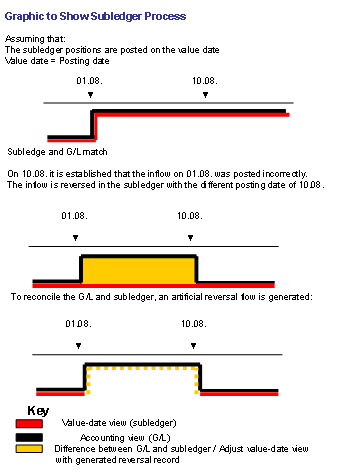
The indicator determines the entries made in the affected fields:
The
posting date
field contains
the posting date of the TM flow for the original flow
the reversal date of the TM flow for the reversed flow
The
position value date
field contains the position value date common to both flows.
The
G/L Account: Debit
and
G/L Account Credit
fields contain the (identical) flow information (not as in the case of offsetting postings where credit and debit are swapped).
The
delta book value
fields in their respective currencies contain the value of the flow as if it were posted and not reversed.
The
posting status of the flow
field contains the indicator for both flows that this flow has been reversed from the view of the TM subledger.
The new
ledger posting status
field contains value 2 (reversed) for the reversal flow and value 3 (generated ledger posted) for the original flow.
The indicator for processing reversed flows is not supported for
Loans
(
CML
) in the operative valuation area 001.
Summarize results
indicator
Summarizing Results using Characteristics
Hide zero records
indicator
If this indicator is set, the data records containing key figures selected in the report definition with a key date value of zero are excluded from the report output.
Only positions with flows in period
indicator
If the indicator is set, only the positions with flows in the selection period are selected and displayed.