 Summarizing Results Using Characteristics
Problem
If the logical database FTI_TR_PERIODS
, used to generate period-based position trend lists, the information for a given time (positions) has to be adequately combined with information for a given period flows) to enable position changes to be analyzed over time.
The logical database delivers the following information to allow position changes to be displayed effectively.
Position Information | Opening position for key date (start of period minus 1 day) |
Flow Information | Business transactions within the selection period that change the opening position, for example:
|
Position Information | Closing position with key date period end |
Within the Query list, each business transaction which changes the initial position is displayed in a separate line. If the evaluation period covers a long period of time, the resulting position trend lists can be very complex and difficult to interpret.
Proposed Solution
A solution might help which (in the same way as for drilldown reporting) displays each position with position changes in a single line. It may make sense to summarize with as many characteristics as possible to achieve results with maximum summarization and a minimum number of lines.
This can be done by using the summarize results
indicator on the selection screen. Individual flows generated by business transactions are no longer displayed if this indicator is set. Rather, the aggregated and summarized position changes are displayed in one line. For more information, see the F1 documentation for the indicator.
Example
Period Evaluation (Not Summarized)
Along with the opening and closing positions, all business transactions that affect the position are also displayed.
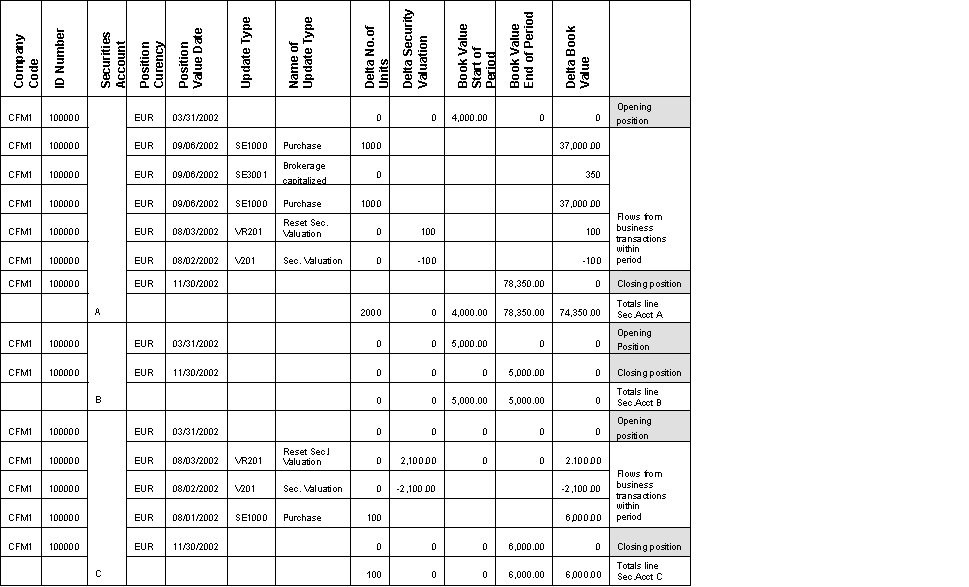
Period Evaluation (Not Summarized)
Period Evaluation (Summarized)
Only one line with position changes is displayed per position:

Period Evaluation (Summarized)
How Is Summarization Done?
In general, the data is summarized on the basis of all characteristics that do not appear in the Query definition. These characteristics are excluded from the summarization because they are selected explicitly in the Query definition for display. The system aggregates using all remaining characteristics.
Example
If the position value data
field is used in the Query definition, it is then excluded from summarization.
Company Code | ID Number | Position Currency | Position Value Date | Update Type | Name of Update Type |
|---|---|---|---|---|---|
CFM1 | 100000 | EUR | 06.09.2002 | SE1000 | Purchase |
CFM1 | 100000 | EUR | 12.09.2002 | SE1000 | Purchase |
The Query delivers the following result:
Company Code | ID Number | Position Currency | Position Value Date | Update Type | Name of Update Type | Delta No. of Units | Delta Book Value |
|---|---|---|---|---|---|---|---|
CFM1 | 100000 | EUR | 06.09.2002 | SE1000 | Purchase | 1000 | 10.000,00 |
CFM1 | 100000 | EUR | 12.09.2002 | SE1000 | Purchase | 2000 | 20.000,00 |
If the Position Value Date
is removed from the Query definition, the system can use this field for summarization. The result of the Query is then a single result line:
Company Code | ID Number | Position Currency | Update Type | Name of Update Type | Delta No. of Units | Delta Book Value |
|---|---|---|---|---|---|---|
CFM1 | 100000 | EUR | SE1000 | Purchase | 3000 | 30.000,00 |
 Note
Note
This summarization logic applies to all characteristics It is valid for positions as well as position changes. This means that you can use the summarization logic for position Queries, that is, Queries based on the logical database FTI_TR_POSITION
.
Example:
To carry out a cross company code position analysis for your book values in each securities account, you can define a Query consisting of the characteristics company code and securities account and the key figure book value. If you have set the Summarize Results
indicator, the display contains exactly one line per securities account, that is, exactly one book value. Unless the Summarize Results
indicator is set, you will get a separate line for each ID number with a position in a securities account.
The summarization carries out a suitable aggregation of key figures. Be aware that the results might be incorrect in the case of certain key figures (such as the interest rate
key figure). In addition, the summation cannot correctly display alternative aggregating functions with SAP Query (such as Average Is Calculated). To evaluate key figures with more complex aggregation functions you must do the following: Use drill-down reporting rather than SAP Query to add the characteristics for which the key figure does not aggregate trivially. This prevents summarization from being carried out (incorrectly) using these characteristics. The Display Report Type
transaction (TRMS
) provides you with an overview of the key figures with complex aggregation behavior.