 Preparing and Executing Retrieval of Legacy Data
To be able to decommission a legacy system and then manage its data using the ILM functions of the Retention Warehouse system, you first need to retrieve all legacy data in compliance with ILM. Retrieving legacy data includes the following steps:
Data Archiving with the Archive Administration functions (transaction
SARA
):ILM-enabled archiving objects: Data of open and completed business processes (snapshots)
Non ILM-enabled archiving objects: Data of completed business processes
Data Extraction with the
Context Data Extractor (CDE):
Non ILM-enabled archiving objects: Data of open business processes
Transaction data and master data that do not belong to an archiving object
Context data (Customizing settings, metadata) that is required for the interpretation of master data and transaction data in the Retention Warehouse system
Data from the System tables, Control tables, and the temporary data stored in tables, if you are using Generic CDE
 Note
Note
You can use Generic CDE or CDE to create archiving objects and extract data from the legacy system. However, you cannot combine the functions of both CDE and Generic CDE.
For more information, see Creating Archiving Objects and Extracting Data from the Legacy System
The following figure illustrates the retrieval of legacy data for transfer to the RW system.
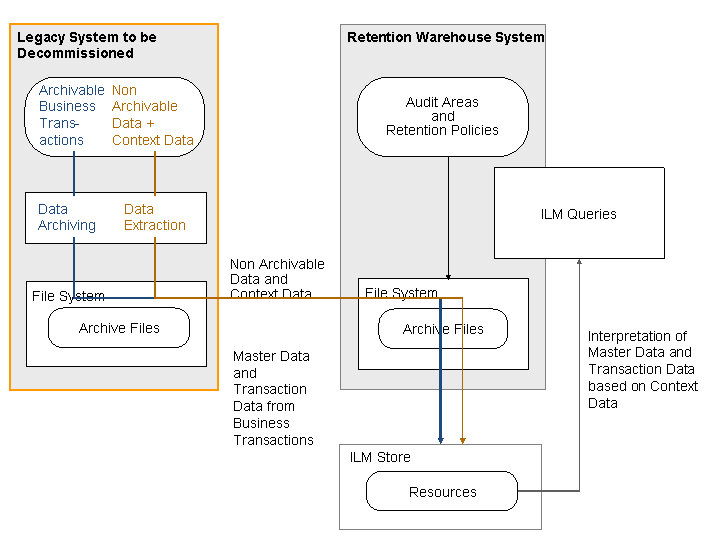
Retrieving Legacy Data
Procedure
Prepare the legacy system for ILM-compliant data extraction.
Copy the settings and adjustments delivered by SAP with CDE for data extraction to the legacy system.
For more information, see Preparing the Legacy System for Data Extraction.
To be able to extract context data and data that cannot be archived, make the configuration settings required for CDE.
For more information, see Making the Configuration Settings for Using CDE.
Execute archiving and extraction of the data from the system to be decommissioned.
For more information, see Archiving and Extracting Legacy System Data .