 Design Time
As described in Interface-Based Processing of Messages, proxies encapsulate the sending and receiving of messages. The Proxy Framework (a runtime component in the Exchange Infrastructure (see architecture)) provides a message with interface parameters and the other way around.
Message interfaces required for communication must be created by the application, but initially not in the system in which they will later be implemented. It is a central concept of the Exchange Infrastructure that all objects relevant for integration are first created platform-independently in a Integration Repository.

You therefore refer to Interface Development in the Integration Repository with Message Interfaces. To use interfaces that already exist in the system (for example, RFC function modules) as part of the Exchange Infrastructure, you must import the respective interfaces into the Integration Repository and use an appropriate adapter.
For message interfaces in the Integration Repository you can generate Proxy Objects for a system, as illustrated in the following graphic:
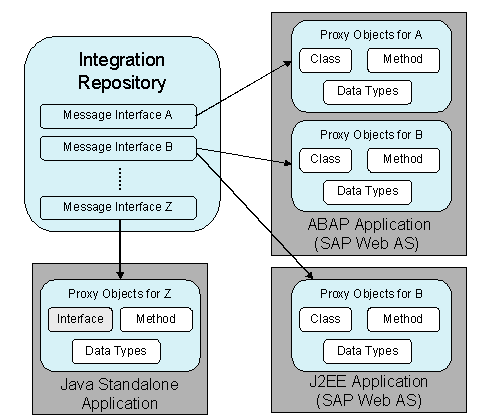
The message interface determines which proxy objects are generated:
· (Java, ABAP object) classes are generated for outbound interfaces. By calling a method of the class you can transfer your data to the Proxy Framework, which constructs the message and forwards it to the Integration Server.
· (Java, ABAP object) interfaces are generated for inbound interfaces that must be implemented by the application for receiver processing.The Proxy Framework calls this processing automatically once it has received an appropriate message.
The proxy classes for J2EE applications are also encapsulated by beans.
As illustrated in the graphic, you can generate proxy objects for an interface object in different systems. Only one version of the generated proxy can exist in a system, however.
The generated objects are client-independent if the system is an ABAP application.
You not only save interface objects in the Integration Repository, but also additional objects that are important for the cross-system business process.
· You can use a Business Scenario to describe the communication of application components on a higher level of abstraction. The application components can be assigned to the products from the System Landscape Directory here.
· You can create mappings for the messages that are exchanged between interfaces. You can define these mappings as graphical message mappings or you can import them into the Integration Repository as XSLT or Java archives.
None of the objects in the Integration Repository can be used at runtime still. The repository information is used in the design of a business process without the information entered there having an effect on an installed system landscape. This development phase in which you enter data in the repository is also known as design time.
