 Architecture
Beginning with the runtime components of SAP Exchange Infrastructure (XI), below is an overview of the options available in the Exchange Infrastructure:
· The Integration Server is a central communication and 'distribution engine’ that processes XML messages. This includes services for determining receivers (logical and technical routing) and for the transformation of message contents between sender and receiver systems (mapping). The Integration Engine can also receive messages from, or send messages to (by using HTTP) other runtime components of SAP Exchange Infrastructure by using communication services. Without these components you would not be able to exchange messages using the Exchange Infrastructure.
· Adapters enable you to connect interfaces from external systems or from SAP systems with SAP Basis Release 4.6 or earlier, to the Integration Engine. Interfaces involved in the integration scenario must be imported into a central Integration Repository.
· SAP’s Exchange Infrastructure is a new program model for new developments. This model enables you to define platform-independent interface descriptions in the central Integration Repository. You can then use the descriptions to generate interface proxies for Java applications and for SAP systems. In this case, XML messages are exchanged with the Proxy Framework using the Integration Engine.
The following graphic illustrates again how systems in a heterogeneous system landscape can communicate with each other using the different runtime components of the Exchange Infrastructure (Integration Engine, Adapters, Proxy Framework):
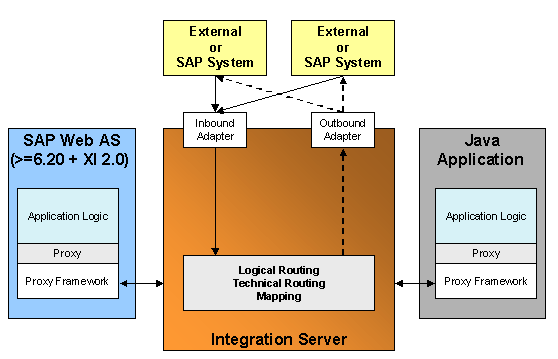
All systems either send messages to, or receive messages from the Integration Engine. In this way, messages can be exchanged between all systems in a heterogeneous system landscape, regardless of whether a message was sent to the Integration Engine using an adapter or the Proxy Framework.

You can of course also use an adapter for existing interfaces in an SAP system from SAP Web Application Server 6.20.
Involved Systems
Systems that communicate with each other in the Exchange Infrastructure are called Business Systems; regardless of whether they exchange messages using adapters or the Proxy Framework.
Proxy Runtime
To be able to use proxies you require SAP Exchange Infrastructure Add-On 2.0. This add on enables you to connect the following applications to SAP Exchange Infrastructure by means of proxies:
· Java Standalone Applications
· Java J2EE applications for SAP Web Application Server 6.20 or higher, including XI 2.0 Add-On
· ABAP applications for SAP Web Application Server 6.20 or higher, including XI 2.0 Add-On In this case, a client corresponds to a business system.
