

 Data-Flow Editor
Use
You use the data-flow editor (at the bottom of the mapping editor) to describe the flow of data from one or more source fields to one target field. Since this mapping is only a part of the actual message mapping and refers to a particular target field, this type of mapping is known as a Target Field Mapping.
Features
The data-flow editor comprises the following:
On the left-hand side of the editor window there are general functions that are useful when editing a target field mapping.
General Functions of the Data-Flow Editor
|
Function |
Meaning |
|
Delete Floating Objects |
Deletes all data-flow objects that are not connected to a source and target field. Floating data-flow objects are displayed in white |
|
|
Produces an ordered representation of the target field mapping |
|
Delete Current Mapping |
Deletes the target field mapping currently displayed |
Activities

All functions (including user-defined functions) expect string arguments and return a string value. The strings true or false are expected for conditions. If a condition transfers a value other than true or false, it is interpreted as false.
Example
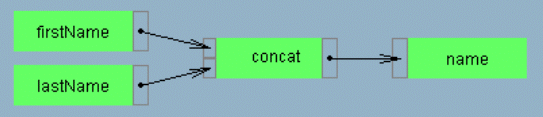
In the example above, a mapping to the target field
name was selected that is connected to the source fields firstName and lastName using the standard function concat. Input values of any data-flow objects are displayed in small rectangles on the left of the object, while output values are displayed on the right of the object. You use these small rectangles to connect data-flow objects to each other so as to define a data flow between multiple source fields and exactly one target field. Technically speaking, a target field mapping is complete once a source field has been assigned to a target field and all arguments for each connecting function have values. Since this is the case in the example illustrated here, the data-flow editor displays the connected objects in green.


