

 Standard Functions
General
Values of elements or attributes of the XML message (the
payload) are technically speaking a string. Therefore, all standard functions (including user-defined functions) expect string arguments and return a string value. Nevertheless, the transferred value can of course have a different data type semantically. This is the data type you specified when defining the schema for the payload for the field. The following is the standard procedure for standard functions:
Also see:
Overview of Functions
Data-flow objects for standard functions are structured as follows:
The following graphic provides an overview of all the different forms of data-flow objects:
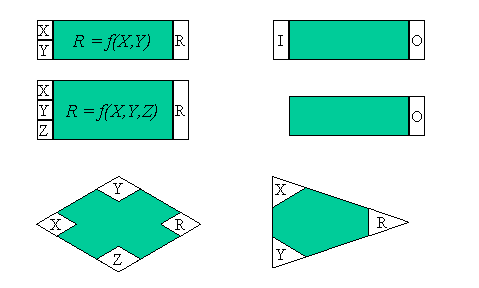
To illustrate how the individual functions are used, the input boxes in the graphic above have the variables X,
Y, Z or I, and the result variable is either R or O. All standard functions in subsequent tables are described using these input and output variables. In the data-flow editor, other data-flow objects that are connected with the functions using the respective connecting boxes either get the input values or receive the result of the operation. You can combine the functions in any way you require (provided that the values transferred to a function can be interpreted).Function Category: Arithmetic
You can only enter numerical value for this category (this includes values with digits after the decimal point). If the value cannot be interpreted as a digit, then the system triggers a Java exception. The format of the result value depends on the result:
|
Function Name |
Function |
|
add |
R = X + Y |
|
multiply |
R = X * Y |
|
divide |
R = X / Y |
|
max |
R = Maximum of values X and Y |
|
min |
R = Minimum of values X and Y |
|
subtract |
R = X - Y |
Function Category: Boolean
All functions in this category expect Boolean input values (see above).
|
Function Name |
Function |
|
And |
R is true if X and Y have the value true. Otherwise, R is false. |
|
Or |
R is true if X or Y have the value true. Otherwise, R is false. |
|
Not |
|
|
Equals |
Compares both Boolean values X and Y and returns true, if both are equal, or false if not. Non-Boolean values are interpreted as false (see above). |
|
notEquals |
R = Not(Equals(X,Y)) |
|
if |
|
|
ifWithoutElse |
If condition X is fulfilled (gets true): R = Y. Otherwise, the target field is not created. |
Function Category: Constants
Since these functions do not have any input values, they are
functions that you must create.|
Function |
Use |
|
Constant |
O gets any string constant that you can enter in the dialog for the function properties. |
| CopyValue |
For a frequently occurring element, copies the value at a defined position in the source structure to the assigned target field. |
Function Category: Date
The following functions enable you to define the date format for the source or target format using the dialog for the function properties.
The format adheres to the convention as defined in the standard Java class
|
Function |
Use |
|
currentDate |
Returns the current data using O. |
|
DateTrans |
Converts date format I to another date format O. |
Function Category: Node Functions
|
Function |
Use |
| createIf |
If there are structuring elements in your target structure that do not exist in the source structure, insert them using this function. Using condition I you can control whether the element is inserted or not. You connect the element in the target structure using O. |
| removeContexts |
Remove the top context of a source field. In this way, you can delete a hierarchy level and generate a list. |
|
replaceValue |
Replaces the value I with a value that you can define in the dialog for the function properties. |
| exists |
O = true, if the source field assigned to inbound channel I exists in the XML instance. Otherwise, O=false. |
| SplitByValue |
Inserts a context change for an element. |
Function Category: Text
|
Function |
Use |
|
substring |
Returns a substring O for a string I. Use the dialog for the function properties to specify the position of the substring. Example: substring(„Hello", 0,1) = „He". |
|
concat |
R = linking of strings X and Y (without blanks).Example: X = "Mrs."; Y = "Miller"; R = "Mrs.Miller". |
|
equalsS |
R = true, if string X equals string Y, otherwise R = false. |
|
indexOf |
R = first position at which string Y is found in X and –1 if Y does not occur at all. The 0 position corresponds to the first character in the string. |
|
lastIndexOf |
R = last position at which string Y is found in X and –1 if Y does not occur at all. The 0 position corresponds to the first character in the string. |
Function Category: Conversions
|
Function |
Use |
|
valueMapping |
Executes a value mapping for the value I entered. In the function attributes, assign the both input value I and source value O to a representation in the value-mapping table. In this way, you can assign source and target structure fields to a representation. You complete the value-mapping table on the configuration maintenance screen in the Integration Builder. Since these entries are not available at design time, the mapping result is just an estimate when you test the message mapping. Also see: Value Mapping. |