 Specifying the Extractor
Parameters
Specifying the Extractor
Parameters 
Use
If the receiver of a message is not explicitly specified in the routing relation, rather is to be determined from the message contents at runtime, then you must enter the following information when configuring the routing.
For the purpose of clarity, let us use an example.
Let us assume that in a flight booking Business Scenario, the receiver of a message from business partner Airline is to be determined. The airline is identified in the payload of the message by the field Airline_Id. The following conditions must apply to the routing: If the business partner is the airline Lufthansa, that is, the Airline_Id field in the message has the value LH, then the message is to be forwarded to the business system AIR_LH of airline Lufthansa.
When configuring the routing you must ensure that:
...
1. The contents of the payload field that identifies the business partner (Lufthansa) can be selected.
2. A receiver business system (the business system AIR_LH) can be derived from this concrete business partner (identified by the field value LH in the payload).
For the second step, Value Mapping is used in the way described below.
We start with two representations of the message receiver:
· Representing the receiver in the role of a “business partner”.
This representation can be determined from the payload.
· Representing the receiver in the role of a “business system”.
This representation is relevant for actually determining the receiver at runtime and must be determined from the first representation by means of value mapping.
Both representations must be defined in the value mapping table. The representation of the receiver as business partner (source representation) can then be mapped onto the representation of the receiver as business system (target representation).
In the dialog box Specifying the Extractor Parameters, enter the required information so that:
· The payload field that identifies the business partner can be selected.
· The link can be produced between the payload field and the representation of the business partner stored in the value mapping table.
The mapping of the business partner representation onto the business system is then ensured by the entries in the value mapping table.
Prerequisites
In the editor Change Routing Relation, you have selected Identifying a receiver from the message contents when Defining the Receiver Identification.
Procedure
...
1.
In the editor
Change Routing
Relation, choose  from the column Condition. The
dialog box Specifying the Extractor Parameters is called.
from the column Condition. The
dialog box Specifying the Extractor Parameters is called.
2. In the dialog box Specifying the Extractor Parameters, enter the following information:
¡ Field Extractor
Here you must specify the field from the payload from which the receiver is to be determined. For this you must use an XPath expression (see Condition Editor).
Under Field Type, enter the following information for the value mapping:
¡ Field Namespace
Here you must specify the namespace for the object type of the selected payload field. This value must be entered in the value mapping table for the representation of the receiver as business partner, in the column Namespace.
¡ Field Name
Here you must specify the object type for the selected payload field. For the value mapping, the object type describes the “role” that the receiver has in the message, that is, the role of business partner. For routing, it is the constant value Business_Partner. This value must be entered in the value mapping table, in the column Object Type.
3.
Confirm your
specifications by choosing Confirm ( ).
).
Result
In the editor Display/Change Routing Relation, the XPath expression for the selected payload field in the table cell under column Condition is displayed in the following form:
Example
Here, the following is specified for the example given (flight booking Business Scenario, see above):
· Which value you must enter when specifying the extractor parameters
· What the corresponding entries in the value mapping table must look like (see graphic)
Connectivity Between Extractor Parameters and Value Mapping Table
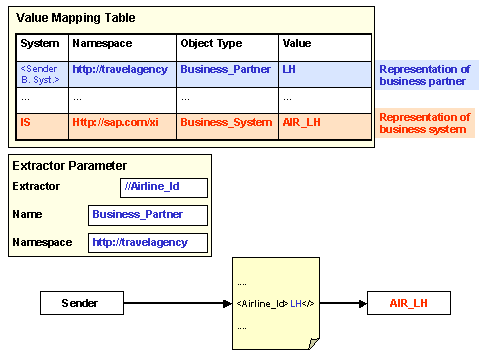
In the value mapping table, two representations must be entered in the same group. Both representations describe the object “Message Receiver”.
· Representation of business partner
In the example shown, the business partner is the airline Lufthansa. The business partner is selected in the message using the field Airline_Id. The column Value must therefore contain the field value that identifies the business partner in the message (in the example, Lufthansa): LH (for the field Airline_Id).
· Representation of business system
This is the representation of the receiver as “business system“.
¡ The column System must contain the constant value IS (Integration Server).
¡ The column Namespace must contain the constant value http://sap.com/xi
¡ The column Object Type must contain the constant value Business_System.
When specifying the extractor parameters, enter the following information:
· Extractor: //Airline_Id
· Namespace: Example: http://travelagency
· Name: constant value: Business_Partner
